• Register
    • Login
    • Search
    • Categories
    • Recent
    • Tags
    • Popular
    • Users
    • Groups
    • Search

    1 wire net dies "Problem solved"

    Mervis
    4
    23
    12164
    Loading More Posts
    • Oldest to Newest
    • Newest to Oldest
    • Most Votes
    Reply
    • Reply as topic
    Log in to reply
    This topic has been deleted. Only users with topic management privileges can see it.
    • T
      tomas_hora administrators @zorro_66 last edited by

      @zorro_66 Please test and report, any possibility to use shielded cable between the sensors?

      1 Reply Last reply Reply Quote 0
      • W
        wizro_pl @zorro_66 last edited by

        @zorro_66 did you connect shield to the ground ? it is necessary.

        1 Reply Last reply Reply Quote 0
        • zorro_66
          zorro_66 last edited by

          Yes as in the picture
          alt text

          1 Reply Last reply Reply Quote 0
          • zorro_66
            zorro_66 last edited by

            Now it has worked in two days
            My second Unipi do not have these problems
            where I have 20 pieces of sensors connected in a star network with no shielded cable.
            Does it help to update the software in Rpi.
            There seems to be some software errors.
            Just got home 2 1-Wire hub from Unipi.
            Can i connect with a standard RJ45 patch cable

            1 Reply Last reply Reply Quote 0
            • zorro_66
              zorro_66 last edited by

              Now, I have rebuilt my entire 1-wire network and used Unipi hub instead
              so now we will see if the network stops die
              alt text
              alt text

              1 Reply Last reply Reply Quote 0
              • zorro_66
                zorro_66 last edited by

                My 1-wire is incredibly unstable
                network dies at irregular intervals, showing unreasonable temperatures.
                I have rebuilt my net for spec from Unipi wiki shielded cat5 cable and hubs.
                But no difference 1-wire network die anyways.
                So it can not be anything wrong with the network itself, but the fault must be in Unipi alt. software.
                Grateful for help .

                alt text

                T 1 Reply Last reply Reply Quote 0
                • T
                  tomas_hora administrators @zorro_66 last edited by

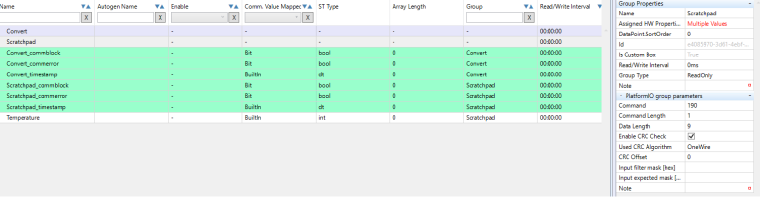
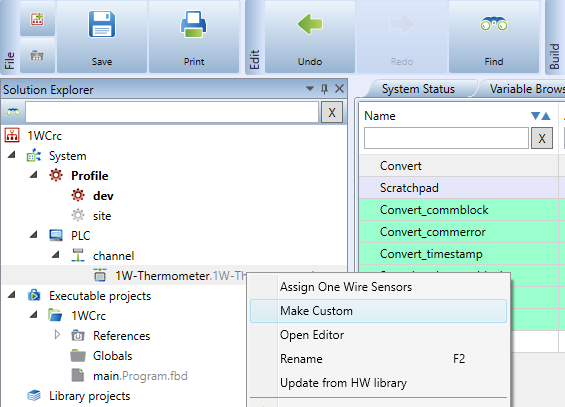
                  @zorro_66 Can you try enabling the CRC check at the sensors? Just check the box in the sesors in the Scratchpad group. You might need to make the sensor as a custom and backup your project before playing with it

                  1 Reply Last reply Reply Quote 0
                  • zorro_66
                    zorro_66 last edited by

                    I do not understand what you mean now

                    T 1 Reply Last reply Reply Quote 0
                    • T
                      tomas_hora administrators @zorro_66 last edited by

                      @zorro_66 1_1488349676124_cusom_1w.png 0_1488349676123_1wcrc.png

                      1 Reply Last reply Reply Quote 0
                      • zorro_66
                        zorro_66 last edited by

                        aha tanks:thumbsup_tone3:

                        1 Reply Last reply Reply Quote 0
                        • zorro_66
                          zorro_66 last edited by

                          Problem solved, I finally found a bad solder
                          at the VCC pin caused power loss in my 1-wire network
                          alt text

                          T 1 Reply Last reply Reply Quote 1
                          • T
                            tomas_hora administrators @zorro_66 last edited by

                            We are sorry for that @zorro_66!

                            But it is really hard to find out this kind of issue during our test but we will update our testing procedures... Thanks for the info.

                            1 Reply Last reply Reply Quote 0
                            • First post
                              Last post