• Register
    • Login
    • Search
    • Categories
    • Recent
    • Tags
    • Popular
    • Users
    • Groups
    • Search
    1. Home
    2. Martin Kudláček
    3. Best
    • Profile
    • Following 0
    • Followers 8
    • Topics 0
    • Posts 576
    • Best 22
    • Controversial 0
    • Groups 0

    Best posts made by Martin Kudláček

    • RE: Neuron 12V digital input

      Hi @Martijn-Hemeryck,
      it depends what type of output your sensor has. Basically there are PNP (sourcing) and NPN (sinking) outputs.

      • PNP (sourcing) typically outputs supply voltage of the sensor when the sensor is in ON state otherwise it is unconnected (high impedance).
      • NPN (sinking) shorts the output against GND when the sensor is ON, otherwise it is unconnected (high impedance).

      For example digital outputs on our units are NPN.

      If your sensor has PNP output and its supply voltage doesn't exceed 24V, you can typically connect it directly to the UniPi's digital input.

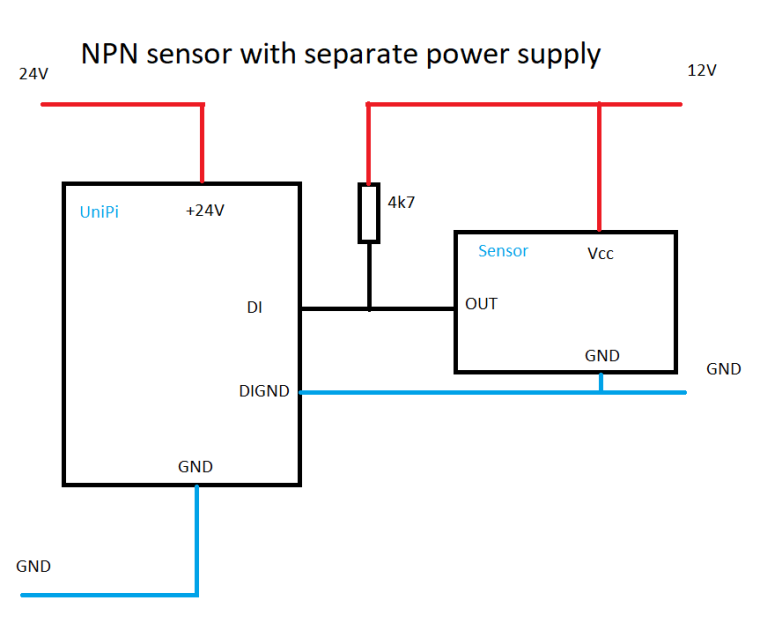
      If your sensor has NPN output, that's where it gets a little bit tricky. Digital inputs can only distinguish the ON state (voltage 5-24V). Any other state - be that 0V, short to the ground or high impedance (nothing connected) will result in OFF state. In order to use NPN sensor, you need to define the OFF state by connecting the NPN output to supply voltage via pull-up resistor. And there are two ways how to do it, depending on the supply voltage of the sensor
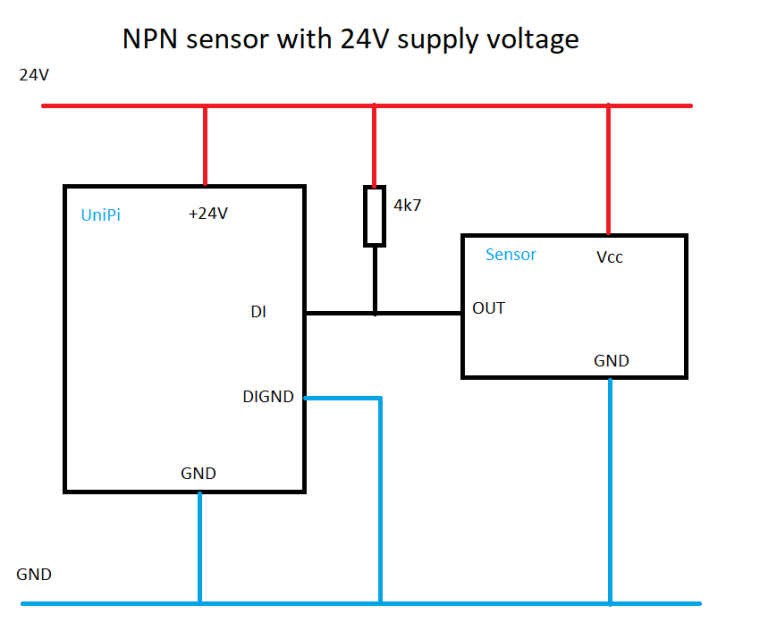
      0_1534317311183_pull-up-resistor-24V.png

      0_1534317316935_pull-up-resistor-separate.png

      The pull up resistor will bring the OUT to the level of the supply voltage. In the first example it is 24V, in the second example it is 12V. The GND of the UniPi and the GND of the second power supply may or may not be connected, depending on the level of isolation you need between UniPi and the sensor. But that's another story. But the DIGND has to be connected in both cases.

      Martin

      posted in Neuron Series
      Martin Kudláček
      Martin Kudláček
    • RE: Connect a screen to Unipi Axon

      Hi Jonathan,
      do you have some touch screen from previous installation, or do you plan to purchase a new one? Generally speaking, the touch screens in industrial automation are equipped with PC (Pro-face for example) running custom HMI software, which communicates with PLC e.g. via Modbus. In this case, you can use Axon with no problem.

      posted in Other Peripherals
      Martin Kudláček
      Martin Kudláček
    • RE: How to add xS40 to Neuron L203 using custom software

      @boy-lenssen And I really recommend you to purchase the USB-RS485 converter. It is extremely handy for such debugging and it costs around $1 on eBay.

      posted in Official API - Evok
      Martin Kudláček
      Martin Kudláček
    • RE: Neuron 12V digital input

      @martijn-hemeryck

      You can measure the type of sensor quite easily with multimeter. Just connect the sensor to power supply and measure the voltage between OUT and GND. If the voltage changes from 0 to Vcc, then the sensor is PNP type. If not, switch the measurement to resistance. If the resistance changes from OL (open loop) to almost 0 ohm, then the sensor is NPN type.

      Martin

      posted in Neuron Series
      Martin Kudláček
      Martin Kudláček
    • RE: Internal Z-wave module

      Hello @jakub, the pin header of the Raspberry Pi inside of the Neuron is not accessible and there is no space inside of the Neuron for such additional devices.

      posted in Other Peripherals
      Martin Kudláček
      Martin Kudláček
    • RE: PWM output Neuron

      Hello @cvrcejir,
      unfortunately this is an error in the REST API, not the Evok's web interface. I forwarded this issue to the programmers and let you know once it is fixed.

      Thank you for your patience,
      Martin

      posted in Official API - Evok
      Martin Kudláček
      Martin Kudláček
    • RE: Internal ModBUS problem

      Hi @ntd,
      we would need some log files, namely /var/log/syslog and /var/log/kern.log from the time when the neurontcp service doesn't respond. Also post the output of these commands (execute them as root):

      • dpkg -l | egrep "neuron|unipi|raspberrypi-kernel"
      • /opt/unipi-bin/fwspi -i 0
      • /opt/unipi-bin/fwspi -i 1
      • /opt/unipi-bin/fwspi -i 2

      You can post it here, or to the support@unipi.technology.

      posted in Neuron Series
      Martin Kudláček
      Martin Kudláček
    • RE: Unipi G100 Setup static ip on both interfaces eth0 eth1

      Hi @roberts_lando,
      the problem probably lies in the dual gateway settings. The gateway should be set only on one interface. Same applies to the DNS settings, which I would put to the /etc/resolv.conf instead of here.

      Best regards,
      Martin

      posted in Other Peripherals
      Martin Kudláček
      Martin Kudláček
    • RE: Axon S605 upgrades

      Hi @martijn-hemeryck,
      some of the dependencies are quite tricky and we weren't able to handle the transitions between new package names gracefully. The repo is reachable, however the URL has to end with slash: https://repo.unipi.technology/debian/

      Best regards,
      Martin

      posted in Official API - Evok
      Martin Kudláček
      Martin Kudláček
    • RE: Internal ModBUS problem

      Hi @ntd,
      the correct way is to use the Raspbian image and install the packages from our repository. Building from source code should work, but we would like you to avoid that because it can bring whole lot of extra variables into the problem. Also it seems the image is an older installation (based on the kernel version), so I advise to update it.

      You can use our image, the UniPian, which is Raspbian with our packages preinstalled.

      posted in Neuron Series
      Martin Kudláček
      Martin Kudláček
    • RE: Připojení k neuronu z pc a čtení/zápis hodnot

      Dobrý den pane Novotný,
      ve zkratce - ano, je to možné a nepotřebujete na to ani Mervis.

      Součástí operačního systému, který dáváte na kartu, je ModbusTCP server, přes který můžete ovládat veškeré vstupy-výstupy vyjma sběrnice 1-Wire. Tento server není typicky dostupný zvenčí ale je možné jej přenastavit tak, aby byl dostupný na portu TCP/502. Můžete tak k PLC jednotce, která se chová jako Modbus Slave, přistupovat z libovolné aplikace, která Modbus podporuje (například pomocí zmíněných Java knihoven). Seznam Modbusových registrů a coilů naleznete zde.

      Druhou možností je použít API našeho softwaru Evok, kterým taktéž můžete ovládat celou jednotku a to včetně zařízení na sběrnici 1-Wire.

      Tutoriály na tyto způsoby komunikace budeme připravovat v následujících týdnech.

      S pozdravem,
      Martin Kudláček

      posted in Mervis
      Martin Kudláček
      Martin Kudláček
    • RE: Any experience with “openBalena” and UNIPY Neuron / Gate?

      Hello @JakubSzlaur,
      we are experimenting with Balena for Unipi Neuron. There is already a public support, we just don't have any examples of how to use it: https://github.com/balena-os/balena-raspberrypi

      The Unipi Gate doesn't run on Raspberry Pi, but rather a Rock Pi. There is no support or work in progress for this platform we now of.

      Best regards,
      Martin

      posted in Node-RED
      Martin Kudláček
      Martin Kudláček
    • RE: RFID modul přes RS485

      Dobrý den @sandyv,
      fyzické rozhraní čtečky je RS485, ale datové není Modbus, jak nejspíš předpokládáte. Dokumentace se na straně 8 odvolává na protokol Netronix, o které se lze dočíst více zde: https://netronix.pl/en/attachment?id_attachment=63

      Daná komunikace není podporovaná Mervisem, ale je možné si její implementaci dopsat pomocí funkcí pro práci se sériovým portem. Osobně bych ale spíše doporučil zakoupit rovnou čtečku s komunikací Modbus. Psaní nového protokolu je netriviální a výše uvedený protokol není jednoduchý na pochopení.

      S pozdravem,
      Martin Kudláček

      posted in Neuron Series
      Martin Kudláček
      Martin Kudláček
    • RE: Připojení k neuronu z pc a čtení/zápis hodnot

      Dobrý den Dalibore,
      toto je velmi jednoduché. V MervisIDE přidáte na PLC "Serverový kanál" a nastavíte protokol na ModbusTCP. Přidáte serverové zařízení, nastavíte mu IP adresu, port a modbusovou adresu, na které bude přístupné. V detailu zařízení pak namapujete registry a coily na příslušné proměnné. K proměnným pak přistupujete přes síť z libovolného Modbus Master zařízení / programu.

      Místo ModbusTCP je možné použít i ModbusRTU, kde nakonfigurujete příslušný RS485 port a nastavíte modbusovou adresu.

      Nemám ověřenou funkcionalitu na starém IDE (2.0.x), ale v novém, které bude začátkem září je toto plně funkční.

      Martin

      posted in Mervis
      Martin Kudláček
      Martin Kudláček
    • RE: Limited acces to node-red

      And this is the installation script we use:

      set -e
      
      # don't ask question
      export DEBIAN_FRONTEND=noninteractive
      
      # gnupg for apt-key
      # g++ for the node-red NPM package
      echo "installation of dependenicies"
      apt install -y --no-install-recommends wget curl gnupg g++ make
      
      # add unofficial NodeJS repository and install the nodejs
      # https://github.com/nodesource/distributions/blob/master/README.md#debmanual
      echo "Installation of nodejs and npm"
      wget -O - -q https://deb.nodesource.com/gpgkey/nodesource.gpg.key | apt-key add -
      echo "deb https://deb.nodesource.com/node_12.x buster main" > /etc/apt/sources.list.d/nodesource.list
      apt update
      apt install -y --no-install-recommends nodejs
      
      # installation of npm
      curl https://www.npmjs.com/install.sh | bash
      
      # Node-RED installation
      echo "Installation of node-red via npm"
      npm install -g --unsafe-perm node-red
      
      # install the Node-RED systemd service
      echo "Setting up the Node-RED to be run via systemd"
      cp "${SCRIPT_FILES}/node-red.service" /etc/systemd/system
      systemctl enable node-red
      posted in Node-RED
      Martin Kudláček
      Martin Kudláček
    • RE: Neuron L303 and M303 DI not working -- LED not showing

      Hi @martijn-hemeryck,
      that seems like a HW error, but let's try to update the PLC to latest packages and firmware.

      sudo bash
      apt update
      For Axon: apt install axon-kernel unipi-kernel-modules
      For Neuron: apt install unipi-kernel-modules
      apt dist-upgrade
      reboot
      sudo /opt/unipi/tools/fwspi --auto -PR -v

      posted in Neuron Series
      Martin Kudláček
      Martin Kudláček
    • RE: home assistant DIY setup blog

      Hi @Martijn-Hemeryck,
      I checked your other posts and have some notes on the Software part:

      The Evok is planned (well, maybe "wished" is a better word:)) to be rewritten to Python 3 and to a multithreaded application. Along with that, major changes to the API will happen. We will abandon some of the less used APIs (RPC and SOAP probably) and definitely add native MQTT support since it is a driving force in the industry.

      The missed state changes of the DI can be detected by checking the state of the DI counter. The counter is implemented in the HW and can count as fast as 10kHz signals.

      And a bit of explanation of the low level communication:

      • The HW boards are connected over SPI
      • The protocol on the SPI level is modified ModbusRTU
      • The Unipi kernel module (part of the unipi-kernel-modules package) exposes this communication channe as /dev/unipispi device
      • The Unipi ModbusTCP server (part of the unipi-modbus-tools) exposes this as a ModbusTCP server running on TCP/502
      • The rest is correct. Evok polls the ModbusTCP server as fast as it can. And creates a "system image" of the HW state.

      Best regards,
      Martin

      posted in Installations
      Martin Kudláček
      Martin Kudláček
    • RE: Access variables from Neuron (MervisOS)

      Hello @stevenhendrickx,
      I'll start from the end - the RaspberryPi running an InfluxDB. I can only guess - and correct me if I am wrong - but you have only SD card with the Raspbian in your RaspberryPi, right? The SD cards are quite fragile regarding the number of data you can write on them. That's the reason why we switch the filesystem in MervisOS to read-only. So generally, running a database on the SD card is not-so-good idea.

      Now to the part how to access Mervis variables from outside. Currently the most straightforward method is via Modbus. If you haven't use Modbus before, please take a look on the protocol itself: physical layers, addressing, datatypes,... The Wikipedia article is a good (a bit too complicated) start.
      Then check our tutorial how to setup ModbusTCP server (slave) in Mervis: https://kb.unipi.technology/en:sw:01-mervis:setting-modbus-server-hidden
      And to put it together check this Python Gist how to poll data from ModbusRTU slave into InfluxDB: https://gist.github.com/sansal54/bea2526ab8e968351a85db3410cc9f65

      There's a lot of information you need to grasp from the beginning to get it working. Feel free to ask more.

      Martin

      posted in Mervis
      Martin Kudláček
      Martin Kudláček
    • RE: History log and SD card lifetime

      Hello @Petr-Helebrant, despite the "disable" option being present in the configuration, the option cannot be disabled. The build of the solution will fail.

      posted in Neuron Series
      Martin Kudláček
      Martin Kudláček