unipi 1.1 + pi3 and 1Wire DS18B20 bus problem
-
@tomas_hora
Hi,
I have:
PRETTY_NAME="Raspbian GNU/Linux 8 (jessie)"
NAME="Raspbian GNU/Linux"
VERSION_ID="8"
VERSION="8 (jessie)"
ID=raspbian
ID_LIKE=debian
HOME_URL="http://www.raspbian.org/"
SUPPORT_URL="http://www.raspbian.org/RaspbianForums"
BUG_REPORT_URL="http://www.raspbian.org/RaspbianBugs"and
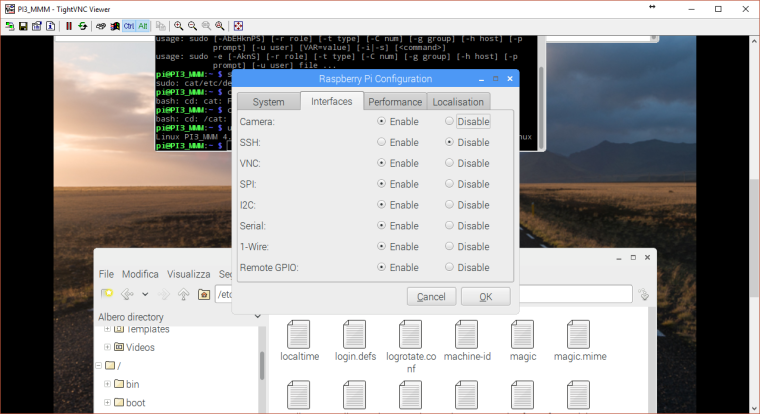
Linux PI3_MMM 4.4.34-v7+ #930 SMP Wed Nov 23 15:20:41 GMT 2016 armv7l GNU/LinuxIn PI config I have enabled 1wire
The sensor is connected to the RJ45 port UNIPI 1.1
I also have a hub (yours) to 8 channels (in and out included) but for now I wanted to try it by connecting the sensor directly to unipiThanks, Alberto
-
-
@Alberto-Cauzzi
this project is for raspberry not for unipi and not work with sensor connected on 1wire unipi port.
The error is only bad image reference -
-
In CoDeSys only it works unipi 1.1 card.
In CoDeSys the expansion board i2c to 8 relays and 1wire bus DO NOT WORK !! -
I guess you did not read the manual which describes the installation really nicely. The Raspi-config you used enables 1Wire via GPIO but the 1Wire we are using is connected via I2C...
Please follow the datasheet as described https://store.codesys.com/codesys-for-unipi.html
-
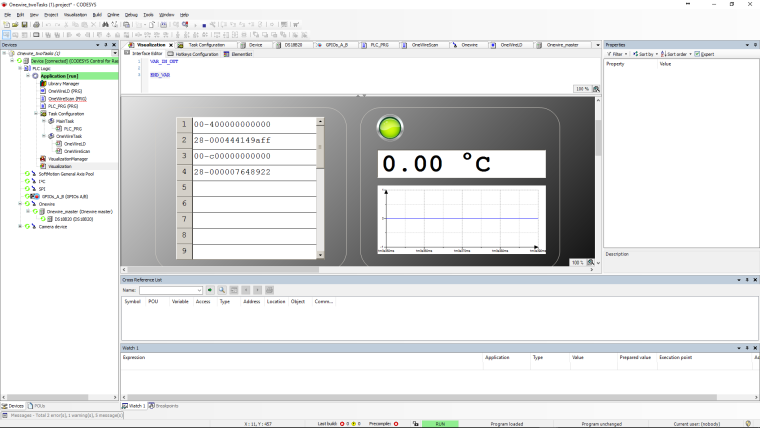
I got this problem few time ago. The sample project gived by Codesys isn't perfect but with this program you can get the address.
-First thing I see is to disable 1-Wire. Because Codesys will try to ping 1-wire Bus from the raspberry pi board and not the 1-wire Bus from UNIPI board. Because the UNIPI BUS is over I2C.
The best thing to do is to run the installation script. But for this, you need to log into the root session.
Put the script into USB KEY.
log into the root session
click right on the script, property.
permission - and bring it executable from anyone.
then double click on the script.
Run from terminal.
There the script gonna get you the correct configuration. Make sure internet work because if my memory is good it have to download something.I did this on a clean install of pixel. And after that everything was fine.
-
IF NOT x THEN
x := TRUE;
//scan function
FOR ui:=1 TO MIN(Onewire_master.uiScannedDevices, 20) DO
astrID[ui] := Onewire_master.pasScannedDevices^[ui-1].StringRepresentation;
END_FOR
END_IfRun this code into a seperate POU (ST language)
x=bool
astrID=array
ui=UINT -
with this, look online the string of the array. from 1 to 20 DS18B20 correctly wired you will have the address.
Once that done, you need to insert the address manually of each DS18B20 into codesys DS18B20. If you use more than 1 DS18B20, you have to click on the DS18B20 already existing, ADD new device and add another DS18B20.
-
@lefrank01 thank you for sharing your tips. I have also had this reported once or twice and on each occasion starting from a clean install of Raspbian, installing CODESYS for Raspberry Pi and then running the script that ships with CODESYS for UniPi has resolved users problems.