• Register
    • Login
    • Search
    • Categories
    • Recent
    • Tags
    • Popular
    • Users
    • Groups
    • Search

    S103-G use GSM/GPRS module to connect to internet

    Neuron Series
    6
    29
    16734
    Loading More Posts
    • Oldest to Newest
    • Newest to Oldest
    • Most Votes
    Reply
    • Reply as topic
    Log in to reply
    This topic has been deleted. Only users with topic management privileges can see it.
    • roberts_lando
      roberts_lando last edited by roberts_lando

      @unix I have added it to node-red flows library: https://flows.nodered.org/flow/af6487676bd89e5e8b74b2c9da1e176d

      Enjoy :)

      1 Reply Last reply Reply Quote 0
      • U
        unix last edited by

        Nice thx for help :smile:
        Regards

        1 Reply Last reply Reply Quote 0
        • U
          unix last edited by

          Hi
          i have inport your data but i get one error in debug
          its "3.11.2017, 10:59:29node: parseModelIDfunction : (error)
          "TypeError: Cannot read property 'trim' of undefined""

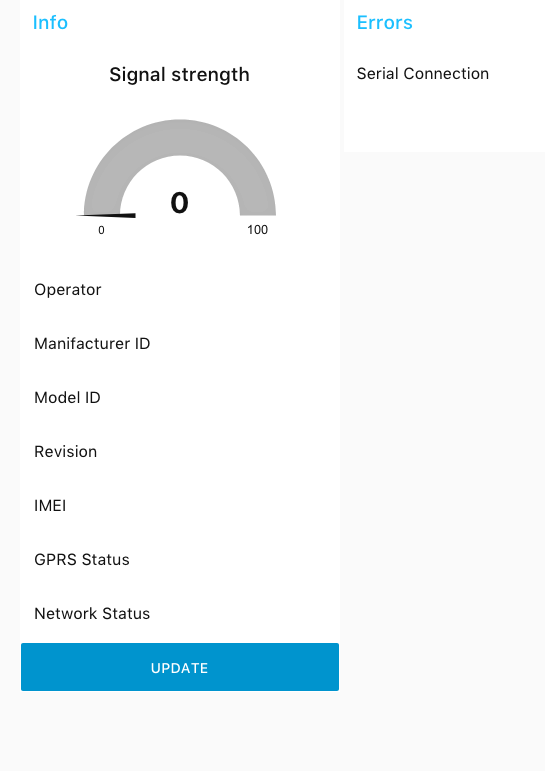
          and the website looks like :
          Daschboard
          connect is green but no info i have only change the serial connect to
          /dev/ttyAMA0: 115200-8n1

          or i have problems whit the modem i can send the first sms whitout problems but after this only error when i test it whit cu -l /dev/ttyAMA0

          hope for hints :smile:

          Regards

          roberts_lando 1 Reply Last reply Reply Quote 0
          • roberts_lando
            roberts_lando @unix last edited by roberts_lando

            @unix Did you close the connection after using cu? Cause that error means that I call .trim() in an undefined var (modelID) that means no data is received after the command. Each command has a timeout, after that I close the read stream from the serial and I try to parse the response string, if the response string is not well parsed those errors are normal, try to put a debug node to see the output of the serial and check that the cu session is closed.

            Disconnect: type ~ (alt+126) than wait for [unipi] output than type . and hit <Enter>

            1 Reply Last reply Reply Quote 0
            • U
              unix last edited by

              Hi
              yes the cu session a closed in debug i see this

              3.11.2017, 11:25:11node: 96ac4186.358femsg.payload : string[4]
              "OK↵"
              3.11.2017, 11:25:13node: 96ac4186.358femsg.payload : string[11]
              "AT+COPS? ↵"
              3.11.2017, 11:25:13node: 96ac4186.358femsg.payload : string[17]
              "+COPS: 0,0,"A1"↵"
              3.11.2017, 11:25:13node: 96ac4186.358femsg.payload : string[2]
              "↵"
              3.11.2017, 11:25:13node: 96ac4186.358femsg.payload : string[4]
              "OK↵"
              3.11.2017, 11:25:14node: parseOperatorfunction : (error)
              "TypeError: Cannot read property 'trim' of undefined"
              3.11.2017, 11:25:15node: 96ac4186.358femsg.payload : string[10]
              "AT+CGMI ↵"
              3.11.2017, 11:25:15node: 96ac4186.358femsg.payload : string[18]
              "+CGMI: "Fibocom"↵"
              3.11.2017, 11:25:15node: 96ac4186.358femsg.payload : string[2]
              "↵"
              3.11.2017, 11:25:15node: 96ac4186.358femsg.payload : string[4]
              "OK↵"
              3.11.2017, 11:25:17node: 96ac4186.358femsg.payload : string[10]
              "AT+CGMM ↵"
              3.11.2017, 11:25:17node: 96ac4186.358femsg.payload : string[38]
              "+CGMM: "GSM850/900/1800/1900","G510"↵"
              3.11.2017, 11:25:17node: 96ac4186.358femsg.payload : string[2]
              "↵"
              3.11.2017, 11:25:17node: 96ac4186.358femsg.payload : string[4]
              "OK↵"
              3.11.2017, 11:25:18node: parseModelIDfunction : (error)
              "TypeError: Cannot read property 'trim' of undefined"
              

              Regards

              roberts_lando 1 Reply Last reply Reply Quote 0
              • roberts_lando
                roberts_lando @unix last edited by roberts_lando

                @unix I haven't the possibility to debug it right now, as your debug shows the commands are correctly received, I think you have to change the serial in-out configuration. Check it and send me a screenshot of both.

                Also try to put a debug node after join node wired with serial-out

                U 1 Reply Last reply Reply Quote 0
                • U
                  unix @roberts_lando last edited by

                  @roberts_lando
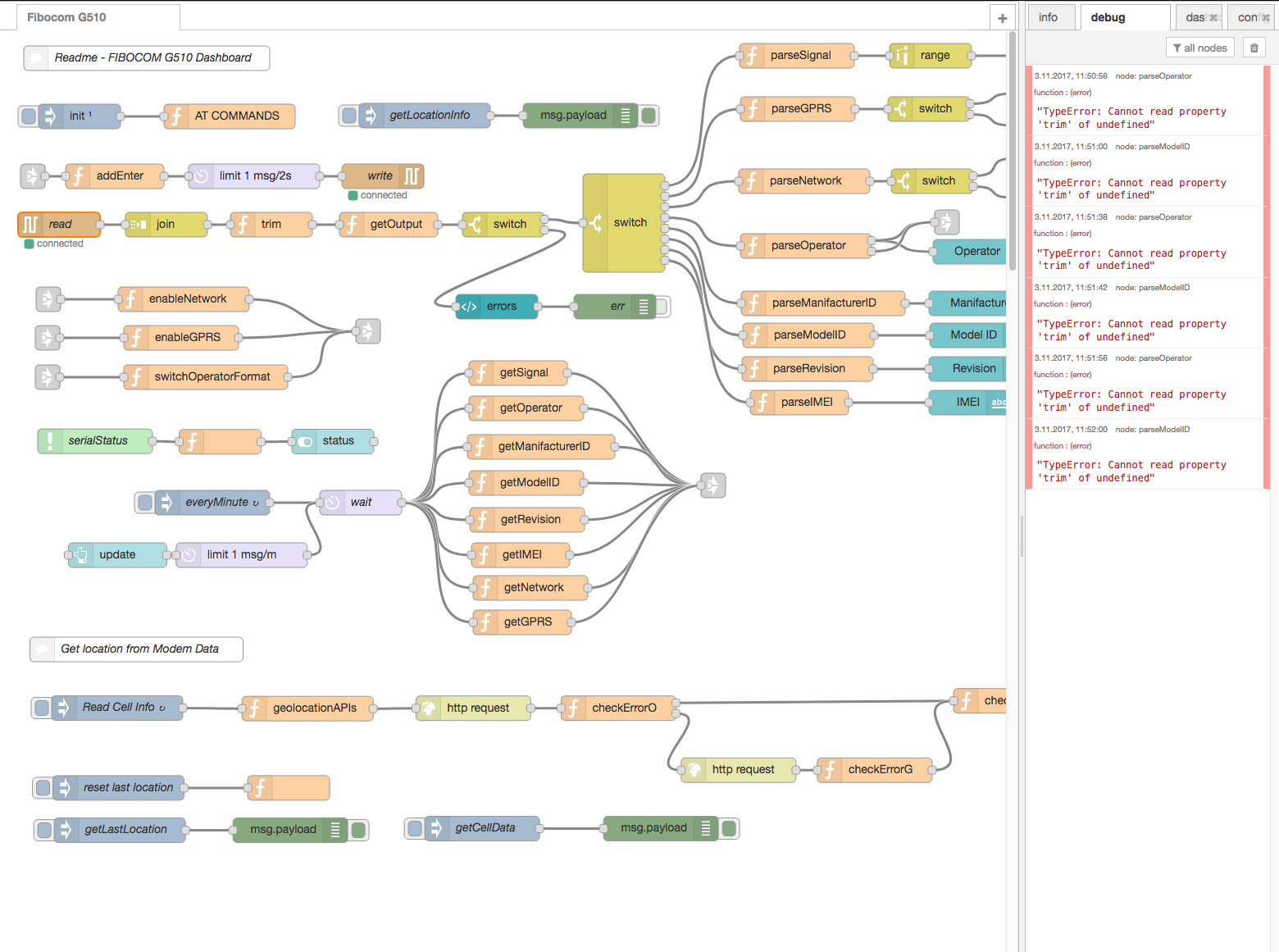
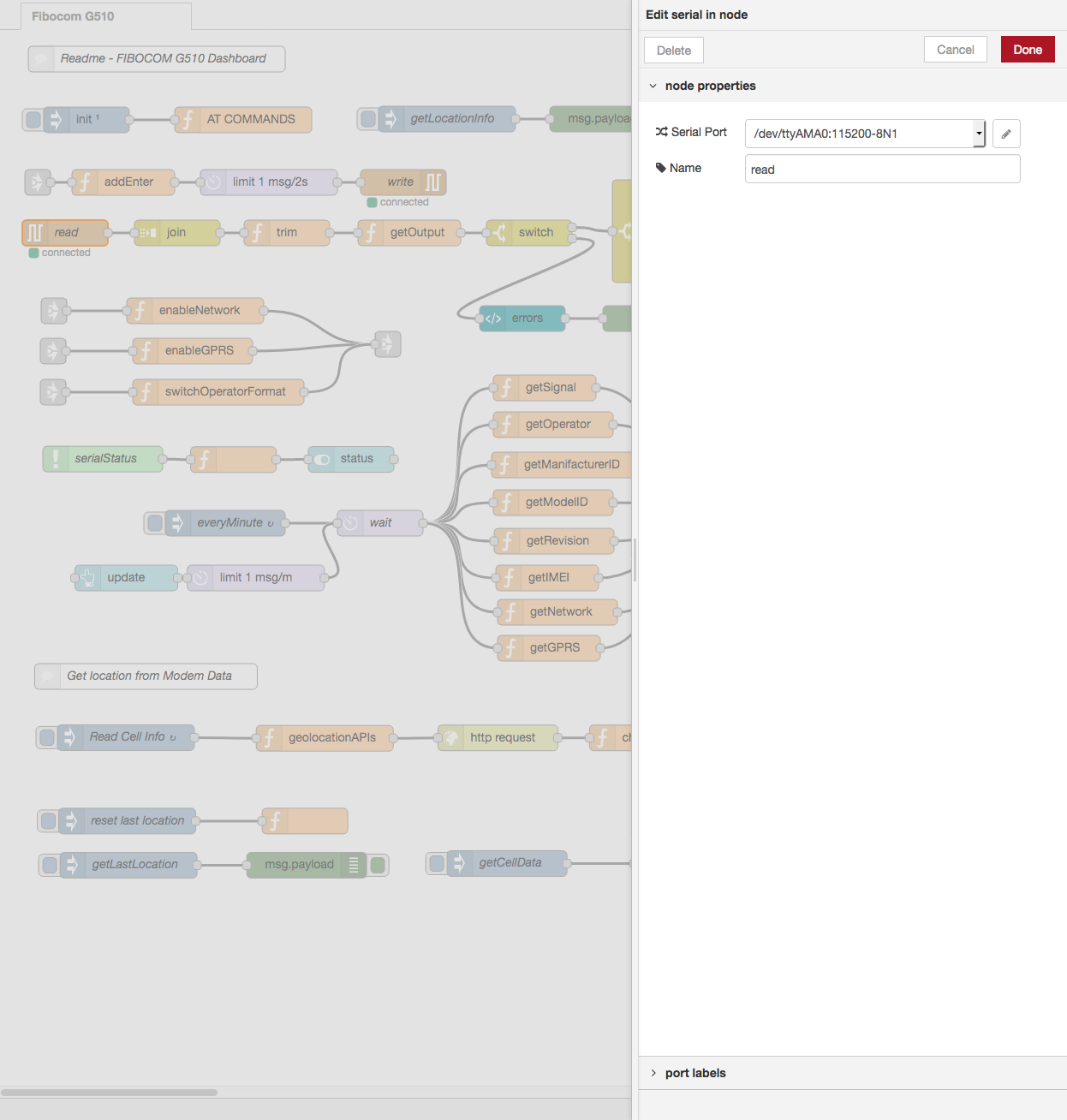
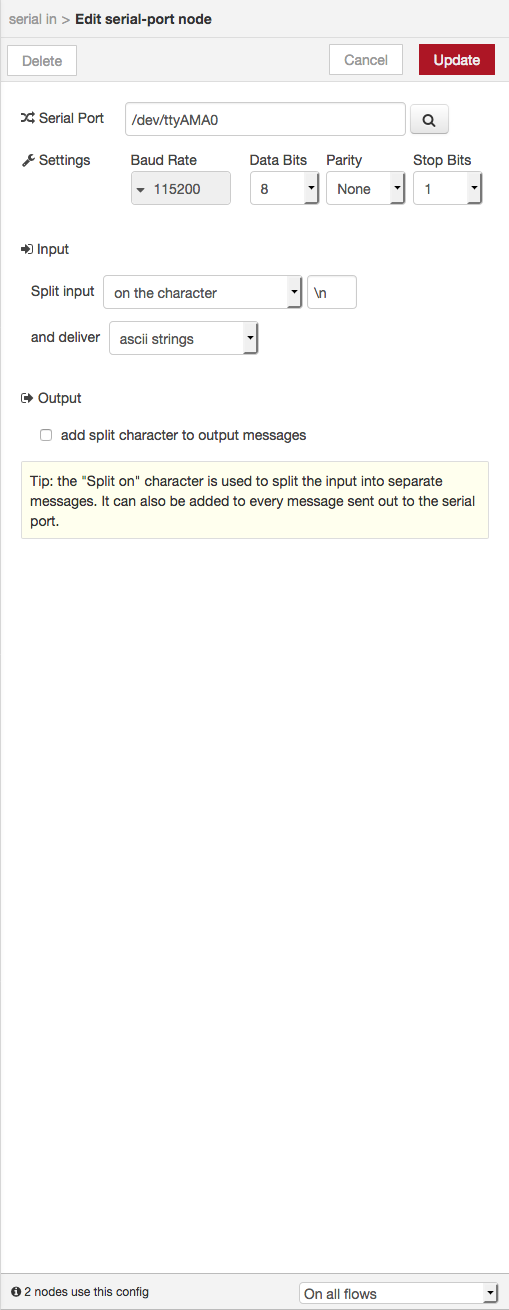
                  i have found one error in another flow i have running sms sender i have delete this and the error seems only the trim see screenshots.

                  1 alt text
                  2 alt text
                  3 alt text

                  Regards

                  i have check the modem connect over cu and modem works and i disconnect to the modem.

                  roberts_lando 1 Reply Last reply Reply Quote 0
                  • roberts_lando
                    roberts_lando @unix last edited by roberts_lando

                    @unix ok I have found the problem: replace \n with \r\n in both serial-in and serial-out nodes than it should work correctly! This has happen because when you have imported the flow I think you haven't already installed node-red-node-serial and the configuration got lost

                    U 1 Reply Last reply Reply Quote 0
                    • U
                      unix @roberts_lando last edited by

                      @roberts_lando

                      WTF great thx for fast response and help :smile:

                      regards

                      roberts_lando 1 Reply Last reply Reply Quote 0
                      • roberts_lando
                        roberts_lando @unix last edited by

                        @unix you welcome! :)

                        1 Reply Last reply Reply Quote 0
                        • Vesa Kauppinen
                          Vesa Kauppinen @roberts_lando last edited by

                          @roberts_lando said in S103-G use GSM/GPRS module to connect to internet:

                          Hi!

                          Great tutorial!

                          I use Raspbian Stretch Lite and I can not get the S103-G to work with these instructions. The command cu -l / dev / ttyAMA0 crashes when I try to AT command. Ifconfig does not give ppp0.

                          What have I missed?

                          Vesa

                          U 1 Reply Last reply Reply Quote 0
                          • U
                            unix @Vesa Kauppinen last edited by

                            @Vesa-Kauppinen
                            Hi
                            have you disable the BT on Pi3

                            /boot/config.txt addline

                            dtoverlay=pi3-disable-bt
                            

                            and on /boot/cmdline.txt remove

                            serial console than its looks like

                            dwc_otg.lpm_enable=0 console=tty1 root=PARTUUID=e13fdf55-02 rootfstype=ext4 elevator=deadline fsck.repair=yes rootwait
                            

                            Regards

                            Vesa Kauppinen 1 Reply Last reply Reply Quote 0
                            • Vesa Kauppinen
                              Vesa Kauppinen @unix last edited by

                              @unix

                              Thank you for answer!

                              BT disabled and cmdline.txt edited...

                              No success

                              @tomas_hora any ideas?

                              Vesa

                              1 Reply Last reply Reply Quote 0
                              • roberts_lando
                                roberts_lando last edited by

                                I always had compatibility problems when using Raspbian Stretch, try to use last Raspbian Jessie img and it should work

                                Vesa Kauppinen 1 Reply Last reply Reply Quote 0
                                • Vesa Kauppinen
                                  Vesa Kauppinen @roberts_lando last edited by Vesa Kauppinen

                                  @roberts_lando

                                  Thank you for answer!

                                  Now i have tried with Rasbian Jessie Lite.....no success :disappointed:

                                  Do you use Jessie Lite or full?

                                  Thanks,
                                  Vesa

                                  roberts_lando 1 Reply Last reply Reply Quote 0
                                  • roberts_lando
                                    roberts_lando @Vesa Kauppinen last edited by

                                    @Vesa-Kauppinen I think you have missed one or more step of the turorial. I suggest you to retry the tutorial and check if an instruction fails. Do you have switch on the GPRS module?

                                    1 Reply Last reply Reply Quote 0
                                    • M
                                      mattia98 @roberts_lando last edited by mattia98

                                      @roberts_lando Hi, I've done all the steps to configure the internet connection but when I type "ifconfig" it doesn't show me the ppp0 interface. Could you please help me?

                                      when I type the command "cat /var/log/syslog" It show me this messages:

                                      Sep 4 13:41:52 raspberrypi pppd[1698]: pppd 2.4.7 started by root, uid 0
                                      Sep 4 13:41:52 raspberrypi chat[1702]: abort on (BUSY)
                                      Sep 4 13:41:52 raspberrypi chat[1702]: abort on (VOICE)
                                      Sep 4 13:41:52 raspberrypi chat[1702]: abort on (NO CARRIER)
                                      Sep 4 13:41:52 raspberrypi chat[1702]: abort on (NO DIALTONE)
                                      Sep 4 13:41:52 raspberrypi chat[1702]: abort on (NO DIAL TONE)
                                      Sep 4 13:41:52 raspberrypi chat[1702]: abort on (NO ANSWER)
                                      Sep 4 13:41:52 raspberrypi chat[1702]: abort on (DELAYED)
                                      Sep 4 13:41:52 raspberrypi chat[1702]: abort on (ERROR)
                                      Sep 4 13:41:52 raspberrypi chat[1702]: abort on (+CGATT: 0)
                                      Sep 4 13:41:52 raspberrypi chat[1702]: send (AT^M)
                                      Sep 4 13:41:52 raspberrypi chat[1702]: timeout set to 12 seconds
                                      Sep 4 13:41:52 raspberrypi chat[1702]: expect (OK)
                                      Sep 4 13:42:04 raspberrypi chat[1702]: alarm
                                      Sep 4 13:42:04 raspberrypi chat[1702]: Failed
                                      Sep 4 13:42:04 raspberrypi pppd[1698]: Connect script failed
                                      Sep 4 13:42:10 raspberrypi OWFS[477]: DEFAULT: ow_reconnect.c:(72) DS2482-100 bus master reconnected
                                      Sep 4 13:42:30 raspberrypi OWFS[477]: DEFAULT: ow_reconnect.c:(72) DS2482-100 bus master reconnected

                                      1 Reply Last reply Reply Quote 0
                                      • T
                                        tomas_hora administrators last edited by

                                        The issue was by the incorrect comm speed with the modem. I modified the guide provided by @roberts_lando to use the proper baudrate of 9600 instead of 115200.


                                        1 Reply Last reply Reply Quote 0
                                        • First post
                                          Last post