How to add xS40 to Neuron L203 using custom software
-
@Boy-Lenssen
That definitely looks like a problem with UART settings, as no RX on the Neuron indicates that there is no response from the extension, not even an error response (which is what occurs when e.g. reading wrong registers or issuing invalid commands).Could you try using the latest version of EVOK? It is possible that some recent changes will help fix the problems you are seeing.
-
@tomasknot I'm sorry, I'm already running 2.0.7. Forgot to mention.
still getting this:
Traceback (most recent call last): File "/opt/evok/neuron.py", line 289, in readboards yield board.parse_definition(self.hw_dict, 1) File "/usr/local/lib/python2.7/dist-packages/tornado/gen.py", line 1055, in run value = future.result() File "/usr/local/lib/python2.7/dist-packages/tornado/concurrent.py", line 238, in result raise_exc_info(self._exc_info) File "/usr/local/lib/python2.7/dist-packages/tornado/gen.py", line 1069, in run yielded = self.gen.send(value) File "/opt/evok/neuron.py", line 571, in parse_definition self.parse_feature(m_feature, board_id) File "/opt/evok/neuron.py", line 547, in parse_feature self.parse_feature_di(max_count, m_feature, board_id) File "/opt/evok/neuron.py", line 413, in parse_feature_di regpolarity=m_feature['polar_reg'], legacy_mode=self.legacy_mode) File "/opt/evok/neuron.py", line 1394, in __init__ curr_ds = self.arm.neuron.modbus_cache_map.get_register(1, self.regmode, unit=self.arm.modbus_address)[0] File "/opt/evok/neuron.py", line 50, in get_register raise Exception('No cached value of register %d on unit %d - read error' % (counter, unit)) Exception: No cached value of register 1018 on unit 1 - read error -
@TomasKnot do you have any pointers for me? I really need to get this working for a customer :\
Any way I can supply you with more info to test it?
Maybe you can create an SD card image file of the configuration that works for you so I can try it out?
-
@boy-lenssen Hello, I am terribly sorry for a delay on our side. Tommorow morning I will reproduce your setup (L203 with xS40) and supply you with the working image. Thank you for you patience.
Martin
-
Hello @Boy-Lenssen ,
I was able to get a working connection from UniPi Neuron L503 to xS40.Here you can see general wiring, the white wires are for RS485.
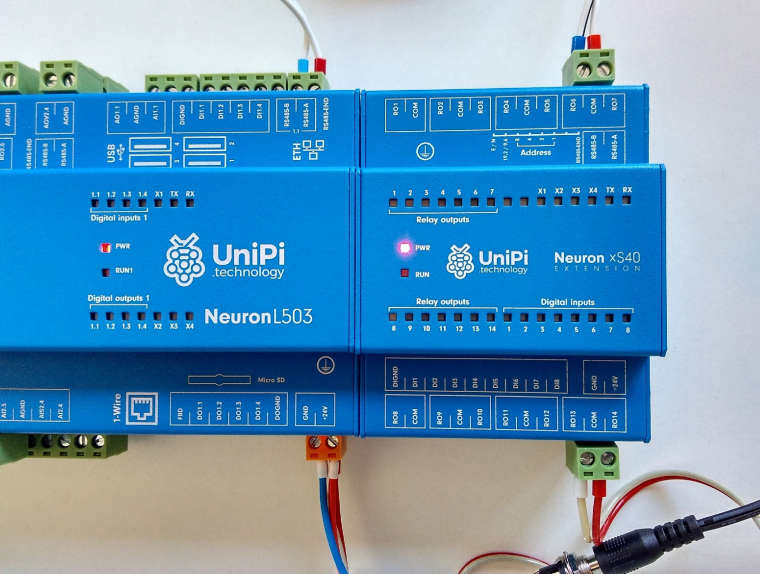
Here you can see the DIP switches on the xS40. As you can see, the Modbus address is set to 5, speed to 19200 and no parity. The unit is also set as a last one on the RS485 bus

And here you can see the working setup. I setted some ROs on the xS40 via the web interface

This is the configuration file I used:
#!!! Do not use '#' for comments !!!

[MAIN]
config_version = 2.5					; Configuration file version, DO NOT CHANGE!
use_schema_verification = False			; Enabling this will deny any requests that do not match the JSON Schema; NOTE THAT THIS RESULTS IN A SIGNIFICANT INCREASE IN LATENCY AND SHOULD NOT BE USED EXCEPT FOR TESTING
log_level = ERROR   					; Minimum severity of messages to be logged; one of INFO, DEBUG, WARNING, ERROR, CRITICAL
log_file = /var/log/evok.log			; Log file to use; will be cleared on boot
port = 8080								; !!! Internal API port - only change if you are certain you know what you are doing; FOR OUR WEB INTERFACE THE PORT SHOULD BE CHANGED IN "/etc/evok-nginx.conf" INSTEAD !!!
webhook_enabled = False					; Enables webhook notification - see e.g. https://sendgrid.com/blog/whats-webhook/
webhook_address = http://127.0.0.1:80   ; Put your server endpoint address here (e.g. http://123.123.123.123:/wh )
webhook_device_mask = ["input","wd"]	; List of device types to notify on (written as a JSON list) - adding AI will generate a large amount of messages!
webhook_complex_events = False			; EVOK will send POST requests with the same data as WebSocket, rather than an empty GET request
wifi_control_enabled = False			; !!! REQUIRES THE UNIPIAP WIFI CONTROLLER TO BE INSTALLED !!! Will allow evok to control the internal Neuron wifi
soap_server_enabled = False				; Enables the simple SOAP server; use only if you need the functionality
soap_server_port = 8081					; !!! IF SOAP SERVER IS ENABLED, THIS PORT NEEDS TO BE UNIQUE (i.e. different from the port setting above) !!!

[NEURON_1]
global_id = 1							; Mandatory, REQUIRED TO BE UNIQUE
allow_register_access = False 			; Optional, False default
scan_frequency = 10						; Optional, 10 default
scan_enabled = True 					; Optional, True default

; Below you can find examples for connecting devices over UART; first example is a Neuron extension while the second is a custom third-party device
; Devices sharing a port use the port settings of the first device on that port (baud rate, parity, stopbits)
; !!!Note that device_name has to match a filename in the /etc/hw_definitions directory!!! See /etc/hw_definitions/DOMAT MMIO.yaml for an example

[EXTENSION_1]
global_id = 2							; Mandatory, REQUIRED TO BE UNIQUE
device_name = xS40						; Mandatory
modbus_uart_port = /dev/extcomm/0/0 	; Mandatory
;neuron_uart_circuit = 1_01				; Optional, allows associating extensions with specific Neuron UART-over-Modbus ports (not possible for non-Modbus UART ports, e.g. /dev/ttyUSB0 or /dev/ttyS0)
;allow_register_access = True 			; Optional, False default, is mandatory with third-party devices
address = 5							; Optional, 1 default
;scan_frequency = 10 					; Optional, 10 default
;scan_enabled = True 					; Optional, True default
; Note that the following settings will be inherited by other devices sharing the same port, i.e. /dev/extcomm/0/0
baud_rate = 19200						; Optional, NEEDS UNIPI IMAGE TO WORK! USE API TO CONFIGURE UART MANUALLY IF USING STANDARD RASPBIAN
parity = N								; Optional, NEEDS UNIPI IMAGE TO WORK! USE API TO CONFIGURE UART MANUALLY IF USING STANDARD RASPBIAN
stop_bits = 1							; Optional, NEEDS UNIPI IMAGE TO WORK! USE API TO CONFIGURE UART MANUALLY IF USING STANDARD RASPBIAN

;[EXTENSION_2]
;global_id = 3							; Mandatory, REQUIRED TO BE UNIQUE
;device_name = CUSTOM MODBUS DEVICE		; Mandatory
;modbus_uart_port = /dev/extcomm/0/0 	; Mandatory
;neuron_uart_circuit = 1_01				; Optional, allows associating extensions with specific Neuron UART-over-Modbus ports (not possible for non-Modbus UART ports, e.g. /dev/ttyUSB0 or /dev/ttyS0)
;allow_register_access = True 			; Mandatory with third-party devices
;address = 1 							; Optional, 15 default
;scan_frequency = 2 					; Optional, 1 default
;scan_enabled = True 					; Optional, True default

[OWBUS_1]
owbus = /dev/i2c-1 --i2c=/dev/i2c-1:ALL     		; Scanned bus (--i2c=/dev/i2c-1:ALL or localhost:2122 or 'u' for USB dongle)
interval = 3          					; [s] Default sensor reading
scan_interval = 300    					; [s] How often is scanning done

;Example of 1W-4R/4DI extension module, 1W-8R is almost the same, only with inputs instead of relays
;
; - Map a new 1Wire sensor with the appropriate address, type and interval
; - The syntax can be either SENSOR or 1WDEVICE
; - Setting the correct reading interval is crucial to achieve ideal performance; the default interval is 15s
;
;[1WDEVICE_2]
;bus = 1
;address = 29F39A17000000BC
;type = DS2408
;interval = 1
;
;[1WRELAY_10]
;sensor = 2
;pin = 0
;
;[1WRELAY_11]
;sensor = 2
;pin = 1
;
;[1WRELAY_12]
;sensor = 2
;pin = 2
;
;[1WRELAY_13]
;sensor = 2
;pin = 3
;
;[1WINPUT_20]
;sensor = 2
;pin = 4
;
;[1WINPUT_21]
;sensor = 2
;pin = 5
;
;[1WINPUT_22]
;sensor = 2
;pin = 6
;
;[1WINPUT_23]
;sensor = 2
;pin = 7
I can supply you with working image as well, but I used an up-to-date Raspbian Stretch Lite and installed the Evok according to documentation with default values . Please test the settings above and let me know, if it works for you
Martin
-
still the Rx on the Extension light is on and I get the same error as I posted before when running
sudo python /opt/evok/evok.py@martin-kudláček said in How to add xS40 to Neuron L203 using custom software:
The unit is also set as a last one on the RS485 bus
do I need to do something for this? I'm sorry, I'm quite a noob on this.
-
@boy-lenssen Just to be absolutely sure - did you:
- set the DIP switches exactly the same as on the photo
- replaced the /etc/evok.conf with the one I sent you
- restarted evok with sudo systemctl restart evok
The DIP switches need to be set while the extension is OFF and then turned ON.
Thanks,
Martin -
@Martin-Kudláček I created a video of when I turn on the power.
I replaced the evok.conf exactly with what you posted.
I use the SD card I always use and updated it last week to 2.0.7.Here is the video: https://youtu.be/4_BAgph3VSA
and this is the error I see in /var/log/evok.log:
Traceback (most recent call last): File "/opt/evok/neuron.py", line 289, in readboards yield board.parse_definition(self.hw_dict, 1) File "/usr/local/lib/python2.7/dist-packages/tornado/gen.py", line 1055, in run value = future.result() File "/usr/local/lib/python2.7/dist-packages/tornado/concurrent.py", line 238, in result raise_exc_info(self._exc_info) File "/usr/local/lib/python2.7/dist-packages/tornado/gen.py", line 1069, in run yielded = self.gen.send(value) File "/opt/evok/neuron.py", line 571, in parse_definition self.parse_feature(m_feature, board_id) File "/opt/evok/neuron.py", line 547, in parse_feature self.parse_feature_di(max_count, m_feature, board_id) File "/opt/evok/neuron.py", line 413, in parse_feature_di regpolarity=m_feature['polar_reg'], legacy_mode=self.legacy_mode) File "/opt/evok/neuron.py", line 1394, in __init__ curr_ds = self.arm.neuron.modbus_cache_map.get_register(1, self.regmode, unit=self.arm.modbus_address)[0] File "/opt/evok/neuron.py", line 50, in get_register raise Exception('No cached value of register %d on unit %d - read error' % (counter, unit)) Exception: No cached value of register 1018 on unit 5 - read error 2018-06-21 13:01:08,947 - evok - ERROR - No cached value of register 1018 on unit 5 - read error Traceback (most recent call last): File "/opt/evok/neuron.py", line 289, in readboards yield board.parse_definition(self.hw_dict, 1) File "/usr/local/lib/python2.7/dist-packages/tornado/gen.py", line 1055, in run value = future.result() File "/usr/local/lib/python2.7/dist-packages/tornado/concurrent.py", line 238, in result raise_exc_info(self._exc_info) File "/usr/local/lib/python2.7/dist-packages/tornado/gen.py", line 1069, in run yielded = self.gen.send(value) File "/opt/evok/neuron.py", line 571, in parse_definition self.parse_feature(m_feature, board_id) File "/opt/evok/neuron.py", line 547, in parse_feature self.parse_feature_di(max_count, m_feature, board_id) File "/opt/evok/neuron.py", line 413, in parse_feature_di regpolarity=m_feature['polar_reg'], legacy_mode=self.legacy_mode) File "/opt/evok/neuron.py", line 1394, in __init__ curr_ds = self.arm.neuron.modbus_cache_map.get_register(1, self.regmode, unit=self.arm.modbus_address)[0] File "/opt/evok/neuron.py", line 50, in get_register raise Exception('No cached value of register %d on unit %d - read error' % (counter, unit)) Exception: No cached value of register 1018 on unit 5 - read error 2018-06-21 12:59:25,738 - evok - ERROR - No cached value of register 1018 on unit 5 - read error Traceback (most recent call last): File "/opt/evok/neuron.py", line 289, in readboards yield board.parse_definition(self.hw_dict, 1) File "/usr/local/lib/python2.7/dist-packages/tornado/gen.py", line 1055, in run value = future.result() File "/usr/local/lib/python2.7/dist-packages/tornado/concurrent.py", line 238, in result raise_exc_info(self._exc_info) File "/usr/local/lib/python2.7/dist-packages/tornado/gen.py", line 1069, in run yielded = self.gen.send(value) File "/opt/evok/neuron.py", line 571, in parse_definition self.parse_feature(m_feature, board_id) File "/opt/evok/neuron.py", line 547, in parse_feature self.parse_feature_di(max_count, m_feature, board_id) File "/opt/evok/neuron.py", line 413, in parse_feature_di regpolarity=m_feature['polar_reg'], legacy_mode=self.legacy_mode) File "/opt/evok/neuron.py", line 1394, in __init__ curr_ds = self.arm.neuron.modbus_cache_map.get_register(1, self.regmode, unit=self.arm.modbus_address)[0] File "/opt/evok/neuron.py", line 50, in get_register raise Exception('No cached value of register %d on unit %d - read error' % (counter, unit)) Exception: No cached value of register 1018 on unit 5 - read error 2018-06-21 12:59:25,631 - evok - ERROR - No cached value of register 1018 on unit 5 - read error Traceback (most recent call last): File "/opt/evok/neuron.py", line 289, in readboards yield board.parse_definition(self.hw_dict, 1) File "/usr/local/lib/python2.7/dist-packages/tornado/gen.py", line 1055, in run value = future.result() File "/usr/local/lib/python2.7/dist-packages/tornado/concurrent.py", line 238, in result raise_exc_info(self._exc_info) File "/usr/local/lib/python2.7/dist-packages/tornado/gen.py", line 1069, in run yielded = self.gen.send(value) File "/opt/evok/neuron.py", line 571, in parse_definition self.parse_feature(m_feature, board_id) File "/opt/evok/neuron.py", line 547, in parse_feature self.parse_feature_di(max_count, m_feature, board_id) File "/opt/evok/neuron.py", line 413, in parse_feature_di regpolarity=m_feature['polar_reg'], legacy_mode=self.legacy_mode) File "/opt/evok/neuron.py", line 1394, in __init__ curr_ds = self.arm.neuron.modbus_cache_map.get_register(1, self.regmode, unit=self.arm.modbus_address)[0] File "/opt/evok/neuron.py", line 50, in get_register raise Exception('No cached value of register %d on unit %d - read error' % (counter, unit)) Exception: No cached value of register 1018 on unit 5 - read error -
Hello @Boy-Lenssen,
here is the image: www.uschovna.cz/zasilka/ALFLHCVAFG743SWB-4SRJust save it on at least 8GB SD card with Win32DiskImager. The IP will be acquired via DHCP.
Martin
-
@martin-kudláček will do, it is downloading, but takes a couple of hours, it says...
btw;
I tried with a new image, Raspbian stretch lite, installed evok and set up the evok.conf for the extension. Same issue...No cached value of register 1018 on unit 5 - read error -
@Martin-Kudláček I tried your image and gives exactly the same issue.
What now? Am I missing some hardware configuration?
-
Maybe it has something to do with the xS40 or my Neuron? Maybe I could try a different Neuron. Unable to swap the extension unit, as I have only one.
-
@martin-kudláček said in How to add xS40 to Neuron L203 using custom software:
Hello @Boy-Lenssen,
here is the image: www.uschovna.cz/zasilka/ALFLHCVAFG743SWB-4SRJust save it on at least 8GB SD card with Win32DiskImager. The IP will be acquired via DHCP.
Martin
btw, the IP doesn't matter, right? I didn't configure an ethernet connection for your image as it is all local. Just needed to check if the light go on.
I also just use WiFi instead of cabled connection on this device.
-
Hello @Boy-Lenssen,
that's rather odd, if it still doesn't work. You can of course send the extension to us for a warranty claim. But if you have an USB-RS485 converter, you can try talking to the extension directly with this app: https://sourceforge.net/projects/qmodmaster/. Let me know if you will need more help with this.Martin
-
@martin-kudláček I swapped the Neuron, the cables, I used your SD card, I've set the dip switches like you said, nothing works. So I'm starting to expect the extension is defective.
Would the stacktrace I mentioned a couple of times be thrown in case I have the switch incorrect?
I don't have a converter at hand...
I'm thinking of ordering a new xS40 and try it out. If it works, I send the previous one back, if it does work, I keep them both.
Am I missing some hardware specific thing? Are the wires of a different kind than for the other connectors?
Is there anything trivial I'm missing? -
Sorry @Boy-Lenssen,
I think we ran out of ideas what can be wrong. The last thing would be to check whether the extension communicates at all. You could ssh into the Neuron, stop the Evok, run the minicom utility, send some Modbus packet (e.g read register 1000 - the firmware version) and see, if the extension responds to you. But the process is far from being simple and there are caveats along the way which are easy to overlook. -
@boy-lenssen And I really recommend you to purchase the USB-RS485 converter. It is extremely handy for such debugging and it costs around $1 on eBay.
-
@martin-kudláček Hey Martin, I got me one of those things :)
I connected it to the Extension, set the device id to 5, connected and then pressed the 'scan' button.
It shows this error right away: https://imgur.com/a/mVWeGa7
In the mean time, the Rx light flashes a few times and then it stays on.
Edit: hmm, I've set the pins to be port 15 and now both lights are flashing intermediately. That seems to be right...
weird that it doesn't work on 5...
edit 2: I've toggle the dipswitches again to be set to 5, but still doesn't work. I've set the slave address in the qModMaster to 15 and then it works. It looks like it ignores the dipswitches. I've powercycled the device, so it should take the dip switches in consideration...
edit 3: I'm able to toggle the relays be sending value between 0 and 127 on 'write single register'. Device seems to work fine, but only on slave address 15 then
-
Hello @Boy-Lenssen,
from your description, it looks like the DIP switch address settings are ignored, for some unknown reason. They should be ignored only when all of the address switches (3-6) are in upper position, thus indicating address 0. When this is set, the extension will set its address from the SW configuration, which you can change via Modbus register (see documentation, if you are interested in this).Just to be absolutely sure, can you send me a photo of your "address 5" configuration?
Thanks,
Martin -
Hello @Boy-Lenssen ,
we have experienced the same issue with different Neuron unit and different extensions. It could be problem with extension's firmware. We will investigate it a bit more and let you know as soon as possible.Thank you for your patience,
Martin