sscp-to-sql-bridge error code: 1
-
I am trying to set up sscp-to-sql-bridge on external server with MariaDB. Both devices are on same network. Everything is set up according to the manual placed here:
https://kb.unipi.technology/en:sw:01-mervis:08-sscp-bridgeWhen I try to run program directly I'm stuck on this:
/opt/unipi/tools/sscp-sql-bridge -v
MAIN: Mervis SSCP-to-SQL bridge started
VLIST: Variables from file "/opt/unipi/data/PLC_1db8c22a-8b00-4013-8b81-fbe880ced0a2_utf8.vlist" loaded successfully
MAP: Variable mapping from file: "/etc/unipi/sscp-sql-bridge.d/mapping.yaml" loaded successfully.
MAP: VLIST variables associated
SSCP: Initialised PLC device 34384064:12346
SSCP: Cannot connect to plc plc_1 at ip 192.168.12.2:12346, error code: 1
MAIN: Starting polling loop
Is there any way to debug this with more verbosity?
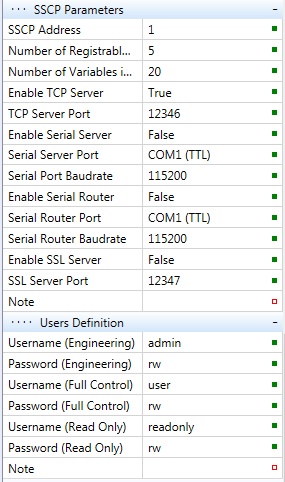
Is there anything more to be set up in Mervis on other place then this? Port 12346 seems to be open and listening.
I am on Neuron L403 with Mervis 2.5.0 installed. Server is Ubuntu jammy on ARM. I had to install some outdated packages manually to meet apt integrity.
-
@Petr-Helebrant Hello Petr,
most probably you have your storage as read only. Please try:
- temporarily set partition as read-write (after restart both partitions will be rest as read-only)
remount rw- set partition as read-write before writing on it
remount rwand after writing set it again as read-only
remount ro- permanent setup of partition as read-write (it will also alter
/etc/fstab)
remount rw -p* -
@zdenek_rusek said in sscp-to-sql-bridge error code: 1:
@Petr-Helebrant Hello Petr,
most probably you have your storage as read only. Please try:
- temporarily set partition as read-write (after restart both partitions will be rest as read-only)
remount rw- set partition as read-write before writing on it
remount rwand after writing set it again as read-only
remount ro- permanent setup of partition as read-write (it will also alter
/etc/fstab)
remount rw -p*Hello @zdenek_rusek, I don't think this is the issue as I have my whole root mounted as read/writeable on server side like this.
/dev/nvme0n1p2 on / type ext4 (rw,relatime,errors=remount-ro,stripe=32)Is there any way to test connection and authorization to SSCP server with something like telnet or so?
-
@Petr-Helebrant Hello Petr, this is strange, please contacts us via email (support@unipi.technology), we will check this deeper.
ZR