Neuron M103 + xS10 no RS485 connection
-
Hello,
I would like use M103 + xS10 + 1wire HUB (current with 1 temperature sensor) for home automation with Node Red. So I have followed UniPian installation instructions in: https://kb.unipi.technology/en:sw:03-3rd-party:nodered:installation-neuron .- Image installation: UniPian-Neuron-OS-2019-01-07-v1.9.img
- then Evok installation and update to version 2.1.6 :
sudo su
apt-get install evok
apt-get update
reboot
After EVOK installation and update, there is no Modbus communication with xS10 extension. No additional Extension mapped in Unipi Control Panel except S102.
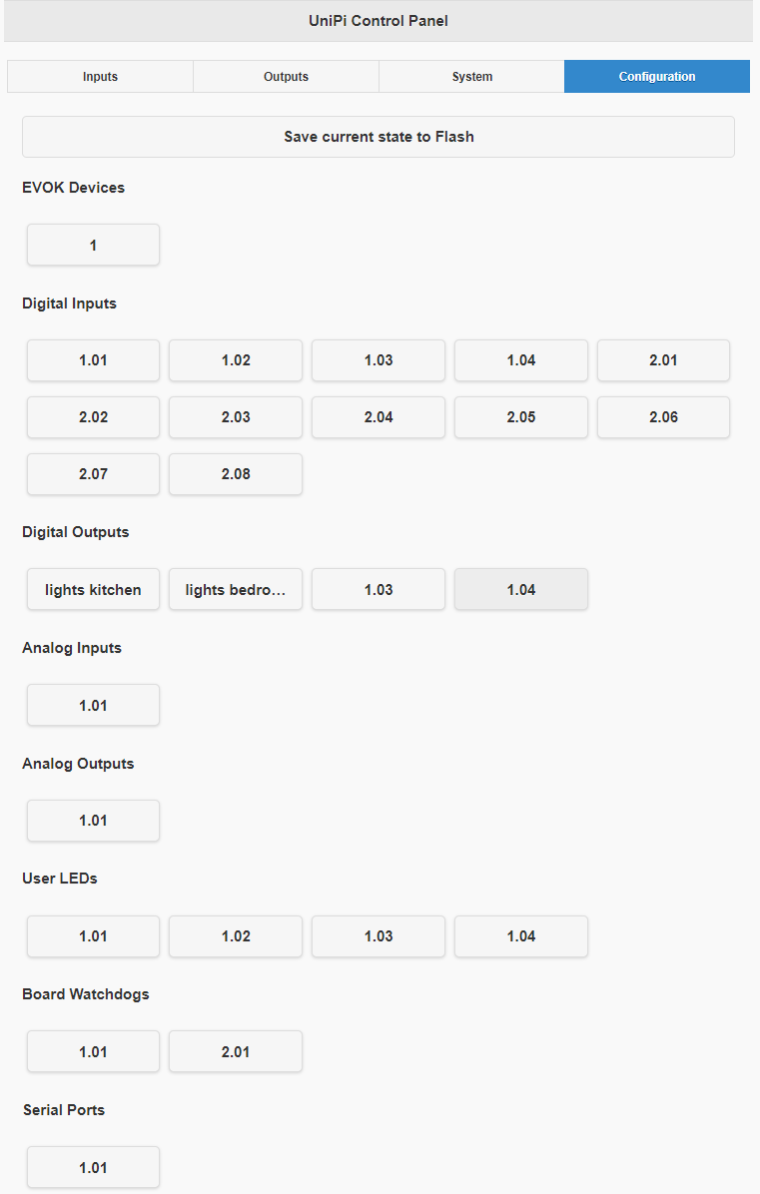
Current status of both units:
-
Neuron S102:
- Rx/Tx leds are OFF
- UART port configuration Parity: None, Speed:19200, Stopbits: One
- RS485 END: ON
- 50cm wiring A-A, B-B
-
xS10:
- Rx/Tx leds are OFF
- power led (red) is ON
- status led (green) is flashing
- dip switches: 1.ON, 2.OFF, 3.ON, 4.OFF, 5.OFF, 6. OFF, 7. ON
pi@M103_2-sn465:~ $ cat /etc/evok.conf#!!! Do not use '#' for comments !!! [MAIN] ; !!! ALL MAIN SECTION OPTIONS ARE MANDATORY !!! config_version = 2.5 ; Configuration file version, DO NOT CHANGE! use_schema_verification = False ; Enabling this will deny any requests that do not match the JSON Schema; NOTE THAT THIS RESULTS IN A SIGNIFICANT INCREASE IN LATENCY AND SHOULD NOT BE USED EXCEPT FOR TESTING log_level = ERROR ; Minimum severity of messages to be logged; one of INFO, DEBUG, WARNING, ERROR, CRITICAL log_file = /var/log/evok.log ; Log file to use; will be cleared on boot port = 8080 ; !!! Internal API port - only change if you are certain you know what you are doing; FOR OUR WEB INTERFACE THE PORT SHOULD BE CHANGED IN "/etc/evok-nginx.conf" INSTEAD !!! webhook_enabled = False ; Enables webhook notification - see e.g. https://sendgrid.com/blog/whats-webhook/ webhook_address = http://127.0.0.1:80 ; Put your server endpoint address here (e.g. http://123.123.123.123:/wh ) webhook_device_mask = ["input","wd"] ; List of device types to notify on (written as a JSON list) - adding AI will generate a large amount of messages! webhook_complex_events = False ; EVOK will send POST requests with the same data as WebSocket, rather than an empty GET request wifi_control_enabled = False ; !!! REQUIRES THE UNIPIAP WIFI CONTROLLER TO BE INSTALLED !!! Will allow evok to control the internal Neuron wifi soap_server_enabled = False ; Enables the simple SOAP server; use only if you need the functionality soap_server_port = 8081 ; !!! IF SOAP SERVER IS ENABLED, THIS PORT NEEDS TO BE UNIQUE (i.e. different from the port setting above) !!! [NEURON_1] global_id = 1 ; Mandatory, REQUIRED TO BE UNIQUE allow_register_access = False ; Optional, False default scan_frequency = 10 ; Optional, 10 default, scanning frequency in [Hz] scan_enabled = True ; Optional, True default ; Below you can find examples for connecting devices over UART; first example is a Neuron extension while the second is a custom third-party device ; Devices sharing a port use the port settings of the first device on that port (baud rate, parity, stop bits) ; !!! Note that device_name has to match a filename in the /etc/hw_definitions directory !!! See /etc/hw_definitions/CUSTOM MODBUS DEVICE.yaml for an example ;[EXTENSION_1] ;global_id = 2 ; Mandatory, REQUIRED TO BE UNIQUE ;device_name = xS10 ; Mandatory ;modbus_uart_port = /dev/extcomm/0/0 ; Mandatory ;neuron_uart_circuit = 1_01 ; Optional, allows associating extensions with specific Neuron UART-over-Modbus ports (not possible for non-Modbus UART ports, e.g. /dev/ttyUSB0 or /dev/ttyS0) ;allow_register_access = True ; Optional, False default, is mandatory with third-party devices ;address = 1 ; Optional, 1 default ;scan_frequency = 10 ; Optional, 10 default, scanning frequency in [Hz] ;scan_enabled = True ; Optional, True default ; Note that the following settings will be inherited by other devices sharing the same port, i.e. /dev/extcomm/0/0 ;baud_rate = 19200 ; Optional, NEEDS UNIPI IMAGE TO WORK WITH UNIPI SERIAL PORTS! USE API TO CONFIGURE UART MANUALLY IF USING STANDARD RASPBIAN ;parity = N ; Optional, NEEDS UNIPI IMAGE TO WORK WITH UNIPI SERIAL PORTS! USE API TO CONFIGURE UART MANUALLY IF USING STANDARD RASPBIAN ;stop_bits = 1 ; Optional, NEEDS UNIPI IMAGE TO WORK WITH UNIPI SERIAL PORTS! USE API TO CONFIGURE UART MANUALLY IF USING STANDARD RASPBIAN ;[EXTENSION_2] ;global_id = 3 ; Mandatory, REQUIRED TO BE UNIQUE ;device_name = CUSTOM MODBUS DEVICE ; Mandatory ;modbus_uart_port = /dev/extcomm/0/0 ; Mandatory ;neuron_uart_circuit = 1_01 ; Optional, allows associating extensions with specific Neuron UART-over-Modbus ports (not possible for non-Modbus UART ports, e.g. /dev/ttyUSB0 or /dev/ttyS0) ;allow_register_access = True ; Mandatory with third-party devices ;address = 1 ; Optional, 15 default ;scan_frequency = 2 ; Optional, 1 default, scanning frequency in [Hz] ;scan_enabled = True ; Optional, True default [OWBUS_1] owbus = /dev/i2c-1 --i2c=/dev/i2c-1:ALL ; Mandatory, scanned bus (--i2c=/dev/i2c-1:ALL or localhost:2122 or 'u' for USB dongle) interval = 3 ; Mandatory, [s] length of sensor reading scan_interval = 300 ; Mandatory, [s] How often the scanning is done ; See below for 1Wire extension module configuration ; Example for the 1W-4R/4DI extension module, 1W-8R is almost the same, only with inputs instead of relays ; ; - Map a new 1Wire sensor with the appropriate address, type and interval ; - The syntax can be either SENSOR or 1WDEVICE ; - Setting the correct reading interval is crucial to achieve ideal performance; the default interval is 15s ; ;[1WDEVICE_2] ;bus = 1 ;address = 29F39A17000000BC ;type = DS2408 ;interval = 1 ; ;[1WRELAY_10] ;sensor = 2 ;pin = 0 ; ;[1WRELAY_11] ;sensor = 2 ;pin = 1 ; ;[1WRELAY_12] ;sensor = 2 ;pin = 2 ; ;[1WRELAY_13] ;sensor = 2 ;pin = 3 ; ;[1WINPUT_20] ;sensor = 2 ;pin = 4 ; ;[1WINPUT_21] ;sensor = 2 ;pin = 5 ; ;[1WINPUT_22] ;sensor = 2 ;pin = 6 ; ;[1WINPUT_23] ;sensor = 2 ;pin = 7pi@M103_2-sn465:~ $ sudo systemctl status evok● evok.service - EVOK ModBus/WebSocket/RPC Server Loaded: loaded (/lib/systemd/system/evok.service; enabled; vendor preset: enabled) Active: active (running) since Fri 2019-11-15 17:55:11 GMT; 39min ago Process: 794 ExecStartPre=/bin/ln -sf /etc/nginx/sites-enabled/evok /etc/evok-nginx.conf (code=exited, status=0/SUCCESS) Process: 791 ExecStartPre=/bin/rm -f /etc/nginx/sites-enabled/mervis (code=exited, status=0/SUCCESS) Process: 788 ExecStartPre=/bin/mv -f /etc/nginx/sites-enabled/mervis /etc/nginx/sites-available/ (code=exited, status=1/FAILURE) Process: 720 ExecStartPre=/bin/cp -f /etc/nginx/sites-available/evok /etc/nginx/sites-enabled/ (code=exited, status=0/SUCCESS) Main PID: 797 (python) CGroup: /system.slice/evok.service ├─797 /opt/evok/bin/python /opt/evok/lib/python2.7/site-packages/evok/evok.py └─866 /opt/evok/bin/python /opt/evok/lib/python2.7/site-packages/evok/evok.py Nov 15 18:05:16 M103_2-sn465 OWFS[866]: DEFAULT: ow_reconnect.c:(72) DS2482-100 bus master reconnected Nov 15 18:05:16 M103_2-sn465 OWFS[866]: DEFAULT: ow_reconnect.c:(72) DS2482-100 bus master reconnected Nov 15 18:10:16 M103_2-sn465 OWFS[866]: DEFAULT: ow_reconnect.c:(72) DS2482-100 bus master reconnected Nov 15 18:12:16 M103_2-sn465 OWFS[866]: DEFAULT: ow_reconnect.c:(72) DS2482-100 bus master reconnected Nov 15 18:15:16 M103_2-sn465 OWFS[866]: DEFAULT: ow_reconnect.c:(72) DS2482-100 bus master reconnected Nov 15 18:17:16 M103_2-sn465 OWFS[866]: DEFAULT: ow_reconnect.c:(72) DS2482-100 bus master reconnected Nov 15 18:20:17 M103_2-sn465 OWFS[866]: DEFAULT: ow_reconnect.c:(72) DS2482-100 bus master reconnected Nov 15 18:25:17 M103_2-sn465 OWFS[866]: DEFAULT: ow_reconnect.c:(72) DS2482-100 bus master reconnected Nov 15 18:27:17 M103_2-sn465 OWFS[866]: DEFAULT: ow_reconnect.c:(72) DS2482-100 bus master reconnected Nov 15 18:30:17 M103_2-sn465 OWFS[866]: DEFAULT: ow_reconnect.c:(72) DS2482-100 bus master reconnectedHoping for a response,
Thank you,
Lubo -
I´m replying to myself :)
I have never worked with Linux, so I search little bit and found this video: https://www.youtube.com/watch?v=T20jXu7rDCA
Based on it, I understood how to solve my problem.
I have editedevok.confbynanotext editor, where it is necessary to deleted all " ; " around [Extension 1]root@M103_2-sn465:~# cd /etc root@M103_2-sn465:/etc# nano evok.conf GNU nano 2.7.4 File: evok.conf #!!! Do not use '#' for comments !!! [MAIN] ; !!! ALL MAIN SECTION OPTIONS ARE MANDATORY !!! config_version = 2.5 ; Configuration file version, DO NOT CHANGE! use_schema_verification = False ; Enabling this will deny any requests that do not match the JSON Schema; NO$ log_level = ERROR ; Minimum severity of messages to be logged; one of INFO, DEBUG, WAR$ log_file = /var/log/evok.log ; Log file to use; will be cleared on boot port = 8080 ; !!! Internal API port - only change if you are cer$ webhook_enabled = False ; Enables webhook notification - see e.g. https://sendgrid.com/blog/$ webhook_address = http://127.0.0.1:80 ; Put your server endpoint address here (e.g. http://123.123.123.123:/wh ) webhook_device_mask = ["input","wd"] ; List of device types to notify on (written as a JSON list) - adding AI will genera$ webhook_complex_events = False ; EVOK will send POST requests with the same data as WebSocket, rather than $ wifi_control_enabled = False ; !!! REQUIRES THE UNIPIAP WIFI CONTROLLER TO BE INSTALLED !!! Will allow ev$ soap_server_enabled = False ; Enables the simple SOAP server; use only if you need the functiona$ soap_server_port = 8081 ; !!! IF SOAP SERVER IS ENABLED, THIS PORT NEEDS TO BE UNIQUE (i.e. $ [NEURON_1] global_id = 1 ; Mandatory, REQUIRED TO BE UNIQUE allow_register_access = False ; Optional, False default scan_frequency = 10 ; Optional, 10 default, scanning frequency in [Hz] scan_enabled = True ; Optional, True default ; Below you can find examples for connecting devices over UART; first example is a Neuron extension while the second is a cu$ ; Devices sharing a port use the port settings of the first device on that port (baud rate, parity, stop bits) ; !!! Note that device_name has to match a filename in the /etc/hw_definitions directory !!! See /etc/hw_definitions/CUSTOM $ [EXTENSION_1] global_id = 2 ; Mandatory, REQUIRED TO BE UNIQUE device_name = xS10 ; Mandatory modbus_uart_port = /dev/extcomm/0/0 ; Mandatory neuron_uart_circuit = 1_01 ; Optional, allows associating extensions with specific Neuron UART-$ allow_register_access = True ; Optional, False default, is mandatory with third-party devices address = 1 ; Optional, 1 default scan_frequency = 10 ; Optional, 10 default, scanning frequency in [Hz] scan_enabled = True ; Optional, True default ; Note that the following settings will be inherited by other devices sharing the same port, i.e. /dev/extcomm/0/0 baud_rate = 19200 ; Optional, NEEDS UNIPI IMAGE TO WORK WITH UNIPI SERIAL PORT$ parity = N ; Optional, NEEDS UNIPI IMAGE TO WORK WITH UNIPI SER$ stop_bits = 1 ; Optional, NEEDS UNIPI IMAGE TO WORK WITH UNIPI SERIAL PORT$ ;[EXTENSION_2] ;global_id = 3 ; Mandatory, REQUIRED TO BE UNIQUE ;device_name = CUSTOM MODBUS DEVICE ; Mandatory ;modbus_uart_port = /dev/extcomm/0/0 ; Mandatory ;neuron_uart_circuit = 1_01 ; Optional, allows associating extensions with specific Neuron UART-$ ;allow_register_access = True ; Mandatory with third-party devices ;address = 1 ; Optional, 15 default ;scan_frequency = 2 ; Optional, 1 default, scanning frequency in [Hz] ;scan_enabled = True ; Optional, True default [OWBUS_1] owbus = /dev/i2c-1 --i2c=/dev/i2c-1:ALL ; Mandatory, scanned bus (--i2c=/dev/i2c-1:ALL or localhost:2122 or 'u' for USB dong$ interval = 3 ; Mandatory, [s] length of sensor reading scan_interval = 300 ; Mandatory, [s] How often the scanning is done ; See below for 1Wire extension module configuration ; Example for the 1W-4R/4DI extension module, 1W-8R is almost the same, only with inputs instead of relays ; ; - Map a new 1Wire sensor with the appropriate address, type and interval ; - The syntax can be either SENSOR or 1WDEVICE ; - Setting the correct reading interval is crucial to achieve ideal performance; the default interval is 15s ; [ Read 99 lines ] ^G Get Help ^O Write Out ^W Where Is ^K Cut Text ^J Justify ^C Cur Pos ^Y Prev Page M-\ First Line ^X Exit ^R Read File ^\ Replace ^U Uncut Text ^T To Spell ^_ Go To Line ^V Next Page M-/ Last LineThan:
Ctrl o,
Enter,
Ctrl x
reboot
After reboot , Evok and Modbus started correctly.