• Register
    • Login
    • Search
    • Categories
    • Recent
    • Tags
    • Popular
    • Users
    • Groups
    • Search

    S103-G use GSM/GPRS module to connect to internet

    Neuron Series
    6
    29
    16735
    Loading More Posts
    • Oldest to Newest
    • Newest to Oldest
    • Most Votes
    Reply
    • Reply as topic
    Log in to reply
    This topic has been deleted. Only users with topic management privileges can see it.
    • roberts_lando
      roberts_lando last edited by tomas_hora

      TUTORIAL FIBOCOM G510 Unipi Neuron S103-G

      Make the file-system writable:

      mount / -o remount,rw
      mount /boot -o remount,rw
      

      Test the interface /dev/ttyAMA0 (serial link parameters: 115 200 1N8 Bps/Par/Bits)

      1. Export pin 18
      echo 18 >/sys/class/gpio/export
      
      1. Switch on module
      echo out > /sys/class/gpio/gpio18/direction
      echo 1 > /sys/class/gpio/gpio18/value
      echo 0 > /sys/class/gpio/gpio18/value
      sleep 1
      echo 1 > /sys/class/gpio/gpio18/value
      sleep 2
      
      1. Start the communication using cu
      apt-get install cu
      chown root:root /dev/ttyAMA0
      cu -l /dev/ttyAMA0
      
      1. Test: send sms (<Enter> means you have to press enter, OK is the output of the command)
      AT  <Enter>
      OK
      
      AT+CMGF=1 <Enter>
      OK
      
      AT+CMGS="yourphonenumber" <Enter>
      > Prova  <Ctrl+z>
      
      +CMGS: 152
      OK
      
      1. Disconnect: type ~ (alt+126) than wait for [unipi] output than type . and hit <Enter>
      ~[unipi]. <Enter>
      

      If interface doesn't works try:

      1. Enable UART: nano /boot/cmdline.txt add (if not present) or edit this line: enable_uart=1. Close and save the file by typing Ctrl+X and Y. Reboot Unipi Neuron and retry to test the interface.

      Now let's configure the interface for internet connection

      1. Install required packages
      apt-get update
      apt-get install ppp screen elinks
      
      1. Edit the configuration file (I use nano apt-get install nano)
      cd /etc/ppp/peers/
      nano rnet
      
      1. Copy the code below to the new file
      #configure for connection
      connect "/usr/sbin/chat -v -f /etc/chatscripts/gprs -T <yourAPNhere>"
       
      # Use /dev/ttyAMA0 as the communication port:
      /dev/ttyAMA0
       
      # Baudrate
      9600
       
      # Assumes that your IP address is allocated dynamically by the ISP.
      noipdefault
       
      # Try to get the name server addresses from the ISP.
      usepeerdns
       
      # Use this connection as the default route to the internet.
      defaultroute
       
      # Makes PPPD "dial again" when the connection is lost.
      persist
       
      # Do not ask the remote to authenticate.
      noauth
       
      # No hardware flow control on the serial link with GSM Modem
      nocrtscts
       
      # No modem control lines with GSM Modem
      local
      
      1. Replace <yourAPNhere> with your APN (Search in google APN of "your mobile operator") close and save the file by typing Ctrl+X and Y

      2. If your SIM card has a PIN edit this file nano /etc/chatscripts/gprs un comment the line AT+CPIN=1234 and set the pin instead of 1234

      3. Enable the connection by typing pon rnet. The show the log for PPPD type cat /var/log/syslog | grep pppd it will show if connection is established successfully.

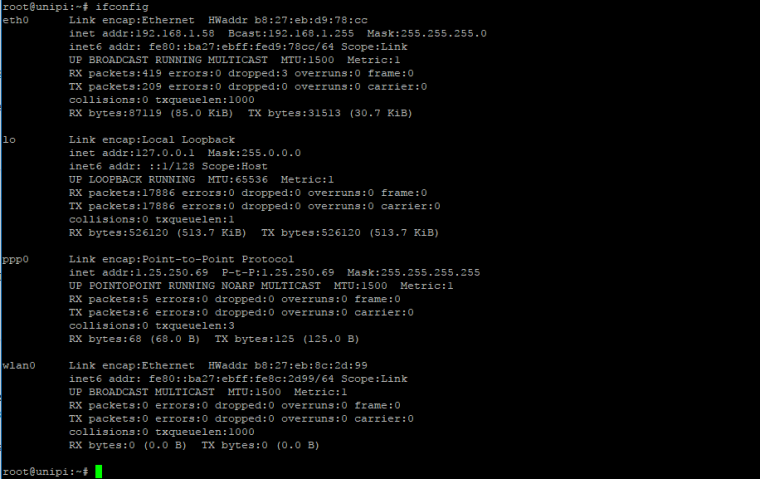
      4. Type ifconfig, now you should see another interface named ppp0.

      0_1507015540134_upload-6607adf9-72d1-4cc9-97e2-cbe5b291b1c7

      1. To close the connection type poff rnet
      T Vesa Kauppinen M 3 Replies Last reply Reply Quote 0
      • T
        tomas_hora administrators @roberts_lando last edited by

        @roberts_lando Great! Thanks a lot!

        1 Reply Last reply Reply Quote 0
        • roberts_lando
          roberts_lando last edited by roberts_lando

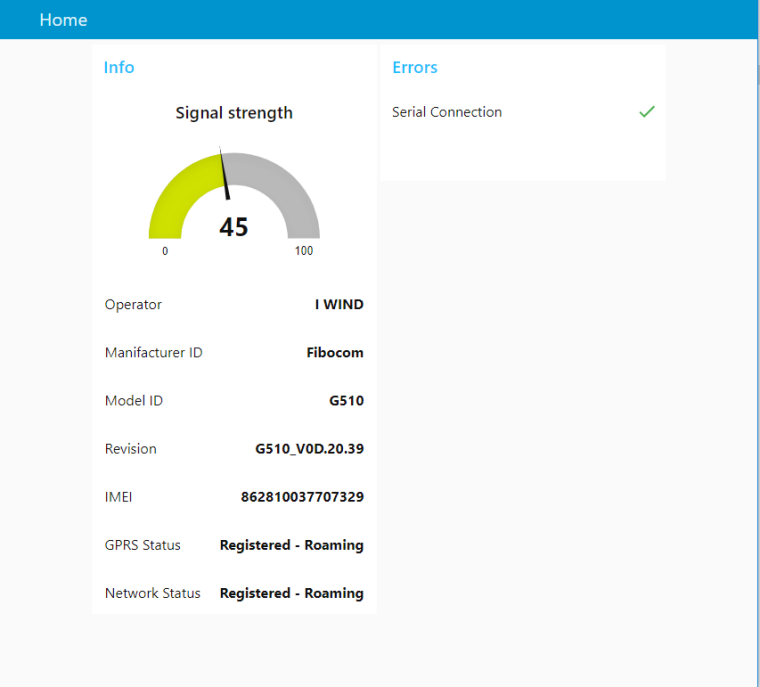
          @tomas_hora Just made a node-red Dashboard to get Modem Data :)
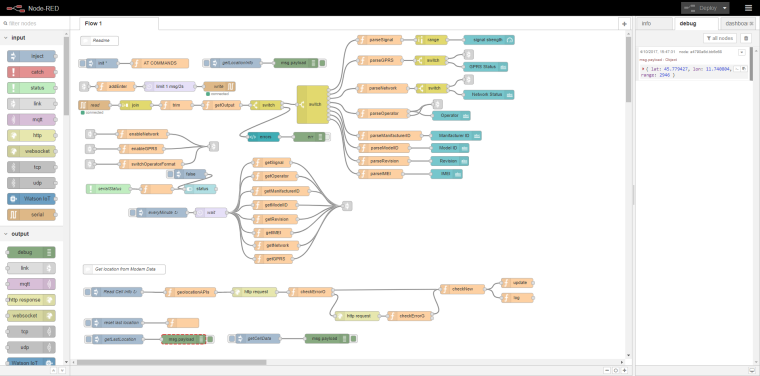
          0_1507124912843_upload-f44d0f00-3612-47f8-aa08-91819d6ff5fe

          0_1507124782319_upload-8a2171eb-31ce-403a-8b88-428e8162c1b4

          With MNC MCC CellID and LAC it is also possible to get the location of the device by using https://opencellid.org/ APIs

          U 1 Reply Last reply Reply Quote 0
          • O
            oho last edited by

            Re: S103-G use GSM/GPRS module to connect to internet

            Does anyone know if it's possible to send AT commands from Mervis after turning on the modem first? Thanks.

            T 1 Reply Last reply Reply Quote 0
            • T
              tomas_hora administrators @oho last edited by

              @oho Support of the GSM functionality will be available in Mervis in the next release.

              1 Reply Last reply Reply Quote 0
              • U
                unix @roberts_lando last edited by

                @roberts_lando hi iam new in node-red and S103-g my question is can you share your nice looking flow to learn better node-red.
                regards

                1 Reply Last reply Reply Quote 0
                • roberts_lando
                  roberts_lando last edited by roberts_lando

                  @unix I have added it to node-red flows library: https://flows.nodered.org/flow/af6487676bd89e5e8b74b2c9da1e176d

                  Enjoy :)

                  1 Reply Last reply Reply Quote 0
                  • U
                    unix last edited by

                    Nice thx for help :smile:
                    Regards

                    1 Reply Last reply Reply Quote 0
                    • U
                      unix last edited by

                      Hi
                      i have inport your data but i get one error in debug
                      its "3.11.2017, 10:59:29node: parseModelIDfunction : (error)
                      "TypeError: Cannot read property 'trim' of undefined""

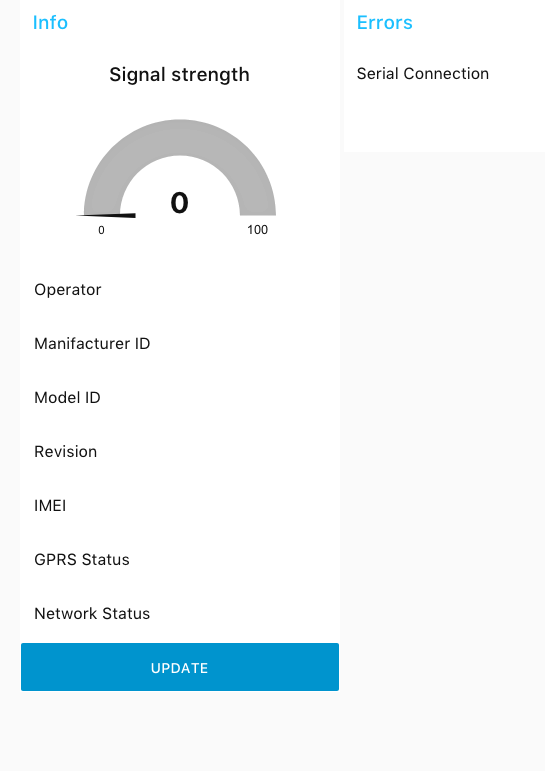
                      and the website looks like :
                      Daschboard
                      connect is green but no info i have only change the serial connect to
                      /dev/ttyAMA0: 115200-8n1

                      or i have problems whit the modem i can send the first sms whitout problems but after this only error when i test it whit cu -l /dev/ttyAMA0

                      hope for hints :smile:

                      Regards

                      roberts_lando 1 Reply Last reply Reply Quote 0
                      • roberts_lando
                        roberts_lando @unix last edited by roberts_lando

                        @unix Did you close the connection after using cu? Cause that error means that I call .trim() in an undefined var (modelID) that means no data is received after the command. Each command has a timeout, after that I close the read stream from the serial and I try to parse the response string, if the response string is not well parsed those errors are normal, try to put a debug node to see the output of the serial and check that the cu session is closed.

                        Disconnect: type ~ (alt+126) than wait for [unipi] output than type . and hit <Enter>

                        1 Reply Last reply Reply Quote 0
                        • U
                          unix last edited by

                          Hi
                          yes the cu session a closed in debug i see this

                          3.11.2017, 11:25:11node: 96ac4186.358femsg.payload : string[4]
                          "OK↵"
                          3.11.2017, 11:25:13node: 96ac4186.358femsg.payload : string[11]
                          "AT+COPS? ↵"
                          3.11.2017, 11:25:13node: 96ac4186.358femsg.payload : string[17]
                          "+COPS: 0,0,"A1"↵"
                          3.11.2017, 11:25:13node: 96ac4186.358femsg.payload : string[2]
                          "↵"
                          3.11.2017, 11:25:13node: 96ac4186.358femsg.payload : string[4]
                          "OK↵"
                          3.11.2017, 11:25:14node: parseOperatorfunction : (error)
                          "TypeError: Cannot read property 'trim' of undefined"
                          3.11.2017, 11:25:15node: 96ac4186.358femsg.payload : string[10]
                          "AT+CGMI ↵"
                          3.11.2017, 11:25:15node: 96ac4186.358femsg.payload : string[18]
                          "+CGMI: "Fibocom"↵"
                          3.11.2017, 11:25:15node: 96ac4186.358femsg.payload : string[2]
                          "↵"
                          3.11.2017, 11:25:15node: 96ac4186.358femsg.payload : string[4]
                          "OK↵"
                          3.11.2017, 11:25:17node: 96ac4186.358femsg.payload : string[10]
                          "AT+CGMM ↵"
                          3.11.2017, 11:25:17node: 96ac4186.358femsg.payload : string[38]
                          "+CGMM: "GSM850/900/1800/1900","G510"↵"
                          3.11.2017, 11:25:17node: 96ac4186.358femsg.payload : string[2]
                          "↵"
                          3.11.2017, 11:25:17node: 96ac4186.358femsg.payload : string[4]
                          "OK↵"
                          3.11.2017, 11:25:18node: parseModelIDfunction : (error)
                          "TypeError: Cannot read property 'trim' of undefined"
                          

                          Regards

                          roberts_lando 1 Reply Last reply Reply Quote 0
                          • roberts_lando
                            roberts_lando @unix last edited by roberts_lando

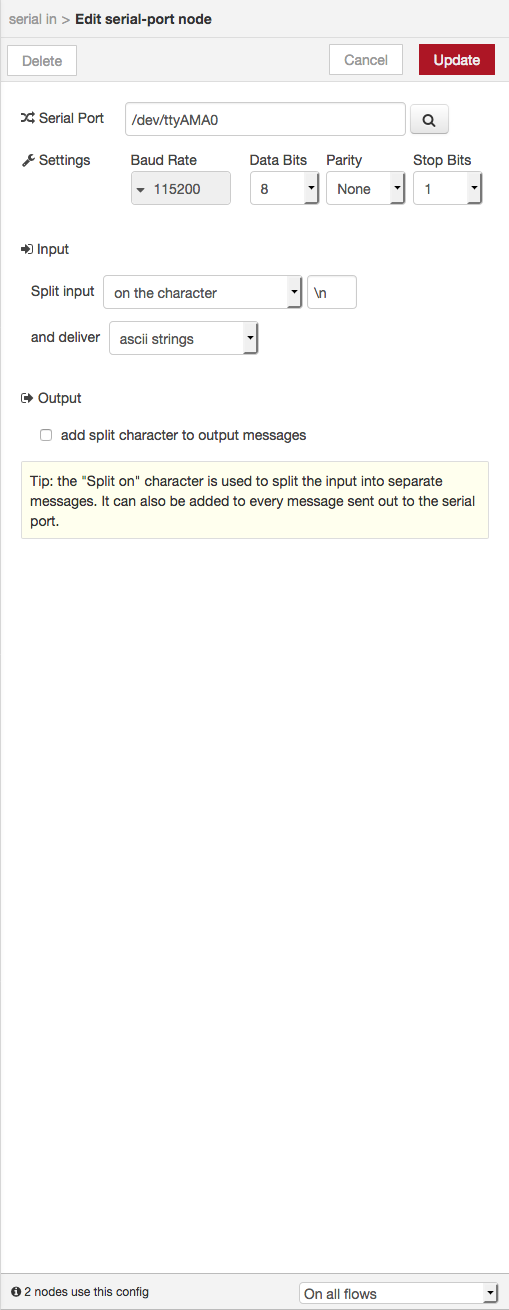
                            @unix I haven't the possibility to debug it right now, as your debug shows the commands are correctly received, I think you have to change the serial in-out configuration. Check it and send me a screenshot of both.

                            Also try to put a debug node after join node wired with serial-out

                            U 1 Reply Last reply Reply Quote 0
                            • U
                              unix @roberts_lando last edited by

                              @roberts_lando
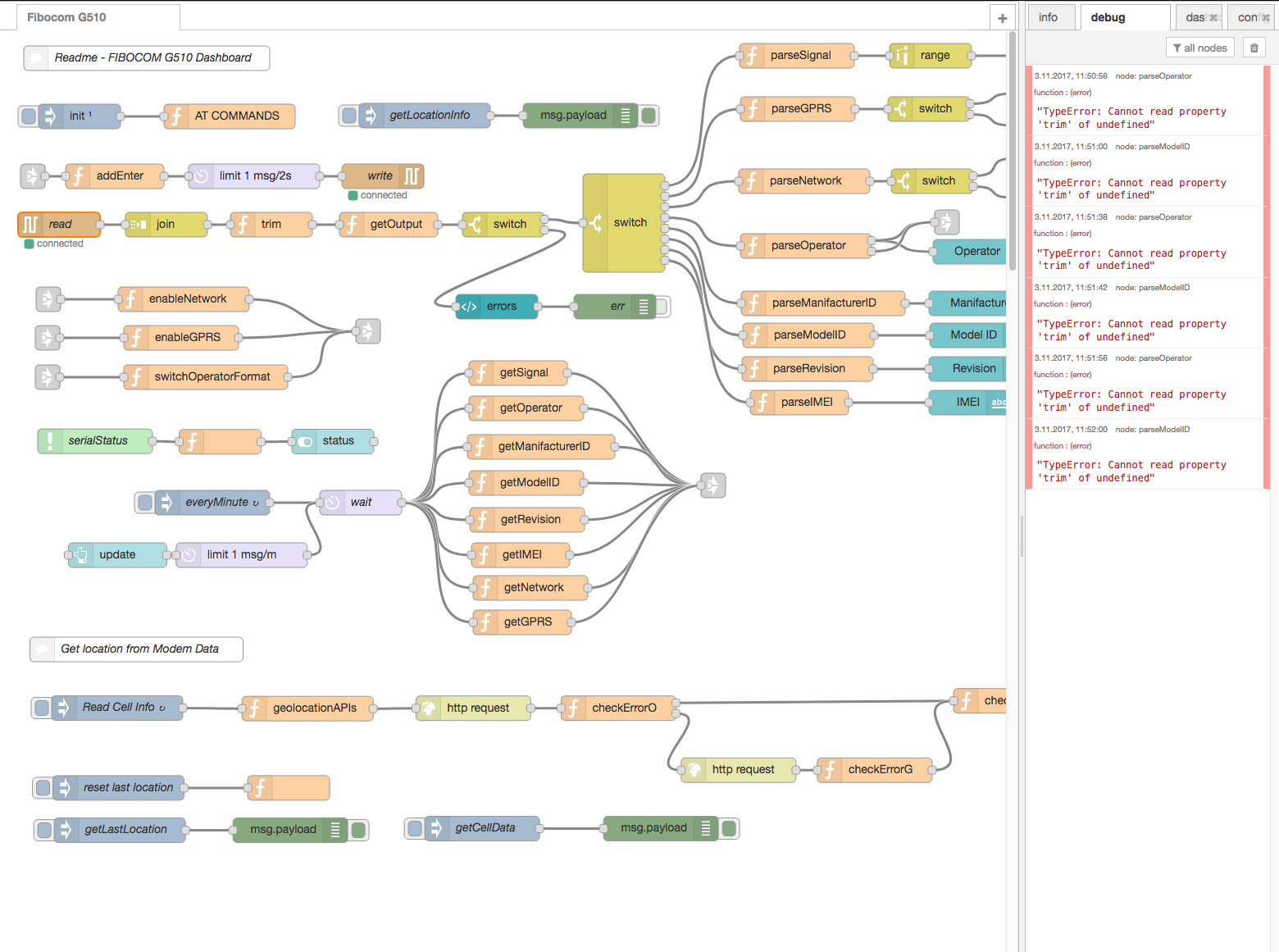
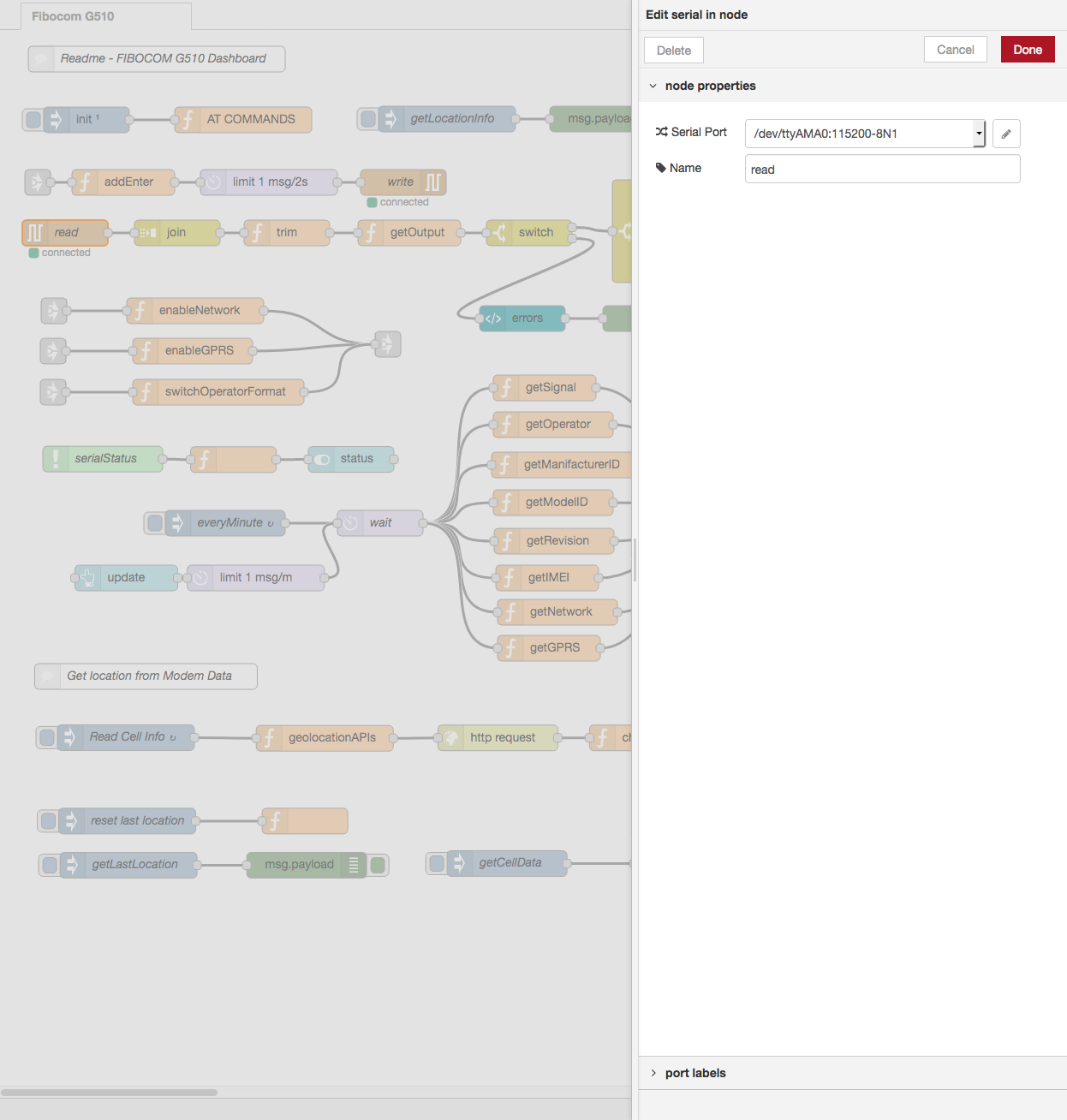
                              i have found one error in another flow i have running sms sender i have delete this and the error seems only the trim see screenshots.

                              1 alt text
                              2 alt text
                              3 alt text

                              Regards

                              i have check the modem connect over cu and modem works and i disconnect to the modem.

                              roberts_lando 1 Reply Last reply Reply Quote 0
                              • roberts_lando
                                roberts_lando @unix last edited by roberts_lando

                                @unix ok I have found the problem: replace \n with \r\n in both serial-in and serial-out nodes than it should work correctly! This has happen because when you have imported the flow I think you haven't already installed node-red-node-serial and the configuration got lost

                                U 1 Reply Last reply Reply Quote 0
                                • U
                                  unix @roberts_lando last edited by

                                  @roberts_lando

                                  WTF great thx for fast response and help :smile:

                                  regards

                                  roberts_lando 1 Reply Last reply Reply Quote 0
                                  • roberts_lando
                                    roberts_lando @unix last edited by

                                    @unix you welcome! :)

                                    1 Reply Last reply Reply Quote 0
                                    • Vesa Kauppinen
                                      Vesa Kauppinen @roberts_lando last edited by

                                      @roberts_lando said in S103-G use GSM/GPRS module to connect to internet:

                                      Hi!

                                      Great tutorial!

                                      I use Raspbian Stretch Lite and I can not get the S103-G to work with these instructions. The command cu -l / dev / ttyAMA0 crashes when I try to AT command. Ifconfig does not give ppp0.

                                      What have I missed?

                                      Vesa

                                      U 1 Reply Last reply Reply Quote 0
                                      • U
                                        unix @Vesa Kauppinen last edited by

                                        @Vesa-Kauppinen
                                        Hi
                                        have you disable the BT on Pi3

                                        /boot/config.txt addline

                                        dtoverlay=pi3-disable-bt
                                        

                                        and on /boot/cmdline.txt remove

                                        serial console than its looks like

                                        dwc_otg.lpm_enable=0 console=tty1 root=PARTUUID=e13fdf55-02 rootfstype=ext4 elevator=deadline fsck.repair=yes rootwait
                                        

                                        Regards

                                        Vesa Kauppinen 1 Reply Last reply Reply Quote 0
                                        • Vesa Kauppinen
                                          Vesa Kauppinen @unix last edited by

                                          @unix

                                          Thank you for answer!

                                          BT disabled and cmdline.txt edited...

                                          No success

                                          @tomas_hora any ideas?

                                          Vesa

                                          1 Reply Last reply Reply Quote 0
                                          • roberts_lando
                                            roberts_lando last edited by

                                            I always had compatibility problems when using Raspbian Stretch, try to use last Raspbian Jessie img and it should work


                                            Vesa Kauppinen 1 Reply Last reply Reply Quote 0
                                            • First post
                                              Last post