• Register
    • Login
    • Search
    • Categories
    • Recent
    • Tags
    • Popular
    • Users
    • Groups
    • Search
    1. Home
    2. Giamba
    3. Posts
    G
    • Profile
    • Following 0
    • Followers 0
    • Topics 9
    • Posts 47
    • Best 2
    • Controversial 0
    • Groups 0

    Posts made by Giamba

    • Unipi 1.1 Analog Inputs

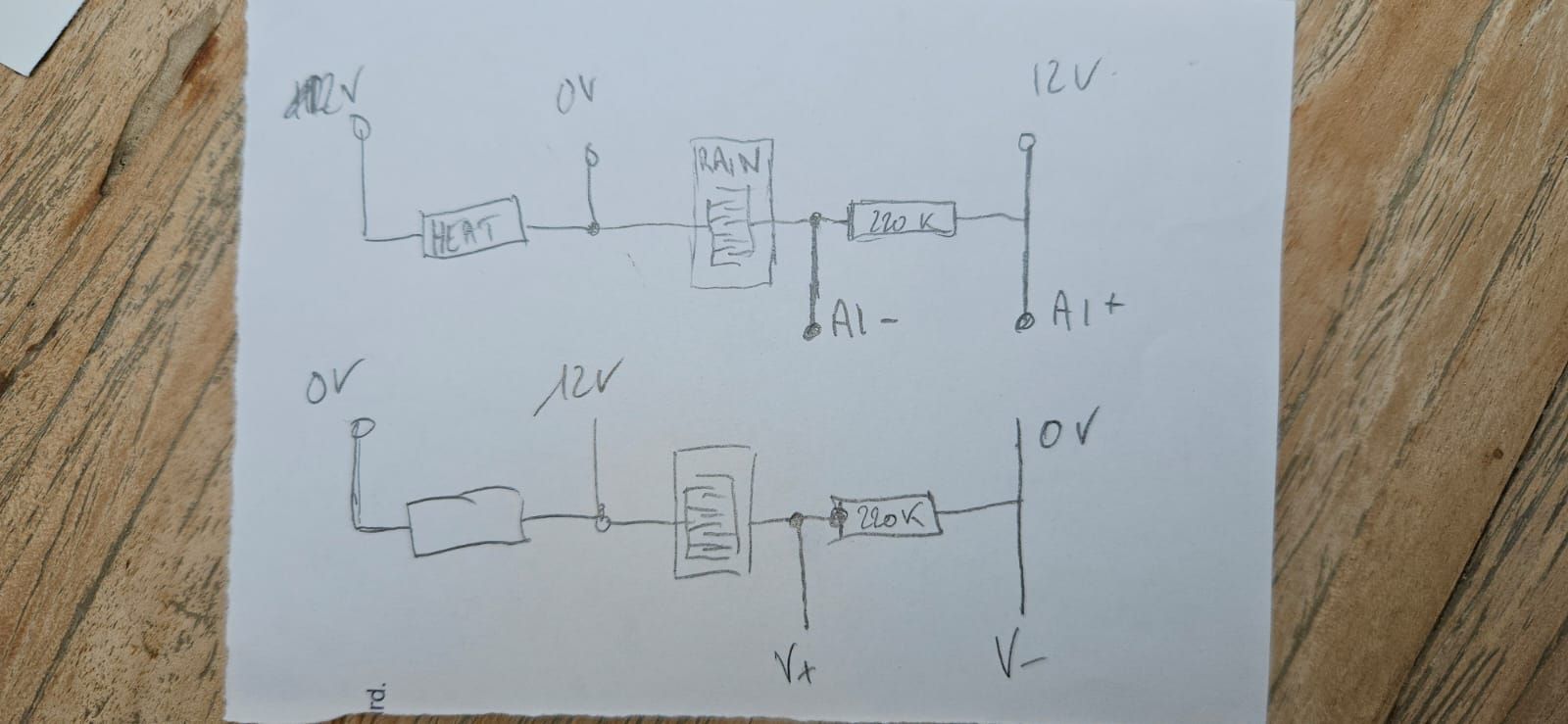
      I have a rain sensor from VELUX VXPRVX00081.
      I would like to measure the voltage at the 220K resistor. I need the lowest current possible to avoid electrolysis on the sensor so I think I can't acheive the bottom diagram.
      With the top diagram, my multimeter read the correct value of the voltage. More water, more current, more voltage. But once plugged in the AIx the value return by the MCP3422 is always at maximum.
      I'm using an external 12V power supply because of the internal sensor heater. The grounds are not connected together.
      I'm reading the value from cpp program with WiringPi and mcp3422.h. The gain is b00, the sample_rate is b11 and LSB 15.625. I red The K factor from the EEPROM.
      Here the _read funtion:

      float Analog_Input::_read() {
          std::lock_guard<std::mutex> lock(*i2cMutex);
          float value;
          value = analogRead (MCP3422_PIN_BASE + this->getChannel()) - 16;
          //std::cout << std::to_string(value) << std::endl;
          value = value * this->lsb / 1000 * this->getK() / 1000;
          //std::cout << std::to_string(value) << std::endl;
          return value;
      }
      

      So why I can't read the value of the voltage on the resistor, how to do ?
      Thanks in advance.
      Giamba.
      WhatsApp Image 2025-06-14 à 14.59.27_cbf19f60.jpg

      posted in Unipi 1 - First Generation
      G
      Giamba
    • RE: Push button relay toggle

      0_1545042847414_mervis.png

      posted in Mervis
      G
      Giamba
    • RE: Access to variables from another PLC

      Hi CKB.
      Yes it's ok for me now. Tested with example and with my project.

      posted in Mervis
      G
      Giamba
    • RE: Access to variables from another PLC

      Hi, this is the SSCP Server log. Can U tell me how is managed the login on the RT (maybe cookie with wrong acl) and if the sscp connection have to be permanant keep-alive because it seems to reconnect on each request.

      [10.05 09:16:44.863]      TSvr12346: New connection on port 12346 (remote 192.168.1.55:48494)
      [10.05 09:16:44.883] <->  TSvr12346: Assigned client context no. 0
      [10.05 09:16:46.909] <->  TSvr12346: Unassigned client context no. 0
      [10.05 09:16:46.914]      TSvr12346: New connection on port 12346 (remote 192.168.1.55:48496)
      [10.05 09:16:46.919] <->  TSvr12346: Assigned client context no. 0
      [10.05 09:16:48.959] <->  TSvr12346: Unassigned client context no. 0
      [10.05 09:16:48.965]      TSvr12346: New connection on port 12346 (remote 192.168.1.55:48498)
      [10.05 09:16:48.970] <->  TSvr12346: Assigned client context no. 0
      [10.05 09:16:51.010] <->  TSvr12346: Unassigned client context no. 0
      [10.05 09:16:51.015]      TSvr12346: New connection on port 12346 (remote 192.168.1.55:48500)
      [10.05 09:16:51.020] <->  TSvr12346: Assigned client context no. 0
      [10.05 09:16:53.060] <->  TSvr12346: Unassigned client context no. 0
      [10.05 09:16:53.066]      TSvr12346: New connection on port 12346 (remote 192.168.1.55:48502)
      [10.05 09:16:53.085] <->  TSvr12346: Assigned client context no. 0
      [10.05 09:16:55.111] <->  TSvr12346: Unassigned client context no. 0
      [10.05 09:16:55.116]      TSvr12346: New connection on port 12346 (remote 192.168.1.55:48504)
      [10.05 09:16:55.121] <->  TSvr12346: Assigned client context no. 0
      
      posted in Mervis
      G
      Giamba
    • RE: Tool Tips in HMI pannel...

      Hi!
      It's purely Javascript and DOM.
      If you have knowledge in this, you can take a look at http://www.voicerss.org/ which translates the text that you pass to in audio. With Javascript, you fetch all the elements of the DOM until you find those where you set an attribute (data-my-text-to-read) to define it's hhover event. Methode for all recents browsers.
      You can edit the sources of the HMI web pages in the web directory of your project directory.
      Hope that's help.

      posted in Mervis
      G
      Giamba
    • RE: Access to variables from another PLC

      Up @tomas_hora

      posted in Mervis
      G
      Giamba
    • RE: Access to variables from another PLC

      As seen in https://kb.mervis.info/lib/exe/fetch.php/cs:mervis-ide:sharkprotocolspecification_user_2017_05_30.pdf,
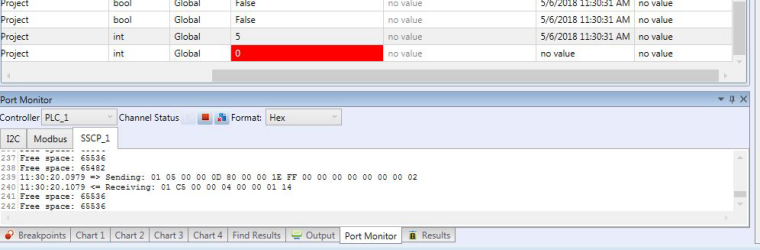
      In port monitor:
      On receiving:

      • 01 SSCP address
      • C5 00 Read variables directly error
      • 00 04 Data length
      • 00 00 01 14 NotLogged

      So I have a resonse, credentials seems too be wrong, but I have admin - rw on PLC configuration and SSCP Device.
      Do you have an explanation ?

      posted in Mervis
      G
      Giamba
    • RE: Access to variables from another PLC

      Hi,
      I test lots of configurations and doesn't work yet.
      This is what I have in mervis:
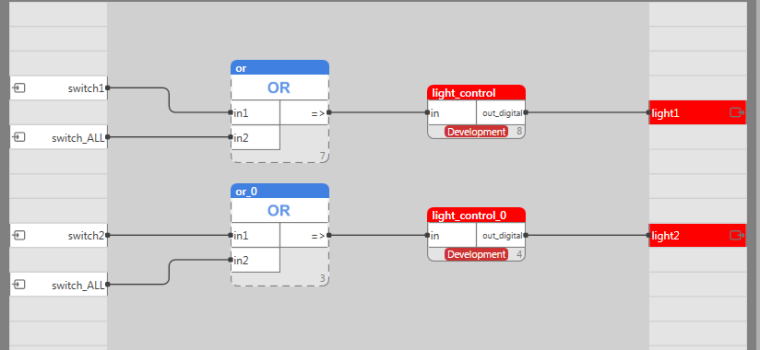
      !0_1525599211705_Mervis com.JPG
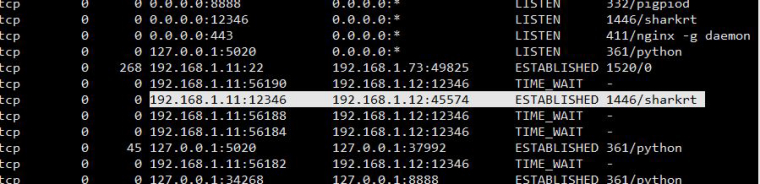
      And netstat command:
      0_1525599296587_tcp connexion.JPG
      So, plz, can U tell me what's wrong ?

      posted in Mervis
      G
      Giamba
    • RE: Access to variables from another PLC

      hi @CKB, @tomas_hora ,
      Same problem for me, did you find the solution ?
      Thanks.

      posted in Mervis
      G
      Giamba
    • RE: 1 Wire problems

      Hi @tomas_hora,

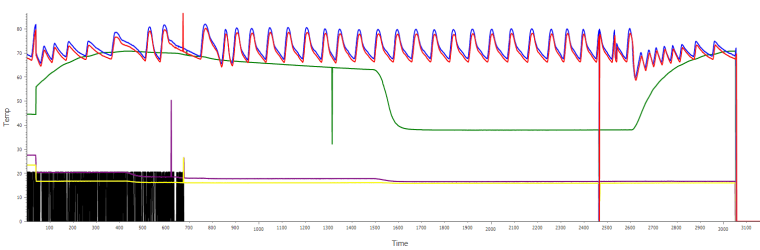
      So this is the chart I get of few hours with some unusual peaks and a unfortunate no signal blackout at the end for a couple of minutes.

      Could you please provide me a chart that shows on a long term basis multiple 1wire sensors curves to make sure that the product (sensors and hub) you sold on you website are reliable.
      Thanks in advance.

      0_1510526864647_temp chart.png

      posted in Mervis
      G
      Giamba
    • RE: 1 Wire problems

      Hi,
      Ok, now my one wire network is working for a few minutes.
      I have put 4+5 together, 3+8 and 6+7, but I have inserted a 150ohm resistor to the data pin of each branch, one branch for one sensor in the middle (1.5m) and one for the star "branch" to the end at 3m.
      According to the specification, 150ohm resistor is not suposed to work for the DS2482-X but it's actualy the only way I found to make it works (for a few minutes) whereas without resistor no sensor is found.

      Is there a way to modify the DS2482-x configuration register to test diferent PullUp options ?

      So the 1 wire is very important for me, it controls solar heating panels and boiler, without this working it's realy a problem.

      Thanks to help me to get it working.

      posted in Mervis
      G
      Giamba
    • RE: 1 Wire problems

      Hi,
      I have some things to understand...
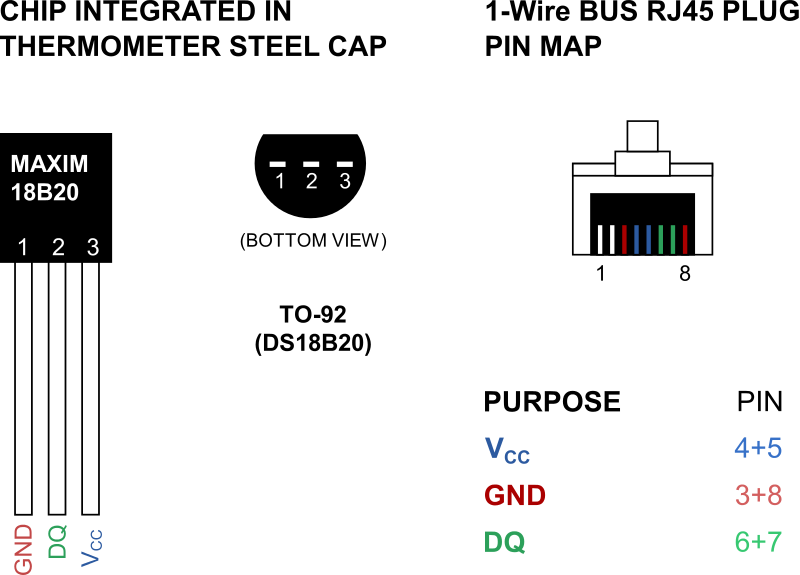
      I can see (first picture) on the RJ45 connector, there are no 3 but 6 wires. 7 and 6 are the same pair, 3-6 and 4-5 too, so data lines are always twisted with the ground.
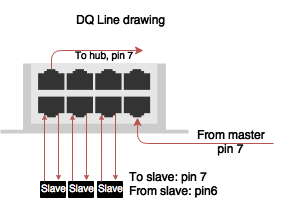
      And now (second picture), if I well understand, pin 6 and 7 are not the same on the Unipi, one for write (pin7) and one for read (pin6). Is that true? So am I to connect sensors to the pin 6 or 7 only or to 6 and 7 together when I'm not using a HUB but weldings ?
      Olso, is your Hub active (mean with DS chips inside) ?
      alt text
      ![alt text](0_1508634787455_upload-d62e2e44-7e53-4f81-a59f-18f45a2d626a image url)

      If you are here, thank for your time to read my posts.

      posted in Mervis
      G
      Giamba
    • RE: 1 Wire problems

      Hi,
      After many test and wiring, My 1-Wire network can't exeed 1m to be stable; with one or more sensors it's the same.
      I'm using cat 5e shielded with brown to gnd, white/blue to Vcc and white/brown to Data.
      I olso test to put the shield on the installation ground (the earth).
      My sensors are DS18B20.
      The Vcc is about 4,80V.
      When we have 5 sensors, is it necessary to put pull-up resistor and where?
      Next step is to plug my oscilloscope to Vcc and Data pin to check weldings.
      Does I'm doing something wrong or does my Unipi 1-wire chips (master or esd) have a problem ?

      posted in Mervis
      G
      Giamba
    • 1 Wire problems

      Hi,
      I have a 3m 1Wire network on an Unipi 1.1 with 5 temps sensors.
      I can't have them to work. I check the wiring.
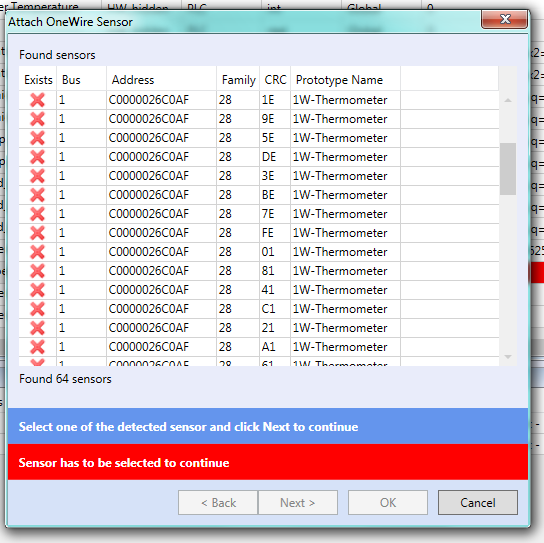
      This is what Mervis find:
      0_1508542148233_unipi 1wire 1.png .
      Do you know this issue ?

      posted in Mervis
      G
      Giamba
    • RE: No Value

      Hi @zorro_66
      Same thing append to me when I forgot to build and deploy before start the debugging...

      posted in Mervis
      G
      Giamba
    • RE: MQTT Support

      @roberts_lando
      For me I have Mervis Modbus client wich write registers in my C program modbus thread.
      Then I have an other thread wich take care of changed values and publish on a topic to the mosquitto broker.
      I have an other thread wich make some stuff on values, like a subscribed return value wich update modbus register before reply to modbus client.

      posted in Mervis
      G
      Giamba
    • Modbus Read/Write questions.

      Hi,
      In the modbus client, the client can read or write but I can't find which one happen first ? read or write?
      Then, Is it possible to read and write on the same register and how to.
      I wan to write register, transform my variable with a C program and read it into mervis.

      Thanks in advance.

      posted in Mervis
      G
      Giamba
    • RE: MQTT Support

      Hi @roberts_lando,
      I do the trick with modbus client on Mervis and libmosquitto in C that give me all the variable I want to export in my web browser in JSON format.

      posted in Mervis
      G
      Giamba
    • RE: Modbus, send REAL data

      I find it!

      Modbus data order: 1234.
      Example:
      In C program header:

      typedef unsigned long DWORD;
      typedef unsigned short WORD;
      union u_DWORD_TO_FLOAT{
          DWORD i;
          float f;
      };
      

      and in the code:

      union u_DWORD_TO_FLOAT AI01;
      ...
      AI01.i = (mb_mapping->tab_registers[20] << 16) + mb_mapping->tab_registers[21];
      float value = AI01.f;
      

      Hope this help someone !

      posted in General Discussion
      G
      Giamba
    • Modbus, send REAL data

      Hi,
      I have some real values to send via modbus from Mervis.
      Since REAL take 4 bytes, REAL should take two registers.
      How can I combine the two registers values to make one real value in C program ?

      regards.

      posted in General Discussion
      G
      Giamba