• Register
    • Login
    • Search
    • Categories
    • Recent
    • Tags
    • Popular
    • Users
    • Groups
    • Search
    1. Home
    2. Juergen
    3. Posts
    J
    • Profile
    • Following 0
    • Followers 0
    • Topics 4
    • Posts 18
    • Best 0
    • Controversial 0
    • Groups 0

    Posts made by Juergen

    • L403 Relaygroup 3 not working

      The 403 runs well for 18 months.
      Now I had a problem with the SD-Card.
      So I created a new one using the same Image from unipi dated 2019.
      After reboot i can Access the Groups 1 and 2. The LEDs RUn1 and RUN2 are green.
      But RUN3 is off, not red.

      After that I created a second SD-Card using the newest Image with the result that all RUN-LEDs are off.

      Any ideas?

      Best regards Jürgen

      posted in Neuron Series
      J
      Juergen
    • RE: evok not working

      Hi Thomas
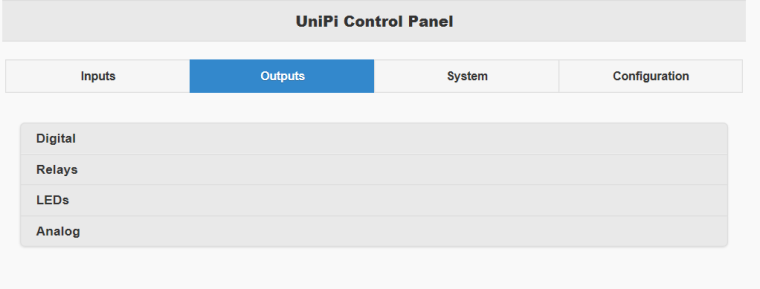
      I found the reason why the Control Panel does not Show any IO ports.

      The problem is the Internet Explorer, i use Version 11

      With Chrome it works !!!

      Best regards

      Jürgen

      posted in Official API - Evok
      J
      Juergen
    • RE: evok not working

      Hi Thomas

      attached the evok-nginx.conf, which is from your Image, i did no modifications

      server {
      listen 80 default_server;
      server_name _;

      #ssl on;
      #ssl_certificate      /etc/nginx/democert.pem;
      #ssl_certificate_key  /etc/nginx/democert.key;
      
      access_log  /var/log/evok.access.log;
      root /var/www/evok;
      
      location / {
          index index.html;	    
      }
      
      location /ws {
      	proxy_pass http://localhost:8080;
      	proxy_set_header Host $host:$server_port;
      	proxy_http_version 1.1;
      	proxy_set_header Upgrade $http_upgrade;
      	proxy_set_header Connection "upgrade";
      	proxy_buffering off;
      	proxy_cache off;
      	#send_timeout 120;
      	proxy_read_timeout 180;
      	#proxy_set_header X-Real-IP $remote_addr;
      }
      
      location /rest {
      	proxy_pass http://localhost:8080;
      	proxy_set_header Host      $host:$server_port;
      	#proxy_set_header X-Real-IP $remote_addr;
      }
      
      location /json {
      	proxy_pass http://localhost:8080;
      	proxy_set_header Host      $host:$server_port;
      	#proxy_set_header X-Real-IP $remote_addr;
      }
      

      }

      posted in Official API - Evok
      J
      Juergen
    • RE: jsonrpc get digital input

      Hi Thomas,

      now it works without an error.

      I used the the Image from 9. of march.
      You should also modify /usr/local/lib/python2.7/dist-packages/jsonrpclib/jsonrpc.py
      to avoid the error "getitem" I postd 3 days ago.

      1- sudo nano /usr/local/lib/python2.7/dist-packages/jsonrpclib/jsonrpc.py
      2- Press "Strg + w" to search for "return response['result']"
      3- edit
      def _request(self, methodname, params, rpcid=None):
      request = dumps(params, methodname, encoding=self.__encoding, rpcid=rpcid, version=self.__version)
      response = self._run_request(request)
      check_for_errors(response)
      return response['result']

      to

      def _request(self, methodname, params, rpcid=None):
      request = dumps(params, methodname, encoding=self.__encoding,
      rpcid=rpcid, version=self.__version)
      response = self._run_request(request)
      check_for_errors(response)
      if response == None:
      return response
      else:
      return response['result']

      5- Press "Strg + x" to exit
      6- Finish

      Thank you very much

      Jürgen

      posted in Official API - Evok
      J
      Juergen
    • RE: jsonrpc get digital input

      Hi Thomas,

      if I start my program

      import jsonrpclib
      s=jsonrpclib.Server('http://localhost:8080/rpc')
      re="1_01"
      s.relay_set("1_01",0)
      s.relay_get("1_01")
      s.relay_set("1_01",1)
      spstatus=s.input_get_value('1_01')
      print("sp:", spstatus)

      It works, I can set the relay and also read the DI, but I found the following error:

      relay_set
      [I 180314 17:41:14 web:2063] 200 POST /rpc (::1) 4.82ms
      [E 180314 17:41:14 concurrent:129] Future exception was never retrieved: Traceback (most recent call last):
      File "/usr/local/lib/python2.7/dist-packages/tornado/gen.py", line 1069, in run
      yielded = self.gen.send(value)
      File "/usr/local/lib/python2.7/dist-packages/tornadorpc_evok/base.py", line 195, in post
      self.finish(response_text)
      File "/usr/local/lib/python2.7/dist-packages/tornado/web.py", line 962, in finish
      raise RuntimeError("finish() called twice")
      RuntimeError: finish() called twice
      relay_set
      [I 180314 17:41:14 web:2063] 200 POST /rpc (::1) 49.89ms
      [E 180314 17:41:14 concurrent:129] Future exception was never retrieved: Traceback (most recent call last):
      File "/usr/local/lib/python2.7/dist-packages/tornado/gen.py", line 1069, in run
      yielded = self.gen.send(value)
      File "/usr/local/lib/python2.7/dist-packages/tornadorpc_evok/base.py", line 195, in post
      self.finish(response_text)
      File "/usr/local/lib/python2.7/dist-packages/tornado/web.py", line 962, in finish
      raise RuntimeError("finish() called twice")
      RuntimeError: finish() called twice
      input_get_value
      [I 180314 17:41:14 web:2063] 200 POST /rpc (::1) 45.27ms

      Maybee this could help you with my other problem

      posted in Official API - Evok
      J
      Juergen
    • RE: evok not working

      Hi Thomas,

      after boot I stopped evok and start it again manually.
      pi@S103-sn291:/opt/evok $ sudo python evok.py
      [I 180314 17:15:28 config:63] eprom: UniPi Neuron S103 version: 1.0 serial: 0x123
      [I 180314 17:15:28 evok:1628] Starting using config file /etc/evok.conf
      [I 180314 17:15:29 config:75] YAML Definition loaded: L20x.yaml, type: 3, definition count 0
      [I 180314 17:15:29 config:75] YAML Definition loaded: M30x.yaml, type: 3, definition count 1
      [I 180314 17:15:29 config:75] YAML Definition loaded: L50x.yaml, type: 3, definition count 2
      [I 180314 17:15:29 config:75] YAML Definition loaded: S10x.yaml, type: 3, definition count 3
      [I 180314 17:15:29 config:75] YAML Definition loaded: xS40.yaml, type: 3, definition count 4
      [I 180314 17:15:29 config:75] YAML Definition loaded: M10x.yaml, type: 3, definition count 5
      [I 180314 17:15:30 config:75] YAML Definition loaded: L30x.yaml, type: 3, definition count 6
      [I 180314 17:15:30 config:75] YAML Definition loaded: M50x.yaml, type: 3, definition count 7
      [I 180314 17:15:30 config:75] YAML Definition loaded: L51x.yaml, type: 3, definition count 8
      [I 180314 17:15:30 config:75] YAML Definition loaded: xS30.yaml, type: 3, definition count 9
      [I 180314 17:15:30 config:75] YAML Definition loaded: M40x.yaml, type: 3, definition count 10
      [I 180314 17:15:31 config:75] YAML Definition loaded: M20x.yaml, type: 3, definition count 11
      [I 180314 17:15:31 config:75] YAML Definition loaded: CUSTOM MODBUS DEVICE.yaml, type: 3, definition count 12
      [I 180314 17:15:31 config:75] YAML Definition loaded: L40x.yaml, type: 3, definition count 13
      [I 180314 17:15:31 config:75] YAML Definition loaded: xS10.yaml, type: 3, definition count 14
      [I 180314 17:15:31 config:75] YAML Definition loaded: xS50.yaml, type: 3, definition count 15
      [I 180314 17:15:31 config:75] YAML Definition loaded: evok-alias.yaml, type: 2, definition count 0
      [I 180314 17:15:31 evok:1692] HTTP server listening on port: 8080
      [I 180314 17:15:31 modbusclient_tornado:122] SPI client started
      [I 180314 17:15:31 neuron:157] Reading SPI boards
      [D 180314 17:15:31 owclient:377] Entering 1wire loop
      [I 180314 17:15:31 neuron:172] No board on SPI 2
      [I 180314 17:15:31 neuron:172] No board on SPI 3

      Then I try to connect with a browser bolded text http://192.168.200.188, the Control Panel is loaded,
      without any Outputs or Inputs as described in my first post.

      But if I try to connect with port 8080: bolded texthttp://192.168.200.188:8080
      I get this message.

      [W 180314 17:15:42 web:2063] 404 GET / (192.168.200.105) 5.97ms

      Which serverprocess is listening to port 8080 ?

      posted in Official API - Evok
      J
      Juergen
    • RE: jsonrpc get digital input

      Ok,

      I use your image

      posted in Official API - Evok
      J
      Juergen
    • RE: jsonrpc get digital input

      Hi Thomas,

      I found the Problem in an old Forum Topic from october 2015.

      With a modification of jsonrpclib.py it works.

      One last question.

      Is it possible for you to create an Image with a full raspian strech and only the lite Version

      Best regards

      Jürgen

      posted in Official API - Evok
      J
      Juergen
    • RE: jsonrpc get digital input

      Hi Thomas,

      that is funny.
      I had tested this with an older Installation based on evok 1.0

      With the new Image it works!

      But if I add
      s.relay_set("1_01",1)
      to my program I get the message:
      Traceback (most recent call last):
      File "jhtest2.py", line 5, in <module>
      s.relay_set("1_01",1)
      File "/usr/local/lib/python2.7/dist-packages/jsonrpclib/jsonrpc.py", line 288, in call
      return self.__send(self.__name, args)
      File "/usr/local/lib/python2.7/dist-packages/jsonrpclib/jsonrpc.py", line 239, in _request
      return response['result']
      TypeError: 'NoneType' object has no attribute 'getitem'

      posted in Official API - Evok
      J
      Juergen
    • RE: jsonrpc get digital input

      Hi Thomas

      atached my code:

      Import jsonrpclib
      s = jsonrpclib.Server('http://localhost:8088/rpc')
      st = Server.input_get_value("1_01")
      print("result :", st)

      My tests where:

      1. start my Programm without loaded Webpage, result is always 0
        2)start Webpage
      2. start program again, result is 0 or 1 depending on DI1 is set or not. Ist working
      3. Close the Webpage while DI1 is set
      4. now result is 1, independed of DI1

      So it looks that the actual state of DI1 is stored

      posted in Official API - Evok
      J
      Juergen
    • RE: evok not working

      Hi Thomas,

      I spent a lot of hours at sunday to do some test with 3 different NEURONs.

      Attached the logs.

      On all boxes it is the same error.
      Did you test it in your lab?

      ==================== before starting evok =========================

      [ 4.049533] neuronspi: loading out-of-tree module taints kernel.
      [ 4.051444] NEURONSPI: Neuronspi Probe Started
      [ 4.073184] NEURONSPI: Probe did not detect a valid Neuron device on CS 3
      [ 4.073293] neuronspi: probe of spi0.3 failed with error -5
      [ 4.073975] NEURONSPI: Neuronspi Probe Started
      [ 4.076877] NEURONSPI: Probe did not detect a valid Neuron device on CS 2
      [ 4.076926] neuronspi: probe of spi0.2 failed with error -5
      [ 4.077432] NEURONSPI: Neuronspi Probe Started
      [ 4.081189] NEURONSPI: Probe detected Neuron Board 0 v5.9 on CS 1, Uart count: 1 - reg1000: 509, reg1001: 404, reg1002: 311, reg1003: 10, reg1004: 10
      [ 4.081203] NEURONSPI: Neuron device on CS 1 uses SPI communication freq. 12000000 Mhz
      [ 4.081207] NEURONSPI: LED model detected at CS: 1
      [ 4.083188] NEURONSPI: Added UART port 0
      [ 4.093548] brcmfmac: Firmware version = wl0: Aug 7 2017 00:46:29 version 7.45.41.46 (r666254 CY) FWID 01-f8a78378
      [ 4.100572] NEURONSPI: SPI Driver Registered, Major Version: Master Version 1.0:20:12:2017
      [ 4.192339] at24 1-0057: 128 byte 24c01 EEPROM, writable, 1 bytes/write
      [ 4.203374] rtc-ds1307 1-006f: rtc core: registered mcp7941x as rtc0
      [ 4.203409] rtc-ds1307 1-006f: 64 bytes nvram
      [ 5.488765] Adding 102396k swap on /var/swap. Priority:-1 extents:1 across:102396k SSFS
      [ 5.518603] IPv6: ADDRCONF(NETDEV_UP): wlan0: link is not ready
      [ 5.518616] brcmfmac: power management disabled
      [ 5.612027] smsc95xx 1-1.1:1.0 eth0: hardware isn't capable of remote wakeup
      [ 5.612245] IPv6: ADDRCONF(NETDEV_UP): eth0: link is not ready
      [ 7.126774] IPv6: ADDRCONF(NETDEV_CHANGE): eth0: link becomes ready
      [ 7.127538] smsc95xx 1-1.1:1.0 eth0: link up, 100Mbps, full-duplex, lpa 0xC5E

      ==================== starting evok =========================

      pi@S103-sn291:~ $ sudo python /opt/evok/evok.py
      [I 180312 13:09:52 config:63] eprom: UniPi Neuron S103 version: 1.0 serial: 0x123
      [I 180312 13:09:52 evok:1628] Starting using config file /etc/evok.conf
      [I 180312 13:09:52 config:75] YAML Definition loaded: L20x.yaml, type: 3, definition count 0
      [I 180312 13:09:52 config:75] YAML Definition loaded: M30x.yaml, type: 3, definition count 1
      [I 180312 13:09:53 config:75] YAML Definition loaded: L50x.yaml, type: 3, definition count 2
      [I 180312 13:09:53 config:75] YAML Definition loaded: S10x.yaml, type: 3, definition count 3
      [I 180312 13:09:53 config:75] YAML Definition loaded: xS40.yaml, type: 3, definition count 4
      [I 180312 13:09:53 config:75] YAML Definition loaded: M10x.yaml, type: 3, definition count 5
      [I 180312 13:09:53 config:75] YAML Definition loaded: L30x.yaml, type: 3, definition count 6
      [I 180312 13:09:53 config:75] YAML Definition loaded: M50x.yaml, type: 3, definition count 7
      [I 180312 13:09:54 config:75] YAML Definition loaded: L51x.yaml, type: 3, definition count 8
      [I 180312 13:09:54 config:75] YAML Definition loaded: xS30.yaml, type: 3, definition count 9
      [I 180312 13:09:54 config:75] YAML Definition loaded: M40x.yaml, type: 3, definition count 10
      [I 180312 13:09:54 config:75] YAML Definition loaded: M20x.yaml, type: 3, definition count 11
      [I 180312 13:09:54 config:75] YAML Definition loaded: CUSTOM MODBUS DEVICE.yaml, type: 3, definition count 12
      [I 180312 13:09:54 config:75] YAML Definition loaded: L40x.yaml, type: 3, definition count 13
      [I 180312 13:09:55 config:75] YAML Definition loaded: xS10.yaml, type: 3, definition count 14
      [I 180312 13:09:55 config:75] YAML Definition loaded: xS50.yaml, type: 3, definition count 15
      [I 180312 13:09:55 config:75] YAML Definition loaded: evok-alias.yaml, type: 2, definition count 0
      [I 180312 13:09:55 evok:1692] HTTP server listening on port: 8080
      [I 180312 13:09:55 modbusclient_tornado:122] SPI client started
      [I 180312 13:09:55 neuron:157] Reading SPI boards
      [D 180312 13:09:55 owclient:377] Entering 1wire loop
      [I 180312 13:09:55 neuron:172] No board on SPI 2
      [I 180312 13:09:55 neuron:172] No board on SPI 3

      ==================== after starting evok =========================
      [ 3.969623] usbcore: registered new interface driver brcmfmac
      [ 4.049533] neuronspi: loading out-of-tree module taints kernel.
      [ 4.051444] NEURONSPI: Neuronspi Probe Started
      [ 4.073184] NEURONSPI: Probe did not detect a valid Neuron device on CS 3
      [ 4.073293] neuronspi: probe of spi0.3 failed with error -5
      [ 4.073975] NEURONSPI: Neuronspi Probe Started
      [ 4.076877] NEURONSPI: Probe did not detect a valid Neuron device on CS 2
      [ 4.076926] neuronspi: probe of spi0.2 failed with error -5
      [ 4.077432] NEURONSPI: Neuronspi Probe Started
      [ 4.081189] NEURONSPI: Probe detected Neuron Board 0 v5.9 on CS 1, Uart count: 1 - reg1000: 509, reg1001: 404, reg1002: 311, reg1003: 10, reg1004: 10
      [ 4.081203] NEURONSPI: Neuron device on CS 1 uses SPI communication freq. 12000000 Mhz
      [ 4.081207] NEURONSPI: LED model detected at CS: 1
      [ 4.083188] NEURONSPI: Added UART port 0
      [ 4.093548] brcmfmac: Firmware version = wl0: Aug 7 2017 00:46:29 version 7.45.41.46 (r666254 CY) FWID 01-f8a78378
      [ 4.100572] NEURONSPI: SPI Driver Registered, Major Version: Master Version 1.0:20:12:2017
      [ 4.192339] at24 1-0057: 128 byte 24c01 EEPROM, writable, 1 bytes/write
      [ 4.203374] rtc-ds1307 1-006f: rtc core: registered mcp7941x as rtc0
      [ 4.203409] rtc-ds1307 1-006f: 64 bytes nvram
      [ 5.488765] Adding 102396k swap on /var/swap. Priority:-1 extents:1 across:102396k SSFS

      posted in Official API - Evok
      J
      Juergen
    • RE: evok not working

      Hi Thomas,

      I found on UNIPI-Homepage a new image 2018-03-09

      again: evok not working

      The i stopped evak and start it again manually:

      attached the log

      Jürgen


      pi@S103-sn291:~ $ sudo systemctl stop evok
      pi@S103-sn291:~ $ sudo python (opt/evok/evok.py
      -bash: syntax error near unexpected token `('
      pi@S103-sn291:~ $ sudo python /opt/evok/evok.py
      [I 180310 13:46:21 config:63] eprom: UniPi Neuron S103 version: 1.0 serial: 0x123
      [I 180310 13:46:21 evok:1628] Starting using config file /etc/evok.conf
      [I 180310 13:46:21 config:75] YAML Definition loaded: L20x.yaml, type: 3, definition count 0
      [I 180310 13:46:21 config:75] YAML Definition loaded: M30x.yaml, type: 3, definition count 1
      [I 180310 13:46:22 config:75] YAML Definition loaded: L50x.yaml, type: 3, definition count 2
      [I 180310 13:46:22 config:75] YAML Definition loaded: S10x.yaml, type: 3, definition count 3
      [I 180310 13:46:22 config:75] YAML Definition loaded: xS40.yaml, type: 3, definition count 4
      [I 180310 13:46:22 config:75] YAML Definition loaded: M10x.yaml, type: 3, definition count 5
      [I 180310 13:46:22 config:75] YAML Definition loaded: L30x.yaml, type: 3, definition count 6
      [I 180310 13:46:23 config:75] YAML Definition loaded: M50x.yaml, type: 3, definition count 7
      [I 180310 13:46:23 config:75] YAML Definition loaded: L51x.yaml, type: 3, definition count 8
      [I 180310 13:46:23 config:75] YAML Definition loaded: xS30.yaml, type: 3, definition count 9
      [I 180310 13:46:23 config:75] YAML Definition loaded: M40x.yaml, type: 3, definition count 10
      [I 180310 13:46:23 config:75] YAML Definition loaded: M20x.yaml, type: 3, definition count 11
      [I 180310 13:46:23 config:75] YAML Definition loaded: CUSTOM MODBUS DEVICE.yaml, type: 3, definition count 12
      [I 180310 13:46:24 config:75] YAML Definition loaded: L40x.yaml, type: 3, definition count 13
      [I 180310 13:46:24 config:75] YAML Definition loaded: xS10.yaml, type: 3, definition count 14
      [I 180310 13:46:24 config:75] YAML Definition loaded: xS50.yaml, type: 3, definition count 15
      [I 180310 13:46:24 config:75] YAML Definition loaded: evok-alias.yaml, type: 2, definition count 0
      [I 180310 13:46:24 evok:1692] HTTP server listening on port: 8080
      [I 180310 13:46:24 modbusclient_tornado:122] SPI client started
      [I 180310 13:46:24 neuron:157] Reading SPI boards
      [I 180310 13:46:24 neuron:172] No board on SPI 1
      [I 180310 13:46:24 neuron:172] No board on SPI 2
      [D 180310 13:46:24 owclient:377] Entering 1wire loop
      [I 180310 13:46:24 neuron:172] No board on SPI 3
      [E 180310 13:46:24 neuron:211] 'NoneType' object has no attribute 'do_scan'
      Traceback (most recent call last):
      File "/opt/evok/neuron.py", line 209, in scan_boards
      yield self.modbus_cache_map.do_scan()
      AttributeError: 'NoneType' object has no attribute 'do_scan'
      [E 180310 13:46:25 neuron:211] 'NoneType' object has no attribute 'do_scan'
      Traceback (most recent call last):
      File "/opt/evok/neuron.py", line 209, in scan_boards
      yield self.modbus_cache_map.do_scan()
      AttributeError: 'NoneType' object has no attribute 'do_scan'

      posted in Official API - Evok
      J
      Juergen
    • RE: evok not working

      Hi Thomas,

      I found the following lines

      3.958394] neuronspi: loading out-of-tree module taints kernel.
      

      [ 4.000911] NEURONSPI: Neuronspi Probe Started
      [ 4.042699] NEURONSPI: Probe did not detect a valid Neuron device on CS 3
      [ 4.042750] neuronspi: probe of spi0.3 failed with error -5
      [ 4.043222] NEURONSPI: Neuronspi Probe Started
      [ 4.051528] NEURONSPI: Probe did not detect a valid Neuron device on CS 2
      [ 4.051582] neuronspi: probe of spi0.2 failed with error -5
      [ 4.052068] NEURONSPI: Neuronspi Probe Started
      [ 4.052965] at24 1-0057: 128 byte 24c01 EEPROM, writable, 1 bytes/write
      [ 4.061926] NEURONSPI: Probe detected Neuron Board 0 v5.6 on CS 1, Uart count: 1 - reg1000: 506, reg1001: 404, reg1002: 311, reg1003: 10, reg1004: 10
      [ 4.061941] NEURONSPI: Neuron device on CS 1 uses SPI communication freq. 12000000 Mhz
      [ 4.061946] NEURONSPI: LED model detected at CS: 1
      [ 4.063726] NEURONSPI: Added UART port 0
      [ 4.081361] NEURONSPI: SPI Driver Registered, Major Version: Master Version 1.0:20:12:2017

      I'm waiting 10 Minutes the I do the reboot.

      No difference, same problem as reported first

      Jürgen

      posted in Official API - Evok
      J
      Juergen
    • RE: evok not working

      Hi Thomas
      my next attempt as follows.

      1. load the Image from 2018-03-07
      2. boot neuron, and wait until the run-led is blinking
      3. reboot Neuron
      4. connect from pc to evok Homepage.
      5. same result as in my first post

      I did the test with a one yoer old M10x and with a brandnew S103
      same result.

      Is there a possibility to check that the Firmwareupdate was ok.

      best regards Jürgen

      posted in Official API - Evok
      J
      Juergen
    • evok not working

      Hi all,
      I have installed the Image Unipian-Neuron-OS-2018-92-26 to test th Modbus-TCP

      After Startup I try to connect to the Neuron M10x with a browser
      0_1520159720211_Unbenannt.PNG

      I can't see the Inputs and Outputs

      Must I do some configuration steps ?

      posted in Official API - Evok
      J
      Juergen
    • jsonrpc get digital input

      Using python an jsonrpc I can read the digital Input.
      But it works only when the Unipi-Control-Panel is running in a browser.

      Without UniPi-Control-Panel I always get the value 0, without an error.

      Setting he digital Outputs works in both cases.

      posted in Official API - Evok
      J
      Juergen
    • RE: Neuron with JSONPRC and python

      after downloading the new version i can control the Neuron with the web Interface.
      But if i run the following program:
      #!/usr/bin/env python
      import jsonrpclib
      s=jsonrpclib.Server('http://192.168.200.133:8088/rpc')
      print("S:", s)
      print("Version", jsonrpclib.config.version)
      print(">>", s.relay_get(1))
      s.relay_set(1,1)

      i get this error:
      ('S:', <ServerProxy for 192.168.200.133:8088/rpc>)
      ('Version', 2.0)
      Traceback (most recent call last):
      File "./MDE.py", line 6, in <module>
      print(">>", s.relay_get(1))
      File "/usr/local/lib/python2.7/dist-packages/jsonrpclib/jsonrpc.py", line 288, in call
      return self.__send(self.__name, args)
      File "/usr/local/lib/python2.7/dist-packages/jsonrpclib/jsonrpc.py", line 238, in _request
      check_for_errors(response)
      File "/usr/local/lib/python2.7/dist-packages/jsonrpclib/jsonrpc.py", line 567, in check_for_errors
      raise ProtocolError((code, message))
      jsonrpclib.jsonrpc.ProtocolError: (-32603, u'Internal Error')

      Any ideas ?

      best regards Jürgen

      posted in Official API - Evok
      J
      Juergen
    • Neuron with JSONPRC and python

      I would like to control the Neuron with evok / jsonrpc.
      I had downloaded from github the following:
      wget https://github.com/UniPiTechnology/evok/archive/v1.0.0.tar.gz

      after Installation without any errors I can't communicate with the Neuron.

      But if I put the SD-Card into an Raspberry with Unipi-Board it works

      posted in Official API - Evok
      J
      Juergen