• Register
    • Login
    • Search
    • Categories
    • Recent
    • Tags
    • Popular
    • Users
    • Groups
    • Search
    1. Home
    2. knebb
    3. Posts
    K
    • Profile
    • Following 0
    • Followers 0
    • Topics 27
    • Posts 83
    • Best 2
    • Controversial 0
    • Groups 0

    Posts made by knebb

    • RE: Updating to Debian 13 (Trixie) already possible?

      @cleve
      Thanks for letting me know.

      To be honest- there is no urgent need for upgrading.

      I just prefer to be on the up-to-date version knowing the old stable gets outdated faser than expected ;)

      Do you have an estimation when it might be available for Trixie?

      Thanks!

      /KNEBB

      posted in General Discussion
      K
      knebb
    • Updating to Debian 13 (Trixie) already possible?

      Hi,

      my Neuron is working based on the BaseOS image. Which is Debian12.

      As Debian13 just popped out and I already upgraded my other Debian12 machines I am thinking of upgrading my Neuron M103 (old) to Debian 13.

      Is this suitable and recommended?
      Or do I have to wait until some repositorities are up-to-date for Trixie?

      Thanks!

      /KNEBB

      posted in General Discussion
      K
      knebb
    • RE: Analogue Input Type not correct?

      @cleve

      Neuron M103 (the old one, not the current) which is still running with Raspbian 10/ buster.

      How do I get the information about the firmware?

      (BTW: I tried to upgrade to latest Raspbian, but failed)

      posted in Neuron Series
      K
      knebb
    • Analogue Input Type not correct?

      Hi,

      on my M103 (old model) I have attached to my analogue input a sensor which delivers 0-10V.
      I can read this voltage through modbus. So far, everything is fine.

      I am just wondering why it works ;)

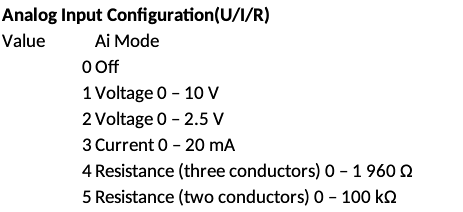
      Register 1024 is supposed to configure the type of measurement:
      bb649ed8-cbbc-43e7-8ff2-bbb3fe1cab79-grafik.png

      However, register 1024 always shows "0" for me, while the input rating shows the right voltage.
      My code:

      union   {
              uint16_t word[2];
              uint32_t dword;
              float flt;
      } wert = 0;
      err =  modbus_read_registers(connection, 1024 , 1, &wert.word[0]);
      printf("[read_ai] Wert: %d",wert.dword);
      
      // Now read the voltage:
      err =  modbus_read_registers(connection, 3002 , 2, &wert.word[0]);
      printf("[read_ai] wert.flt: %5.2f",wert.flt);
      

      Output is:

      [read_ai] Wert: 0
      [read_ai] wert.flt: 3.00
      

      So value 0 mean "disabled". But it still reads the voltage. Shouldn't it be at "1" for the default mode of measuring voltage?

      /KNEBB

      posted in Neuron Series
      K
      knebb
    • Re-Calculation of Voltage for AI/AO still valid?

      Hi,

      I own a Neuron M103 (the old one, not the current) which is still running with Raspbian 10/ buster.

      I want to control my AO and read AIs through Modbus with my C-code.

      I remember there was a calculation how to get to the value to be written to the register. Somethins with deviation, offset and so on. Mentioned here. But I was unable (or to dumb) to find any up-to-date documentation.

      Checking the latest register map I see register 3000& 3001 marked as "Basic" for the value.

      So I was able to set (and read later) a voltage to 5V through:

      union   {
              uint16_t word[2];
              uint32_t dword;
              float fl;
      } wert;
      wert.fl = 5;
      ret = modbus_write_registers(connection, 3000, 2, &wert.word[0]);   
      

      Am I right I do not need those mentioned calculations any more and I can set the value (float between 0 and 10)?

      Thanks!

      /KNEBB

      posted in Neuron Series
      K
      knebb
    • RE: Controlling FAN 0-10V - wiring needed

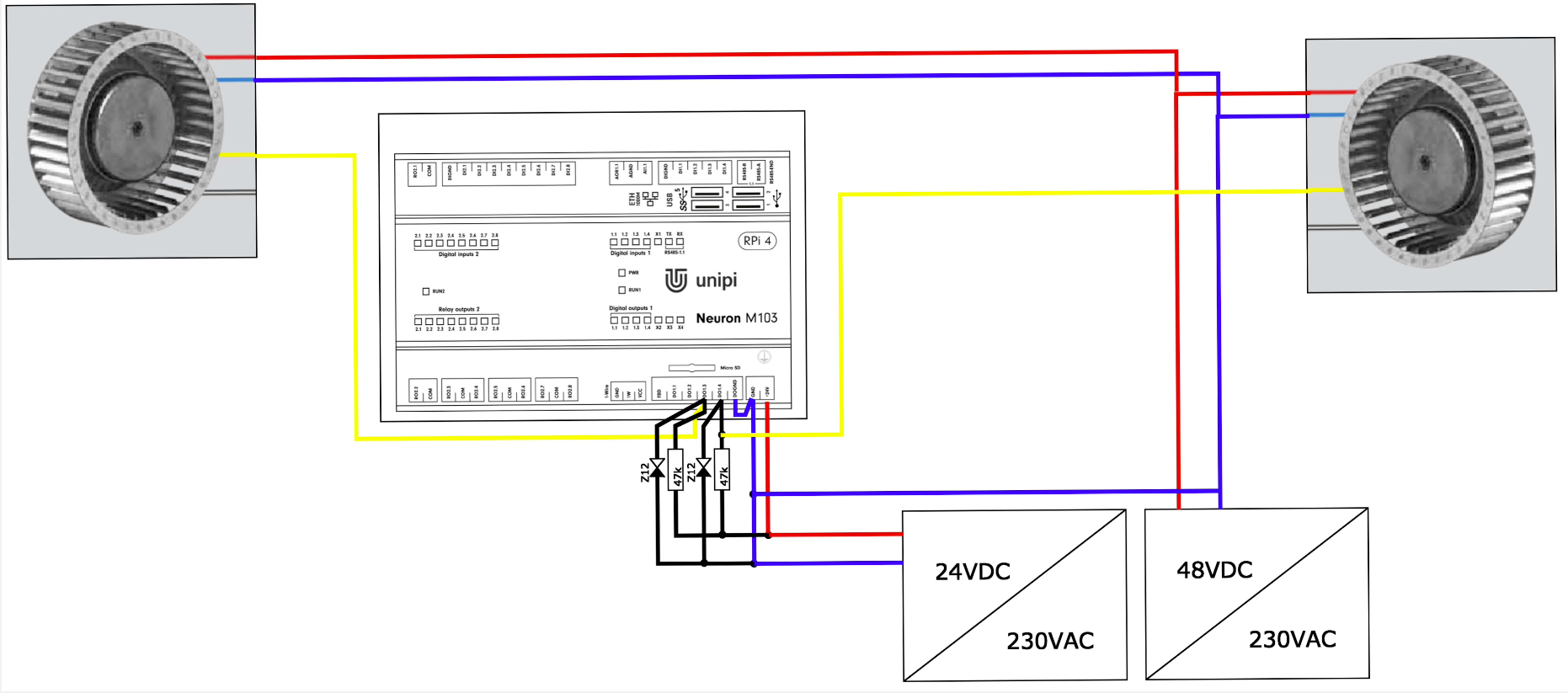
      Replying to mysqlf as I found a nice guy who did the cabling for me.
      As I want to control two vents the wiring has been extended accordingly:
      a4ab227e-bcae-4181-a2bc-968b0c0611af-grafik.png

      So for each vent I need a 47k resistor and a 12V diode.

      That's it! Easy for someone who knowns. Impossible to do it for me.

      /KNEBB

      posted in Neuron Series
      K
      knebb
    • PWM Example on DigOut

      Hi,
      I am struggling with controlling a fan with PWM.

      By documentation of the fan a frequency for the signal from 1kHz up to 10kHz is supported. So I used 4kHz here.

      I have read the KnowledgeBase article regarding PWM but it does not bring any light in here.
      I checked the Neuron M103 register map.

      So I use the following values:

      • frequency = 4kHz = 4,000Hz
      • resolution = 11 (want to have 0,10,20,...,100 as percentage)

      I can not set these values directly to the registers, instead I have to use a "prescaler and a "cycle length" according to the Neuron modbus documentation above.
      These values are to be calculated (again, see first linked doc) as follows:

      PWM_Cycle = resolution - 2
      
                                4.8 * 10^7
      PWM_Prescale = ------------------------------- - 1
                      frequency * ( resolution - 1)     
      

      So in my case I get the following calculated values:

      • PWM_prescaler: 1199
      • PWM_Cycle: 9

      Both am I setting without any errors to the documented registers 1017 and 1018 (in C):

      err = modbus_write_register(conn, PRESCALER_ADD, prescaler);
      err = modbus_write_register(connection, CYCLE_ADD, cycle);```
      

      Fine so far. Now I want to set the digital outputs according to any desired percentage value steps (0, 10, 20, ..., 100).
      These are registers 16, 17, 18, 19 according to the DO numbers.
      But which value am I allowed to write to these registrers?
      There was a forum post where @tomas_hora stated:

      The PWM value register takes values from zero to the number in the PWM cycle register.

      So in my case the PWM cycle register has a value of "9" according to above calculations.
      So I should be allowed to use values 0, 1, 2, 3, 4, 5, 6, 7, 8, 9.
      But there are only 10 values and I do not know which percentage they match to.
      I assume 0 equals to 10%, 1 to 20% and 9 to 100%, right?
      If so, how do I tell the digital output to set "0"?

      Or is 0=0%, ... 9=90%?
      Again, if so how do I set 100%?

      Any hints?
      Thanks a lot!

      /KNEBB
      posted in Neuron Series
      K
      knebb
    • Controlling FAN 0-10V - wiring needed

      Hi guys,

      I have a fan which can be controlled by 0-10V or PWM. As I am struggling with electronics I prefer the easiest way without diodes or similar.
      I own a Neuron M503 which has an analogue output of 0-10V or PWM. Additionally I have a 48V power supply for the fan.

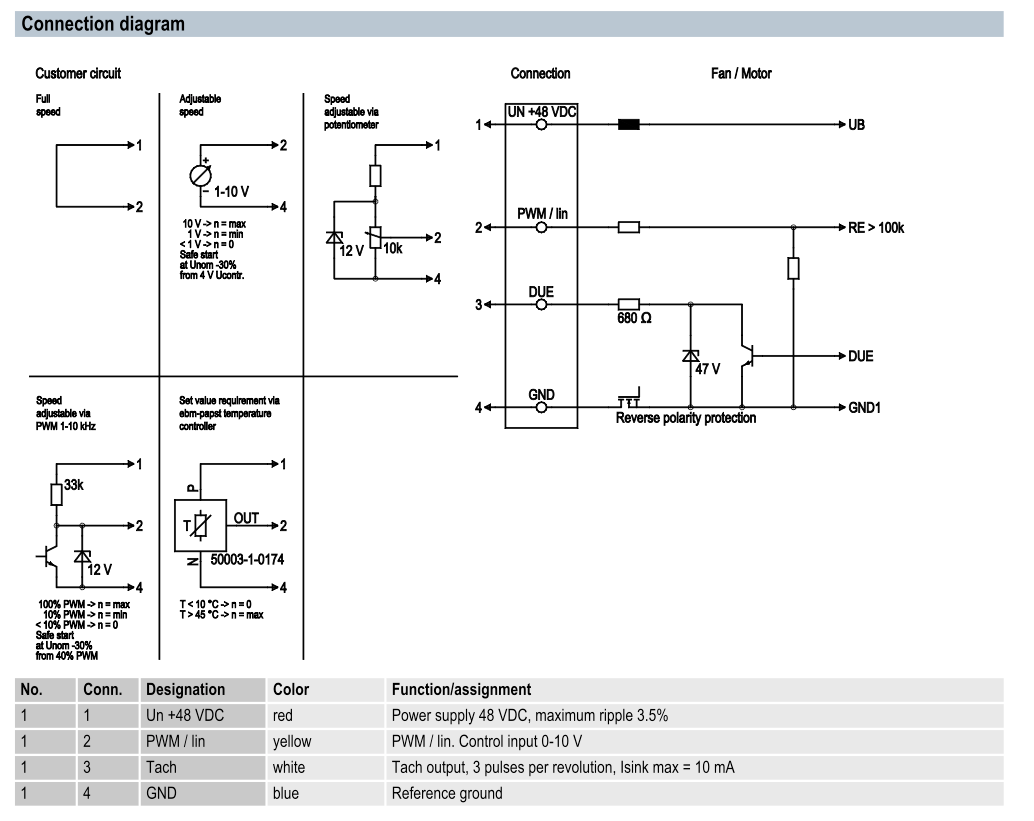
      Here are the possible connections for the fan:
      Bildschirmfoto 2024-12-13 um 11.15.16.png

      Can you guys tell me the wiring cable to get this fan controlled by Neuron (settings the modbus parameter is not a problem)?

      Thanks a lot!

      /KNEBB

      posted in Neuron Series
      K
      knebb
    • RE: Evok brings 404 Error

      @cleve
      Thanks for replying.

      I will try the update again and create a new topic in case it fails.

      /KNEBB

      posted in Official API - Evok
      K
      knebb
    • Evok brings 404 Error

      Hi,

      I am still on Buster (Update failed), my Evok Version ist 2.4.34. Usually I do not need Evok but I wanted to test something manually without writing code.

      So I started with systemctl:
      systemctl start evok and after this I can see port 808 is LISTENing (was not before):

      root@neuronm103:/usr/src# netstat -anp| grep pyth
      tcp        0      0 0.0.0.0:8080            0.0.0.0:*               LISTEN      20899/python        
      

      But when I use my browser I am getting a "404: Not Found" error. I tried to look into the logfiles but there is nothing related.
      In /var/logthe following files are empty:
      evok.log
      nginx/*log

      Anyone having an idea how to get it up and running?

      Thanks!

      /KNEBB

      posted in Official API - Evok
      K
      knebb
    • RE: Upgrading to Bullseye?

      I did as shown above. Ended in an Neuron M103 not booting :(

      Unfortunately I do not have a possibility to attach a screen to M103 (or can I use the HDMI of the inner Raspi?)

      I ended up in restoring the previous image.

      So I can not even tell what the issue was- I guess some kernel/ grub based issues.

      At current stage I would recommend against the above upgrade procedure.

      /KNEBB

      posted in Neuron Series
      K
      knebb
    • RE: Upgrading to Bullseye?

      Hi all,

      anyone having a hint how to upgrade now to Debian 11? I do not want to risk my installation here....

      For Debian/ Raspbian I will have to replace "buster" with "bullseye", right?
      /etc/apt/sources.list.d/raspi.list:

      deb http://archive.raspberrypi.org/debian/ buster main ui
      

      Additionally I need to do the same here, correct?
      /etc/apt/sources.list.d/unipi.list:

      deb https://repo.unipi.technology/debian buster main
      

      Once edited, run apt update; apt full-upgrade; apt autoremove based on this tutorial.

      Is this the way to go?

      Greetings

      /KNEBB

      posted in Neuron Series
      K
      knebb
    • RE: SD Card problem

      @CKB
      Not sure it this might help you. But I have configured my OS to run "read-only". It helps for longer lasting SD cards and it will usually not corrupt upon power outage.

      If you are interested, you might search for "Raspbian Read only".
      See below my filesystems (just the main parts):

      tmpfs on /run type tmpfs (rw,nosuid,noexec,relatime,size=99612k,mode=755)
      /dev/mmcblk0p2 on / type ext4 (ro,noatime)
      tmpfs on /run/lock type tmpfs (rw,nosuid,nodev,noexec,relatime,size=5120k)
      tmpfs on /var/cache type tmpfs (rw,nosuid,nodev,relatime)
      tmpfs on /tmp type tmpfs (rw,nosuid,nodev,relatime)
      tmpfs on /var/tmp type tmpfs (rw,nosuid,nodev,relatime)
      tmpfs on /var/log type tmpfs (rw,nosuid,nodev,relatime)
      /dev/mmcblk0p1 on /boot type vfat (rw,relatime,fmask=0022,dmask=0022,codepage=437,iocharset=ascii,shortname=mixed,errors=remount-ro)
      

      And this is /etc/fstab:

      PARTUUID=7965901e-01  /boot           vfat    ro,defaults          0       2
      PARTUUID=7965901e-02  /               ext4    ro,defaults,noatime  0       1
      # a swapfile is not a swap partition, no line here
      #   use  dphys-swapfile swap[on|off]  for that
      tmpfs /tmp       tmpfs nodev,nosuid 0 0
      tmpfs /var/log   tmpfs nodev,nosuid 0 0
      tmpfs /var/tmp   tmpfs nodev,nosuid 0 0
      tmpfs /var/cache tmpfs nodev,nosuid 0 0
      

      Greetings

      /KNEBB

      posted in Neuron Series
      K
      knebb
    • RE: Upgrading to Bullseye?

      @Martin-Kudláček said in Upgrading to Bullseye?:

      Hello everybody,
      the upgrade to bullseye is planned for March.

      Best regards,
      Martin

      March has been gone now since two months.

      So I am getting the feeling there is no effort put into getting it lifted to current stable?

      Would be a pitty....

      /KNEBB

      posted in Neuron Series
      K
      knebb
    • RE: "UNIPISPI: SPI CRC2 Not Correct" - why?

      @rob
      I just upgraded to unipi-kernel-modules 1.112.1.20220308~buster-1 and it looks like they fixed the error.

      posted in Neuron Series
      K
      knebb
    • RE: unipi-kernel-modules-dkms 1.108 breaks the system on kernel 5.10.103-v7+

      @Achilleas-Kotsis

      Thanks for your hints about downgrading. Worked for me, too.

      For reference the commands here:

      apt install unipi-kernel-modules=1.106.1.20220308~buster-1

      I got the version by apt-cache policy unipi-kernel-modules.

      /KNEBB

      posted in Official API - Evok
      K
      knebb
    • RE: "UNIPISPI: SPI CRC2 Not Correct" - why?

      Hi,

      meanwhile I found a "solution" based on this post.

      I did an

      apt-cache policy unipi-kernel-modules

      which revealed the available version names.
      Followed by

      apt install unipi-kernel-modules=1.106.1.20220308~buster-1

      it installed the previous version and all is smooth again.

      Still, this is a workaround but not a solution.

      /KNEBB

      posted in Neuron Series
      K
      knebb
    • "UNIPISPI: SPI CRC2 Not Correct" - why?

      Hi,

      I noticed recently these messages in my syslog:

      Apr  9 08:53:33 zentrale kernel: [  200.867042] UNIPISPI: part1 b3:07:00:00
      Apr  9 08:53:33 zentrale kernel: [  200.972499] UNIPISPI: SPI CRC2 Not Correct: 2108 COMPUTED: 23f8
      Apr  9 08:53:33 zentrale kernel: [  200.972524] UNIPISPI: len=36, part1=fa:00:55:0e part2=00:82:00:a0:09:c5:80:00:00:00:00:00:00:00:00:00
      Apr  9 08:53:33 zentrale kernel: [  200.977253] UNIPISPI: SPI CRC2 Not Correct: 3200 COMPUTED: 10e5
      Apr  9 08:53:33 zentrale kernel: [  200.977276] UNIPISPI: len=42, part1=fa:00:55:0e part2=01:01:04:c0:00:00:00:0c:00:00:00:11:e5:00:40:00
      Apr  9 08:53:33 zentrale kernel: [  200.979490] UNIPISPI: SPI CRC1 Not Correct (Received: 0000 Calculated: 9b77)
      

      I understand there is some CRC32 mismatch possibly related to some SPI device.

      But what does it mean in detail and how can I prevent this message- or is something seriously broken?
      I haven't noticed anything not working- but I am not using SPI devices (afaik).

      Thanks in advance!

      /KNEBB

      posted in Neuron Series
      K
      knebb
    • RE: Upgrading to Bullseye?

      @Martin-Kudláček

      Hi,

      sorry again for annoying. I am still conmsidering upgrading. Unfortunately my quastion about how I can see if it it ready for Bullseye has not been answered.

      From my point of view with the links I originally provbided it looks like it has not been upgraded up to now. Am I right here?

      Thanks& Greetings

      /KNEBB

      posted in Neuron Series
      K
      knebb
    • Suggestion for IAQ re MQTT

      Hi,

      I use the IAQ sensor through MQTT. Working fine, really.

      Just one point:
      Could you improve the firmware so it will mark it mqtt messages as "retain"?

      Reason:
      When connecting to the mqtt topic the client currently does not get any information. When the retain flag is set the client will get the last information at least. Otherwise it has to wait for the next update.

      With "retain" you get immediately a status.

      Thanks!

      /KNEBB

      posted in Other Peripherals
      K
      knebb