• Register
    • Login
    • Search
    • Categories
    • Recent
    • Tags
    • Popular
    • Users
    • Groups
    • Search
    1. Home
    2. tempurpri
    T
    • Profile
    • Following 0
    • Followers 0
    • Topics 2
    • Posts 10
    • Best 0
    • Controversial 0
    • Groups 0

    tempurpri

    @tempurpri

    0
    Reputation
    469
    Profile views
    10
    Posts
    0
    Followers
    0
    Following
    Joined Last Online

    tempurpri Unfollow Follow

    Latest posts made by tempurpri

    • RE: Evok problem getting I/O boards data

      @tomas_knot The incompatibility with Codesys (the one you mention and the port incompatibility) would be an understandeable reason for the problems I have....had I not managed to have a working setup of Codesys for raspberry and evok running in the last month.

      Unless the 1-wire incompatibility between the two only becomes problematic with time (I'm not sure how that could be), then that was not the case for me. Just to make it clear Codesys and digital signal readout worked for me ... Modbus acces and the web interface. I needed that functionality only occasionally, so I'm not sure when it stopped working, but it was during the last month. Neither Codesys nor evok were re-installed nor was there any change in their configuration.

      I'm trying to find out what happened and especially try to make it work again.

      @tomas_knot @tomas_hora I understand that proper codesys integration is coming, but unless it's coming during this week it won't help my application. Unfortunately that's the timeframe I'm looking at, nothing to do with with Unipi itself.

      OK, so if codesys 1 wire driver is the suspect, is there a way to check that and maybe disable it within the Codesys editor ?

      posted in Official API - Evok
      T
      tempurpri
    • RE: Evok problem getting I/O boards data

      Yes, Neuron tcp is installed and running (as it was from the original open-source OS).

      ~$systemctl status neurontcp
      
      ● neurontcp.service - Unipi Neuron Modbus/Tcp Server
         Loaded: loaded (/opt/neuron-bin/neurontcp.service; enabled; vendor preset: en
         Active: active (running) since Mon 2018-01-22 21:58:30 UTC; 1 day 2h ago
       Main PID: 362 (neuron_tcp_serv)
         CGroup: /system.slice/neurontcp.service
                 └─362 /opt/neuron-bin/neuron_tcp_server -p 502 --check-firmware
      
      Jan 22 21:58:30 S103-sn344 systemd[1]: Started Unipi Neuron Modbus/Tcp Server.
      

      evok.conf

      #!!! Do not use '#' for comments !!!
      
      [MAIN]
      config_version = 2.4					; Configuration file version, DO NOT CHANGE!
      use_schema_verification = False			; Enabling this will deny any requests that do not match the JSON Schema; NOTE THAT THIS RESULTS IN A SIGNIFICANT INCREASE IN LATENCY AND SHOULD NOT BE USED EXCEPT FOR TESTING
      log_level = ERROR   					; Minimum severity of messages to be logged; one of INFO, DEBUG, WARNING, ERROR, CRITICAL
      log_file = /var/log/evok.log			; Log file to use; will be cleared on boot
      port = 8085								; !!! Internal API port - only change if you are certain you know what you are doing; FOR OUR WEB INTERFACE THE PORT SHOULD BE CHANGED IN "/etc/evok-nginx.conf" INSTEAD !!!
      webhook_enabled = False					; Enables webhook notification - see e.g. https://sendgrid.com/blog/whats-webhook/
      webhook_address = http://127.0.0.1:85   ; Put your server endpoint address here (e.g. http://123.123.123.123:/wh )
      webhook_device_mask = ["input","wd"]	; List of device types to notify on (written as a JSON list) - adding AI will generate a large amount of messages!
      webhook_complex_events = False			; EVOK will send POST requests with the same data as WebSocket, rather than an empty GET request
      wifi_control_enabled = False			; !!! REQUIRES THE UNIPIAP WIFI CONTROLLER TO BE INSTALLED !!! Will allow evok to control the internal Neuron wifi 
      soap_server_enabled = False				; Enables the simple SOAP server; use only if you need the functionality
      soap_server_port = 8081					; !!! IF SOAP SERVER IS ENABLED, THIS PORT NEEDS TO BE UNIQUE (i.e. different from the port setting above) !!!
      
      [NEURON_1]
      global_id = 1							; Mandatory, REQUIRED TO BE UNIQUE
      allow_register_access = True 			; Optional, False default
      scan_frequency = 2 						; Optional, 1 default
      scan_enabled = True 					; Optional, True default
      
      ; Below you can find examples for connecting devices over UART; first example is a Neuron extension while the second is a custom third-party device
      ; Devices sharing a port use the port settings of the first device on that port (baud rate, parity, stopbits)
      ; !!!Note that device_name has to match a filename in the /etc/hw_definitions directory!!! See /etc/hw_definitions/DOMAT MMIO.yaml for an example
      
      ;[EXTENSION_1]
      ;global_id = 2							; Mandatory, REQUIRED TO BE UNIQUE
      ;device_name = xS10						; Mandatory
      ;modbus_uart_port = /dev/extcomm/0/0 	; Mandatory
      ;neuron_uart_circuit = 1_01				; Optional, allows associating extensions with specific Neuron UART-over-Modbus ports (not possible for non-Modbus UART ports, e.g. /dev/ttyUSB0 or /dev/ttyS0)
      ;allow_register_access = True 			; Optional, False default, is mandatory with third-party devices
      ;address = 15 							; Optional, 15 default
      ;scan_frequency = 2 					; Optional, 1 default
      ;scan_enabled = True 					; Optional, True default
      ; Note that the following settings will be inherited by other devices sharing the same port, i.e. /dev/extcomm/0/0
      ;baud_rate = 19200						; Optional, NEEDS UNIPI IMAGE TO WORK! USE API TO CONFIGURE UART MANUALLY IF USING STANDARD RASPBIAN
      ;parity = N								; Optional, NEEDS UNIPI IMAGE TO WORK! USE API TO CONFIGURE UART MANUALLY IF USING STANDARD RASPBIAN
      ;stop_bits = 1							; Optional, NEEDS UNIPI IMAGE TO WORK! USE API TO CONFIGURE UART MANUALLY IF USING STANDARD RASPBIAN
      
      ;[EXTENSION_2]
      ;global_id = 3							; Mandatory, REQUIRED TO BE UNIQUE
      ;device_name = CUSTOM MODBUS DEVICE		; Mandatory
      ;modbus_uart_port = /dev/extcomm/0/0 	; Mandatory
      ;neuron_uart_circuit = 1_01				; Optional, allows associating extensions with specific Neuron UART-over-Modbus ports (not possible for non-Modbus UART ports, e.g. /dev/ttyUSB0 or /dev/ttyS0)
      ;allow_register_access = True 			; Mandatory with third-party devices
      ;address = 1 							; Optional, 15 default
      ;scan_frequency = 2 					; Optional, 1 default
      ;scan_enabled = True 					; Optional, True default
      
      [OWBUS_1]
      owbus = /dev/i2c-1 --i2c=/dev/i2c-1:ALL     		; Scanned bus (--i2c=/dev/i2c-1:ALL or localhost:2122 or 'u' for USB dongle)
      interval = 3          					; [s] Default sensor reading
      scan_interval = 300    					; [s] How often is scanning done
      
      ;Example of 1W-4R/4DI extension module, 1W-8R is almost the same, only with inputs instead of relays
      ;
      ; - Map a new 1Wire sensor with the appropriate address, type and interval
      ; - The syntax can be either SENSOR or 1WDEVICE
      ; - Setting the correct reading interval is crucial to achieve ideal performance; the default interval is 15s
      ;
      ;[1WDEVICE_2]
      ;bus = 1
      ;address = 29F39A17000000BC
      ;type = DS2408
      ;interval = 1
      ;
      ;[1WRELAY_10]
      ;sensor = 2
      ;pin = 0
      ;
      ;[1WRELAY_11]
      ;sensor = 2
      ;pin = 1
      ;
      ;[1WRELAY_12]
      ;sensor = 2
      ;pin = 2
      ;
      ;[1WRELAY_13]
      ;sensor = 2
      ;pin = 3
      ;
      ;[1WINPUT_20]
      ;sensor = 2
      ;pin = 4
      ;
      ;[1WINPUT_21]
      ;sensor = 2
      ;pin = 5
      ;
      ;[1WINPUT_22]
      ;sensor = 2
      ;pin = 6
      ;
      ;[1WINPUT_23]
      ;sensor = 2
      ;pin = 7


      evok-nginx.conf

      
      server {
      	listen 85 default_server;
      	server_name  _;
      
      	#ssl on;
      	#ssl_certificate      /etc/nginx/democert.pem;
      	#ssl_certificate_key  /etc/nginx/democert.key;
      
      	access_log  /var/log/evok.access.log;
      	root /var/www/evok;
      
      	location / {
      	    index index.html;	    
      	}
      
      	location /ws {
      		proxy_pass http://localhost:8085;
      		proxy_set_header Host $host:$server_port;
      		proxy_http_version 1.1;
      		proxy_set_header Upgrade $http_upgrade;
      		proxy_set_header Connection "upgrade";
      		proxy_buffering off;
      		proxy_cache off;
      		#send_timeout 120;
      		proxy_read_timeout 180;
      		#proxy_set_header X-Real-IP $remote_addr;
      	}
      
      	location /rest {
      		proxy_pass http://localhost:8085;
      		proxy_set_header Host      $host:$server_port;
      		#proxy_set_header X-Real-IP $remote_addr;
      	}
      	
      	location /json {
      		proxy_pass http://localhost:8085;
      		proxy_set_header Host      $host:$server_port;
      		#proxy_set_header X-Real-IP $remote_addr;
      	}
      	
      }


      I can see the tcp port 502 opened at 127.0.0.1

      I also know that Modbus is the better way to go .. in fact that was the way I also had it working (as you can probably see from the setting in evok.conf), but modbus access went down too - it's not working either. Connecting to the modbus server, trying to read one register at address 0 I only get a modbus exception error code 2.

      I noticed one additional error as shown below, specifically if it means anything new...doubt it though.

      ~ $ systemctl status evok
      ● evok.service - Evok Modbus/Websocket/Rpc Server
         Loaded: loaded (/etc/systemd/system/evok.service; enabled; vendor preset: enabled)
         Active: active (running) since Wed 2018-01-24 00:42:03 UTC; 3s ago
       Main PID: 1807 (python)
         CGroup: /system.slice/evok.service
                 └─1807 /usr/bin/python /opt/evok/evok.py
      
      Jan 24 00:42:03 S103-sn344 systemd[1]: Started Evok Modbus/Websocket/Rpc Server.
      Jan 24 00:42:07 S103-sn344 OWFS[1812]: DEFAULT: owlib.c:(52) No valid 1-wire buses found


      I guess that if the modbus deamon isn't working properly the problem is somewhere deeper.

      (Modbus TCP access to I/Os was fine and fast whle it was forking. Now it's not. But I really look forward to accessing the I/Os directly from Codesys. Alas deadlines are deadlines and I have to get this working at least as it was about a month ago.)

      Do you think it's possible a system update (as I mentioned i DID perform a apt-get update / upgrade during this time) might have introduced some sort of an incompatibility ? Do you have any other suggestion ?

      FYI last time (if you check my other post) reinstalling evok / neurontcp didn't help at all....but then there were what seemed other issues.

      Thanks for your help

      posted in Official API - Evok
      T
      tempurpri
    • Evok problem getting I/O boards data

      Hello,

      I've had some problems with evok in the past, which I was finally able to solve with a fresh OS installation and by adapting ports before installing Codesys (which I need on the Neuron S103 that I have).

      See the linked discussion for further information:
      https://forum.unipi.technology/topic/516/evok-high-cpu-usage/10

      Recently however another problem appeared.
      Evok (service) is running Nginx (service) is running, however I'm unable to access the I/Os through the web page neither throught the modbus server. Both were working for me.

      As far as I can remember the only thing that was done during this time was the usual apd-get update / apt-get upgrade.
      Unfortunately I cannot pinpoint exactly when the problem appeared because I don't need this functionality all the time.

      To make thinfs clear, here is how the web page appears:
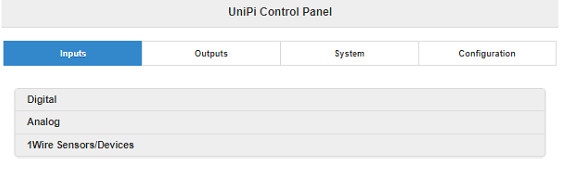
      0_1516571463787_2018_01_21_EvokWebProblem.PNG

      No inputs or outputs are accessible.

      I'm supplying the information that might help shed some light on the situation if anyone can help

      lsmod

      Module                  Size  Used by
      can_raw                 7426  0
      can                    31515  1 can_raw
      w1_therm                6401  0
      w1_gpio                 4818  0
      ds2482                  4427  0
      wire                   32619  3 ds2482,w1_gpio,w1_therm
      cn                      5889  1 wire
      at24                    7587  0
      spidev                  7373  0
      nvmem_core             13774  1 at24
      rtc_ds1307             13908  0
      hwmon                  10552  1 rtc_ds1307
      brcmfmac              292632  0
      brcmutil                9863  1 brcmfmac
      cfg80211              544545  1 brcmfmac
      rfkill                 20851  2 cfg80211
      i2c_bcm2835             7167  0
      spi_bcm2835             7596  0
      bcm2835_gpiomem         3940  0
      uio_pdrv_genirq         3923  0
      fixed                   3285  0
      uio                    10204  1 uio_pdrv_genirq
      i2c_bcm2708             5994  0
      i2c_dev                 6913  0
      ip_tables              13161  0
      x_tables               20578  1 ip_tables
      ipv6                  408900  27
      

      i2cdetect 1

      WARNING! This program can confuse your I2C bus, cause data loss and worse!
      I will probe file /dev/i2c-1.
      I will probe address range 0x03-0x77.
      Continue? [Y/n] y
           0  1  2  3  4  5  6  7  8  9  a  b  c  d  e  f
      00:          -- -- -- -- -- -- -- -- -- -- -- -- --
      10: -- -- -- -- -- -- -- -- UU -- -- -- -- -- -- --
      20: -- -- -- -- -- -- -- -- -- -- -- -- -- -- -- --
      30: -- -- -- -- -- -- -- -- -- -- -- -- -- -- -- --
      40: -- -- -- -- -- -- -- -- -- -- -- -- -- -- -- --
      50: -- -- -- -- -- -- -- UU -- -- -- -- -- -- -- --
      60: -- -- -- -- -- -- -- -- -- -- -- -- -- -- -- UU
      70: -- -- -- -- -- -- -- --


      ps -fax

        PID TTY      STAT   TIME COMMAND
          2 ?        S      0:00 [kthreadd]
          3 ?        S      0:00  \_ [ksoftirqd/0]
          5 ?        S<     0:00  \_ [kworker/0:0H]
          6 ?        S      0:00  \_ [kworker/u8:0]
          7 ?        S      0:00  \_ [rcu_sched]
          8 ?        S      0:00  \_ [rcu_bh]
          9 ?        S      0:00  \_ [migration/0]
         10 ?        S<     0:00  \_ [lru-add-drain]
         11 ?        S      0:00  \_ [cpuhp/0]
         12 ?        S      0:00  \_ [cpuhp/1]
         13 ?        S      0:00  \_ [migration/1]
         14 ?        S      0:00  \_ [ksoftirqd/1]
         16 ?        S<     0:00  \_ [kworker/1:0H]
         17 ?        S      0:00  \_ [cpuhp/2]
         18 ?        S      0:00  \_ [migration/2]
         19 ?        S      0:00  \_ [ksoftirqd/2]
         21 ?        S<     0:00  \_ [kworker/2:0H]
         22 ?        S      0:00  \_ [cpuhp/3]
         23 ?        S      0:00  \_ [migration/3]
         24 ?        S      0:00  \_ [ksoftirqd/3]
         26 ?        S<     0:00  \_ [kworker/3:0H]
         27 ?        S      0:00  \_ [kdevtmpfs]
         28 ?        S<     0:00  \_ [netns]
         29 ?        S      0:00  \_ [khungtaskd]
         30 ?        S      0:00  \_ [oom_reaper]
         31 ?        S<     0:00  \_ [writeback]
         32 ?        S      0:00  \_ [kcompactd0]
         33 ?        S<     0:00  \_ [crypto]
         34 ?        S<     0:00  \_ [bioset]
         35 ?        S<     0:00  \_ [kblockd]
         36 ?        S<     0:00  \_ [watchdogd]
         38 ?        S<     0:00  \_ [rpciod]
         39 ?        S<     0:00  \_ [xprtiod]
         40 ?        S      0:00  \_ [kswapd0]
         41 ?        S<     0:00  \_ [vmstat]
         42 ?        S<     0:00  \_ [nfsiod]
         52 ?        S<     0:00  \_ [kthrotld]
         53 ?        S<     0:00  \_ [bioset]
         54 ?        S<     0:00  \_ [bioset]
         55 ?        S<     0:00  \_ [bioset]
         56 ?        S<     0:00  \_ [bioset]
         57 ?        S<     0:00  \_ [bioset]
         58 ?        S<     0:00  \_ [bioset]
         59 ?        S<     0:00  \_ [bioset]
         60 ?        S<     0:00  \_ [bioset]
         61 ?        S<     0:00  \_ [bioset]
         62 ?        S<     0:00  \_ [bioset]
         63 ?        S<     0:00  \_ [bioset]
         64 ?        S<     0:00  \_ [bioset]
         65 ?        S<     0:00  \_ [bioset]
         66 ?        S<     0:00  \_ [bioset]
         67 ?        S<     0:00  \_ [bioset]
         68 ?        S<     0:00  \_ [bioset]
         69 ?        S<     0:00  \_ [bioset]
         70 ?        S<     0:00  \_ [bioset]
         71 ?        S<     0:00  \_ [bioset]
         72 ?        S<     0:00  \_ [bioset]
         73 ?        S<     0:00  \_ [bioset]
         74 ?        S<     0:00  \_ [bioset]
         75 ?        S<     0:00  \_ [bioset]
         76 ?        S<     0:00  \_ [bioset]
         77 ?        S<     0:00  \_ [iscsi_eh]
         78 ?        S<     0:00  \_ [dwc_otg]
         80 ?        S<     0:00  \_ [DWC Notificatio]
         81 ?        S<     0:00  \_ [VCHIQ-0]
         82 ?        S<     0:00  \_ [VCHIQr-0]
         83 ?        S<     0:00  \_ [VCHIQs-0]
         84 ?        S      0:00  \_ [VCHIQka-0]
         85 ?        S<     0:00  \_ [SMIO]
         87 ?        S      0:00  \_ [irq/92-mmc1]
         90 ?        S<     0:00  \_ [bioset]
         91 ?        S      0:01  \_ [mmcqd/0]
         93 ?        S      0:00  \_ [jbd2/mmcblk0p2-]
         94 ?        S<     0:00  \_ [ext4-rsv-conver]
         96 ?        S<     0:00  \_ [ipv6_addrconf]
        147 ?        S      0:00  \_ [kworker/3:2]
        212 ?        S      0:00  \_ [spi0]
        247 ?        S<     0:00  \_ [cfg80211]
        249 ?        S<     0:00  \_ [brcmf_wq/mmc1:0]
        250 ?        S      0:00  \_ [brcmf_wdog/mmc1]
        285 ?        S      0:00  \_ [w1_bus_master1]
        479 ?        S<     0:00  \_ [kworker/3:1H]
        616 ?        S<     0:00  \_ [kworker/1:1H]
        721 ?        S      0:00  \_ [kworker/1:0]
        722 ?        S<     0:00  \_ [kworker/0:1H]
        893 ?        S      0:00  \_ [kworker/1:1]
        904 ?        S      0:00  \_ [kworker/3:0]
        909 ?        S<     0:00  \_ [kworker/2:1H]
        926 ?        S      0:00  \_ [kworker/0:0]
        991 ?        S      0:00  \_ [kworker/0:1]
       1092 ?        S      0:00  \_ [kworker/u8:1]
       1100 ?        S      0:00  \_ [kworker/2:0]
       1112 ?        S      0:00  \_ [kworker/2:2]
       1118 ?        S      0:00  \_ [kworker/2:1]
          1 ?        Ss     0:02 /sbin/init
        119 ?        Ss     0:00 /lib/systemd/systemd-journald
        152 ?        Ss     0:00 /lib/systemd/systemd-udevd
        317 ?        Ssl    0:00 /lib/systemd/systemd-timesyncd
        359 ?        Ss     0:00 /usr/sbin/cron -f
        360 ?        Ss     0:00 avahi-daemon: running [S103-sn344.local]
        390 ?        S      0:00  \_ avahi-daemon: chroot helper
        362 ?        Ss     0:00 /lib/systemd/systemd-logind
        368 ?        Ss     0:01 /opt/neuron-bin/neuron_tcp_server -p 502 --check-firmware
        369 ?        Ss     0:00 /usr/sbin/thd --triggers /etc/triggerhappy/triggers.d/ --socket /run/thd.socket --user nobody --deviceglob /dev/input/event*
        375 ?        Ss     0:00 /usr/bin/dbus-daemon --system --address=systemd: --nofork --nopidfile --systemd-activation
        393 ?        Ssl    0:00 /usr/sbin/rsyslogd -n
        395 ?        SNsl   1:04 node-red
        413 ?        Ssl    0:01 /sbin/apcupsd
        469 tty1     Ss+    0:00 /sbin/agetty --noclear tty1 linux
        486 ?        Ss     0:00 /sbin/netplugd -p /var/run/netplugd.pid
        492 ?        S      0:01 /opt/codesys/bin/codesyscontrol.bin /etc/CODESYSControl.cfg
        505 ?        Sl     8:07  \_ /opt/codesys/bin/codesyscontrol.bin /etc/CODESYSControl.cfg
        497 ?        Ss     0:00 /usr/sbin/sshd -D
        741 ?        Ss     0:00  \_ sshd: pi [priv]
        756 ?        S      0:01  |   \_ sshd: pi@pts/0
        759 pts/0    Ss     0:00  |       \_ -bash
        775 pts/0    S+     1:33  |           \_ htop
        782 ?        Ss     0:00  \_ sshd: pi [priv]
        792 ?        S      0:00      \_ sshd: pi@pts/1
        795 pts/1    Ss     0:01          \_ -bash
       1119 pts/1    R+     0:00              \_ ps -fax
        598 ?        Ss     0:00 /sbin/dhclient -4 -v -pf /run/dhclient.eth0.pid -lf /var/lib/dhcp/dhclient.eth0.leases -I -df /var/lib/dhcp/dhclient6.eth0.leases eth0
        746 ?        Ss     0:00 /lib/systemd/systemd --user
        749 ?        S      0:00  \_ (sd-pam)
        977 ?        Ssl    0:22 /usr/bin/python /opt/evok/evok.py
        979 ?        Z      0:00  \_ [python] <defunct>
        986 ?        Ss     0:00 nginx: master process /usr/sbin/nginx -g daemon on; master_process on;
        987 ?        S      0:00  \_ nginx: worker process
        988 ?        S      0:00  \_ nginx: worker process
        989 ?        S      0:00  \_ nginx: worker process
        990 ?        S      0:00  \_ nginx: worker process
      

      /boot/config.txt (having the dtoverlay=neuron-spu-new was not problematic during this time .. I could comment it out though if that would welp for some test ?)

      gpu_mem=32
      dtparam=i2c_arm=on,watchdog=on
      
      dtoverlay=i2c-rtc,mcp7941x
      
      # disable it on Unipi 1.x (gpio24, 25!)
      dtoverlay=neuron-spi-new
      dtoverlay=neuronee
      #dtoverlay=unipiee
      
      #Enable kernel driver for I2c OneWire Master
      dtoverlay=ds2482
      
      #remove dependency of spi-clock on system freq
      core_freq=250
      
      #BT enabled on RPi3 swaps UART (ttyAMA) and miniUART ttyS0.
      dtoverlay=pi3-disable-bt
      
      #WIFI disabled
      #dtoverlay=pi3-disable-wifi
      
      
      # For more options and information see
      # http://rpf.io/configtxt
      # Some settings may impact device functionality. See link above for details
      
      # uncomment if you get no picture on HDMI for a default "safe" mode
      #hdmi_safe=1
      
      # uncomment this if your display has a black border of unused pixels visible
      # and your display can output without overscan
      #disable_overscan=1
      
      # uncomment the following to adjust overscan. Use positive numbers if console
      # goes off screen, and negative if there is too much border
      #overscan_left=16
      #overscan_right=16
      #overscan_top=16
      #overscan_bottom=16
      
      # uncomment to force a console size. By default it will be display's size minus
      # overscan.
      #framebuffer_width=1280
      #framebuffer_height=720
      
      # uncomment if hdmi display is not detected and composite is being output
      #hdmi_force_hotplug=1
      
      # uncomment to force a specific HDMI mode (this will force VGA)
      #hdmi_group=1
      #hdmi_mode=1
      
      # uncomment to force a HDMI mode rather than DVI. This can make audio work in
      # DMT (computer monitor) modes
      #hdmi_drive=2
      
      # uncomment to increase signal to HDMI, if you have interference, blanking, or
      # no display
      #config_hdmi_boost=4
      
      # uncomment for composite PAL
      #sdtv_mode=2
      
      #uncomment to overclock the arm. 700 MHz is the default.
      #arm_freq=800
      
      # Uncomment some or all of these to enable the optional hardware interfaces
      #dtparam=i2c_arm=on
      #dtparam=i2s=on
      #dtparam=spi=on
      
      # Uncomment this to enable the lirc-rpi module
      #dtoverlay=lirc-rpi
      
      # Additional overlays and parameters are documented /boot/overlays/README
      
      # Enable audio (loads snd_bcm2835)
      #dtparam=audio=off  


      eeprom verification

      ~ $ sudo grep S103 /sys/bus/i2c/devices/1-0057/eeprom
      Binary file /sys/bus/i2c/devices/1-0057/eeprom matches
      

      This time however I have a lot of errors in /var/log/evok.log (all the same thought)

      2018-01-21 22:09:32,851 - evok - ERROR - 'NoneType' object has no attribute 'do_scan'
      Traceback (most recent call last):
        File "/opt/evok/neuron.py", line 217, in scan_boards
          yield self.modbus_cache_map.do_scan()
      AttributeError: 'NoneType' object has no attribute 'do_scan'
      2018-01-21 22:09:33,354 - evok - ERROR - 'NoneType' object has no attribute 'do_scan'
      Traceback (most recent call last):
        File "/opt/evok/neuron.py", line 217, in scan_boards
          yield self.modbus_cache_map.do_scan()
      AttributeError: 'NoneType' object has no attribute 'do_scan'
      2018-01-21 22:09:33,857 - evok - ERROR - 'NoneType' object has no attribute 'do_scan'
      Traceback (most recent call last):
        File "/opt/evok/neuron.py", line 217, in scan_boards
          yield self.modbus_cache_map.do_scan()
      AttributeError: 'NoneType' object has no attribute 'do_scan'
      2018-01-21 22:09:34,360 - evok - ERROR - 'NoneType' object has no attribute 'do_scan'
      Traceback (most recent call last):
        File "/opt/evok/neuron.py", line 217, in scan_boards
          yield self.modbus_cache_map.do_scan()
      AttributeError: 'NoneType' object has no attribute 'do_scan'
      2018-01-21 22:09:34,862 - evok - ERROR - 'NoneType' object has no attribute 'do_scan'
      Traceback (most recent call last):
        File "/opt/evok/neuron.py", line 217, in scan_boards
          yield self.modbus_cache_map.do_scan()
      AttributeError: 'NoneType' object has no attribute 'do_scan'
      

      It seems that the python script fails in finding the "boards" for the i/o, but I'm not able to find out why.

      Please help, I have a running application on this board and have to connect the I/O signals to it, but I came to a stop with this problem.

      posted in Official API - Evok
      T
      tempurpri
    • RE: Evok high CPU usage

      In the end, nothing else than starting from scratch with a fresh image of the open-source OS helped.
      Then I was able to change the evok port to 8085 (instead of 8080) and nginx port to 85 (instead of 80) prior to installing codesys and it worked.
      ..
      ..
      for a while. I started a new separate thread since the problems have a little bit different symptoms.

      posted in Official API - Evok
      T
      tempurpri
    • RE: Evok high CPU usage

      I apologize for pushing this issue again, but it's been a week since any updates and evok is still not working here. If there are any suggestions how to proceed (based on the data provided), pleas let me know.

      I appreciate any help.

      posted in Official API - Evok
      T
      tempurpri
    • RE: Evok high CPU usage

      I don't see a dtoverlay=neuron-spi line, there are however a couple of duplicate lines in /boot/config.txt

      gpu_mem=32
      dtparam=i2c_arm=on,watchdog=on
      
      dtoverlay=i2c-rtc,mcp7941x
      
      # disable it on Unipi 1.x (gpio24, 25!)
      dtoverlay=neuron-spi-new
      dtoverlay=neuronee
      #dtoverlay=unipiee
      
      #Enable kernel driver for I2c OneWire Master
      dtoverlay=ds2482
      
      #remove dependency of spi-clock on system freq
      core_freq=250
      
      #BT enabled on RPi3 swaps UART (ttyAMA) and miniUART ttyS0.
      dtoverlay=pi3-disable-bt
      
      #WIFI disabled
      #dtoverlay=pi3-disable-wifi
      
      
      # For more options and information see
      # http://rpf.io/configtxt
      # Some settings may impact device functionality. See link above for details
      
      # uncomment if you get no picture on HDMI for a default "safe" mode
      #hdmi_safe=1
      
      # uncomment this if your display has a black border of unused pixels visible
      # and your display can output without overscan
      #disable_overscan=1
      
      # uncomment the following to adjust overscan. Use positive numbers if console
      # goes off screen, and negative if there is too much border
      #overscan_left=16
      #overscan_right=16
      #overscan_top=16
      #overscan_bottom=16
      
      # uncomment to force a console size. By default it will be display's size minus
      # overscan.
      #framebuffer_width=1280
      #framebuffer_height=720
      
      # uncomment if hdmi display is not detected and composite is being output
      hdmi_force_hotplug=1
      
      # uncomment to force a specific HDMI mode (this will force VGA)
      hdmi_group=2
      hdmi_mode=18
      
      # uncomment to force a HDMI mode rather than DVI. This can make audio work in
      # DMT (computer monitor) modes
      #hdmi_drive=2
      
      # uncomment to increase signal to HDMI, if you have interference, blanking, or
      # no display
      #config_hdmi_boost=4
      
      # uncomment for composite PAL
      #sdtv_mode=2
      
      #uncomment to overclock the arm. 700 MHz is the default.
      #arm_freq=800
      
      # Uncomment some or all of these to enable the optional hardware interfaces
      #dtparam=i2c_arm=on
      #dtparam=i2s=on
      #dtparam=spi=on
      
      # Uncomment this to enable the lirc-rpi module
      #dtoverlay=lirc-rpi
      
      # Additional overlays and parameters are documented /boot/overlays/README
      
      # Enable audio (loads snd_bcm2835)
      #dtparam=audio=off   
      
      #Enable i2c bus 1
      device_tree_param=i2c1=on
      dtoverlay=i2c-rtc,mcp7941x
      dtoverlay=unipiee
      dtoverlay=neuronee
      

      I do see a commented parameter about spi

      #dtparam=spi=on
      

      Should this be enabled ?

      FYI: I haven't touched this file manually.

      posted in Official API - Evok
      T
      tempurpri
    • RE: Evok high CPU usage

      I managed to get the CPU usage down...port 8080 which is used by default by EVOK is also used by default by Codesys WebVisu.

      I reinstalled Evok using ports 85 (instead of 80) and 8085 instead of 8080.

      Although the CPU usage went down immediately after this, evok still doesn't work.

      Further testing:

      ~ $ sudo grep S103 /sys/bus/i2c/devices/1-0057/eeprom
      Binary file /sys/bus/i2c/devices/1-0057/eeprom matches
      
      ~ $ sudo python /opt/evok/evok.py
      [I 171207 01:21:42 config:66] eprom: UniPi Neuron S103 version: 1.0 serial: 0x158
      [I 171207 01:21:42 evok:1640] Starting using config file /etc/evok.conf
      [I 171207 01:21:42 config:78] YAML Definition loaded: CUSTOM MODBUS DEVICE.yaml, type: 3, definition count 0
      [I 171207 01:21:42 config:78] YAML Definition loaded: L30x.yaml, type: 3, definition count 1
      [I 171207 01:21:42 config:78] YAML Definition loaded: M50x.yaml, type: 3, definition count 2
      [I 171207 01:21:42 config:78] YAML Definition loaded: L40x.yaml, type: 3, definition count 3
      [I 171207 01:21:42 config:78] YAML Definition loaded: xS40.yaml, type: 3, definition count 4
      [I 171207 01:21:43 config:78] YAML Definition loaded: M30x.yaml, type: 3, definition count 5
      [I 171207 01:21:43 config:78] YAML Definition loaded: M40x.yaml, type: 3, definition count 6
      [I 171207 01:21:43 config:78] YAML Definition loaded: xS50.yaml, type: 3, definition count 7
      [I 171207 01:21:43 config:78] YAML Definition loaded: L50x.yaml, type: 3, definition count 8
      [I 171207 01:21:44 config:78] YAML Definition loaded: L51x.yaml, type: 3, definition count 9
      [I 171207 01:21:44 config:78] YAML Definition loaded: M20x.yaml, type: 3, definition count 10
      [I 171207 01:21:44 config:78] YAML Definition loaded: DALI.yaml, type: 3, definition count 11
      [I 171207 01:21:44 config:78] YAML Definition loaded: S10x.yaml, type: 3, definition count 12
      [I 171207 01:21:44 config:78] YAML Definition loaded: L20x.yaml, type: 3, definition count 13
      [I 171207 01:21:44 config:78] YAML Definition loaded: xS10.yaml, type: 3, definition count 14
      [I 171207 01:21:45 config:78] YAML Definition loaded: M10x.yaml, type: 3, definition count 15
      [I 171207 01:21:45 config:78] YAML Definition loaded: xS30.yaml, type: 3, definition count 16
      [I 171207 01:21:45 config:78] YAML Definition loaded: evok-alias.yaml, type: 2, definition count 0
      [I 171207 01:21:45 evok:1704] HTTP server listening on port: 8085
      [I 171207 01:21:45 modbusclient_tornado:125] SPI client started
      [I 171207 01:21:45 neuron:173] Reading SPI boards
      [I 171207 01:21:45 neuron:188] No board on SPI 1
      Process OwBusDriver-1:
      Traceback (most recent call last):
        File "/usr/lib/python2.7/multiprocessing/process.py", line 258, in _bootstrap
          self.run()
        File "/opt/evok/owclient.py", line 375, in run
      [I 171207 01:21:45 neuron:188] No board on SPI 2
          ow.init(self.bus)
        File "/usr/lib/python2.7/dist-packages/ow/__init__.py", line 224, in init
          raise exNoController
      exNoController
      [I 171207 01:21:45 neuron:188] No board on SPI 3
      [E 171207 01:21:45 config:358] Invalid device circuit number 1_01
          Traceback (most recent call last):
            File "/opt/evok/config.py", line 353, in add_aliases
              dev_obj = Devices.by_int(dev_pointer["dev_type"], dev_pointer["circuit"])
            File "/opt/evok/devices.py", line 67, in by_int
              raise Exception('Invalid device circuit number %s' % str(circuit))
          Exception: Invalid device circuit number 1_01
      [E 171207 01:21:45 config:358] Invalid device circuit number 1_02
          Traceback (most recent call last):
            File "/opt/evok/config.py", line 353, in add_aliases
              dev_obj = Devices.by_int(dev_pointer["dev_type"], dev_pointer["circuit"])
            File "/opt/evok/devices.py", line 67, in by_int
              raise Exception('Invalid device circuit number %s' % str(circuit))
          Exception: Invalid device circuit number 1_02
      [E 171207 01:21:45 neuron:227] 'NoneType' object has no attribute 'do_scan'
          Traceback (most recent call last):
            File "/opt/evok/neuron.py", line 225, in scan_boards
              yield self.modbus_cache_map.do_scan()
          AttributeError: 'NoneType' object has no attribute 'do_scan'
      [E 171207 01:21:46 neuron:227] 'NoneType' object has no attribute 'do_scan'
          Traceback (most recent call last):
            File "/opt/evok/neuron.py", line 225, in scan_boards
              yield self.modbus_cache_map.do_scan()
          AttributeError: 'NoneType' object has no attribute 'do_scan'
      [E 171207 01:21:46 neuron:227] 'NoneType' object has no attribute 'do_scan'
          Traceback (most recent call last):
            File "/opt/evok/neuron.py", line 225, in scan_boards
              yield self.modbus_cache_map.do_scan()
          AttributeError: 'NoneType' object has no attribute 'do_scan'
      [E 171207 01:21:47 neuron:227] 'NoneType' object has no attribute 'do_scan'
          Traceback (most recent call last):
            File "/opt/evok/neuron.py", line 225, in scan_boards
              yield self.modbus_cache_map.do_scan()
          AttributeError: 'NoneType' object has no attribute 'do_scan'
      [E 171207 01:21:47 neuron:227] 'NoneType' object has no attribute 'do_scan'
          Traceback (most recent call last):
            File "/opt/evok/neuron.py", line 225, in scan_boards
              yield self.modbus_cache_map.do_scan()
          AttributeError: 'NoneType' object has no attribute 'do_scan'
      [E 171207 01:21:48 neuron:227] 'NoneType' object has no attribute 'do_scan'
          Traceback (most recent call last):
            File "/opt/evok/neuron.py", line 225, in scan_boards
              yield self.modbus_cache_map.do_scan()
          AttributeError: 'NoneType' object has no attribute 'do_scan'
      [E 171207 01:21:48 neuron:227] 'NoneType' object has no attribute 'do_scan'
          Traceback (most recent call last):
            File "/opt/evok/neuron.py", line 225, in scan_boards
              yield self.modbus_cache_map.do_scan()
          AttributeError: 'NoneType' object has no attribute 'do_scan'
      [E 171207 01:21:49 neuron:227] 'NoneType' object has no attribute 'do_scan'
          Traceback (most recent call last):
            File "/opt/evok/neuron.py", line 225, in scan_boards
              yield self.modbus_cache_map.do_scan()
          AttributeError: 'NoneType' object has no attribute 'do_scan'
      [E 171207 01:21:49 neuron:227] 'NoneType' object has no attribute 'do_scan'
          Traceback (most recent call last):
            File "/opt/evok/neuron.py", line 225, in scan_boards
              yield self.modbus_cache_map.do_scan()
          AttributeError: 'NoneType' object has no attribute 'do_scan'
      

      The python script then never ends...looks like it's stuck in a loop.

      Looking at the evok log, now I also have the same error as displayed when running the script manually (as above).

      posted in Official API - Evok
      T
      tempurpri
    • RE: Evok high CPU usage

      a) lsmod

      Module                  Size  Used by
      fuse                   99603  3
      can_raw                 7426  0
      can                    31515  1 can_raw
      bluetooth             365780  0
      w1_therm                6401  0
      w1_gpio                 4818  0
      ds2482                  4427  0
      wire                   32619  3 ds2482,w1_gpio,w1_therm
      at24                    7587  0
      rtc_ds1307             13908  0
      cn                      5889  1 wire
      hwmon                  10552  1 rtc_ds1307
      nvmem_core             13774  1 at24
      spidev                  7373  0
      brcmfmac              292632  0
      brcmutil                9863  1 brcmfmac
      cfg80211              544545  1 brcmfmac
      rfkill                 20851  5 bluetooth,cfg80211
      i2c_bcm2835             7167  0
      bcm2835_gpiomem         3940  0
      spi_bcm2835             7596  0
      uio_pdrv_genirq         3923  0
      fixed                   3285  0
      uio                    10204  1 uio_pdrv_genirq
      i2c_bcm2708             5994  0
      i2c_dev                 6913  0
      ip_tables              13161  0
      x_tables               20578  1 ip_tables
      ipv6                  408900  26
      

      b) i2cdetect 1

      WARNING! This program can confuse your I2C bus, cause data loss and worse!
      I will probe file /dev/i2c-1.
      I will probe address range 0x03-0x77.
      Continue? [Y/n] y
           0  1  2  3  4  5  6  7  8  9  a  b  c  d  e  f
      00:          -- -- -- -- -- -- -- -- -- -- -- -- -- 
      10: -- -- -- -- -- -- -- -- UU -- -- -- -- -- -- -- 
      20: -- -- -- -- -- -- -- -- -- -- -- -- -- -- -- -- 
      30: -- -- -- -- -- -- -- -- -- -- -- -- -- -- -- -- 
      40: -- -- -- -- -- -- -- -- -- -- -- -- -- -- -- -- 
      50: -- -- -- -- -- -- -- UU -- -- -- -- -- -- -- -- 
      60: -- -- -- -- -- -- -- -- -- -- -- -- -- -- -- UU 
      70: -- -- -- -- -- -- -- --                       
      

      c)ps -fax (evok running)

       PID TTY      STAT   TIME COMMAND
          2 ?        S      0:00 [kthreadd]
          3 ?        S      0:00  \_ [ksoftirqd/0]
          4 ?        S      0:00  \_ [kworker/0:0]
          5 ?        S<     0:00  \_ [kworker/0:0H]
          6 ?        S      0:00  \_ [kworker/u8:0]
          7 ?        S      0:00  \_ [rcu_sched]
          8 ?        S      0:00  \_ [rcu_bh]
          9 ?        S      0:00  \_ [migration/0]
         10 ?        S<     0:00  \_ [lru-add-drain]
         11 ?        S      0:00  \_ [cpuhp/0]
         12 ?        S      0:00  \_ [cpuhp/1]
         13 ?        S      0:00  \_ [migration/1]
         14 ?        S      0:00  \_ [ksoftirqd/1]
         15 ?        S      0:00  \_ [kworker/1:0]
         16 ?        S<     0:00  \_ [kworker/1:0H]
         17 ?        S      0:00  \_ [cpuhp/2]
         18 ?        S      0:00  \_ [migration/2]
         19 ?        S      0:00  \_ [ksoftirqd/2]
         20 ?        S      0:00  \_ [kworker/2:0]
         21 ?        S<     0:00  \_ [kworker/2:0H]
         22 ?        S      0:00  \_ [cpuhp/3]
         23 ?        S      0:00  \_ [migration/3]
         24 ?        S      0:00  \_ [ksoftirqd/3]
         25 ?        S      0:00  \_ [kworker/3:0]
         26 ?        S<     0:00  \_ [kworker/3:0H]
         27 ?        S      0:00  \_ [kdevtmpfs]
         28 ?        S<     0:00  \_ [netns]
         29 ?        S      0:00  \_ [khungtaskd]
         30 ?        S      0:00  \_ [oom_reaper]
         31 ?        S<     0:00  \_ [writeback]
         32 ?        S      0:00  \_ [kcompactd0]
         33 ?        S<     0:00  \_ [crypto]
         34 ?        S<     0:00  \_ [bioset]
         35 ?        S<     0:00  \_ [kblockd]
         36 ?        S<     0:00  \_ [watchdogd]
         37 ?        S      0:00  \_ [kworker/0:1]
         38 ?        S<     0:00  \_ [rpciod]
         39 ?        S<     0:00  \_ [xprtiod]
         40 ?        S      0:00  \_ [kswapd0]
         41 ?        S<     0:00  \_ [vmstat]
         42 ?        S<     0:00  \_ [nfsiod]
         52 ?        S<     0:00  \_ [kthrotld]
         53 ?        S<     0:00  \_ [bioset]
         54 ?        S<     0:00  \_ [bioset]
         55 ?        S<     0:00  \_ [bioset]
         56 ?        S<     0:00  \_ [bioset]
         57 ?        S<     0:00  \_ [bioset]
         58 ?        S<     0:00  \_ [bioset]
         59 ?        S<     0:00  \_ [bioset]
         60 ?        S<     0:00  \_ [bioset]
         61 ?        S<     0:00  \_ [bioset]
         62 ?        S<     0:00  \_ [bioset]
         63 ?        S<     0:00  \_ [bioset]
         64 ?        S<     0:00  \_ [bioset]
         65 ?        S<     0:00  \_ [bioset]
         66 ?        S<     0:00  \_ [bioset]
         67 ?        S<     0:00  \_ [bioset]
         68 ?        S<     0:00  \_ [bioset]
         69 ?        S<     0:00  \_ [bioset]
         70 ?        S<     0:00  \_ [bioset]
         71 ?        S<     0:00  \_ [bioset]
         72 ?        S<     0:00  \_ [bioset]
         73 ?        S<     0:00  \_ [bioset]
         74 ?        S<     0:00  \_ [bioset]
         75 ?        S<     0:00  \_ [bioset]
         76 ?        S<     0:00  \_ [bioset]
         77 ?        S<     0:00  \_ [iscsi_eh]
         78 ?        S<     0:00  \_ [dwc_otg]
         79 ?        S      0:00  \_ [kworker/2:1]
         80 ?        S<     0:00  \_ [DWC Notificatio]
         81 ?        S<     0:00  \_ [VCHIQ-0]
         82 ?        S<     0:00  \_ [VCHIQr-0]
         83 ?        S<     0:00  \_ [VCHIQs-0]
         84 ?        S      0:00  \_ [VCHIQka-0]
         85 ?        S<     0:00  \_ [SMIO]
         86 ?        S      0:00  \_ [kworker/2:2]
         87 ?        S      0:00  \_ [irq/92-mmc1]
         88 ?        S      0:00  \_ [kworker/2:3]
         89 ?        S      0:00  \_ [kworker/1:1]
         90 ?        S<     0:00  \_ [bioset]
         91 ?        S      0:01  \_ [mmcqd/0]
         92 ?        S      0:00  \_ [jbd2/mmcblk0p2-]
         93 ?        S<     0:00  \_ [ext4-rsv-conver]
         94 ?        S      0:00  \_ [kworker/3:1]
         95 ?        S<     0:00  \_ [ipv6_addrconf]
        112 ?        S      0:00  \_ [kworker/u8:1]
        126 ?        S      0:00  \_ [kworker/1:2]
        142 ?        S      0:00  \_ [kworker/3:2]
        163 ?        S      0:00  \_ [kworker/0:2]
        193 ?        S      0:00  \_ [spi0]
        228 ?        S<     0:00  \_ [cfg80211]
        232 ?        S<     0:00  \_ [brcmf_wq/mmc1:0]
        233 ?        S      0:00  \_ [brcmf_wdog/mmc1]
        246 ?        S      0:00  \_ [kworker/0:3]
        268 ?        S      0:00  \_ [kworker/u8:2]
        292 ?        S      0:00  \_ [w1_bus_master1]
        360 ?        S      0:00  \_ [kworker/1:3]
        427 ?        S<     0:00  \_ [kworker/3:1H]
        533 ?        S<     0:00  \_ [kworker/1:1H]
        534 ?        S<     0:00  \_ [kworker/0:1H]
          1 ?        Ss     0:02 /sbin/init splash
        118 ?        Ss     0:00 /lib/systemd/systemd-journald
        150 ?        Ss     0:00 /lib/systemd/systemd-udevd
        301 ?        Ssl    0:00 /lib/systemd/systemd-timesyncd
        335 ?        SNsl   0:16 node-red
        337 ?        Ss     0:00 /lib/systemd/systemd-logind
        339 ?        Ssl    0:00 /usr/sbin/rsyslogd -n
        342 ?        Ss     0:00 /usr/bin/dbus-daemon --system --address=systemd: --no
        375 ?        Ss     0:00 /usr/sbin/cupsd -l
        516 ?        S      0:00  \_ /usr/lib/cups/notifier/dbus dbus://
        762 ?        S      0:00  \_ /usr/lib/cups/notifier/dbus dbus://
        376 ?        Ss     0:00 /usr/sbin/thd --triggers /etc/triggerhappy/triggers.d
        378 ?        Ss     0:00 /opt/neuron-bin/neuron_tcp_server -p 502 --check-firm
        379 ?        Ss     0:00 avahi-daemon: running [S103-sn344.local]
        416 ?        S      0:00  \_ avahi-daemon: chroot helper
        387 ?        Ss     0:00 /usr/sbin/cron -f
        393 ?        Ss     0:00 /sbin/wpa_supplicant -s -B -P /run/wpa_supplicant.wla
        422 ?        Ssl    0:00 /usr/sbin/cups-browsed
        476 ?        S      0:01 /opt/codesys/bin/codesyscontrol.bin /etc/CODESYSContr
        521 ?        Sl     0:06  \_ /opt/codesys/bin/codesyscontrol.bin /etc/CODESYSC
        592 ?        Ss     0:00 /sbin/dhclient -4 -v -pf /run/dhclient.eth0.pid -lf /
        639 ?        Ss     0:00 /usr/bin/vncserver-x11-serviced -fg
        652 ?        S      0:01  \_ /usr/bin/vncserver-x11-core -service
        643 ?        Ss     0:00 /usr/sbin/sshd -D
        656 ?        Ssl    0:00 /usr/sbin/lightdm
        671 tty7     Ssl+   0:01  \_ /usr/lib/xorg/Xorg :0 -seat seat0 -auth /var/run/
        741 ?        Sl     0:00  \_ lightdm --session-child 14 17
        767 ?        Ssl    0:00      \_ /usr/bin/lxsession -s LXDE-pi -e LXDE
        821 ?        Ss     0:00          \_ /usr/bin/ssh-agent x-session-manager
        842 ?        S      0:00          \_ openbox --config-file /home/pi/.config/op
        853 ?        Sl     0:01          \_ lxpanel --profile LXDE-pi
       1022 ?        Sl     0:00          |   \_ termit
       1028 pts/0    Ss     0:00          |       \_ /bin/bash
       1042 pts/0    R+     0:00          |           \_ ps -fax
        855 ?        Sl     0:01          \_ pcmanfm --desktop --profile LXDE-pi
        856 ?        S      0:00          \_ xscreensaver -no-splash
        661 tty1     Ss     0:00 /bin/login -f
        725 tty1     S+     0:00  \_ -bash
        665 ?        Ss     0:00 /sbin/netplugd -p /var/run/netplugd.pid
        701 ?        Ss     0:00 /lib/systemd/systemd --user
        714 ?        S      0:00  \_ (sd-pam)
        777 ?        Ss     0:00  \_ /usr/bin/dbus-daemon --session --address=systemd:
        827 ?        Ssl    0:00  \_ /usr/lib/gvfs/gvfsd
        832 ?        Sl     0:00  \_ /usr/lib/gvfs/gvfsd-fuse /run/user/1000/gvfs -f -
        900 ?        Sl     0:00  \_ /usr/lib/dconf/dconf-service
        940 ?        Ssl    0:00  \_ /usr/lib/gvfs/gvfs-udisks2-volume-monitor
        958 ?        Ssl    0:00  \_ /usr/lib/gvfs/gvfs-afc-volume-monitor
        963 ?        Ssl    0:00  \_ /usr/lib/gvfs/gvfs-gphoto2-volume-monitor
        967 ?        Ssl    0:00  \_ /usr/lib/gvfs/gvfs-goa-volume-monitor
        971 ?        Ssl    0:00  \_ /usr/lib/gvfs/gvfs-mtp-volume-monitor
        980 ?        Sl     0:00  \_ /usr/lib/gvfs/gvfsd-trash --spawner :1.5 /org/gtk
        710 ?        S      0:00 /usr/bin/vncagent service 15
        770 ?        Ssl    0:00 /usr/lib/colord/colord
        861 ?        Ss     0:00 /usr/bin/ssh-agent -s
        863 ?        Sl     0:00 light-locker
        865 ?        Sl     0:00 /usr/lib/at-spi2-core/at-spi-bus-launcher --launch-im
        873 ?        S      0:00  \_ /usr/bin/dbus-daemon --config-file=/usr/share/def
        875 ?        S      0:00 /usr/bin/vncserverui service 17
        912 ?        S      0:00  \_ /usr/bin/vncserverui -statusicon 7
        919 ?        Sl     0:00 /usr/lib/at-spi2-core/at-spi2-registryd --use-gnome-s
        933 ?        Ssl    0:00 /usr/lib/menu-cache/menu-cached /run/user/1000/menu-c
        943 ?        Ssl    0:00 /usr/lib/udisks2/udisksd --no-debug
        949 ?        Ssl    0:00 /usr/lib/policykit-1/polkitd --no-debug
       1041 ?        Rs     0:00 /usr/bin/python /opt/evok/evok.py
      

      ps -fax (evok not running)

        PID TTY      STAT   TIME COMMAND
          2 ?        S      0:00 [kthreadd]
          3 ?        S      0:00  \_ [ksoftirqd/0]
          4 ?        S      0:00  \_ [kworker/0:0]
          5 ?        S<     0:00  \_ [kworker/0:0H]
          6 ?        S      0:00  \_ [kworker/u8:0]
          7 ?        S      0:00  \_ [rcu_sched]
          8 ?        S      0:00  \_ [rcu_bh]
          9 ?        S      0:00  \_ [migration/0]
         10 ?        S<     0:00  \_ [lru-add-drain]
         11 ?        S      0:00  \_ [cpuhp/0]
         12 ?        S      0:00  \_ [cpuhp/1]
         13 ?        S      0:00  \_ [migration/1]
         14 ?        S      0:00  \_ [ksoftirqd/1]
         15 ?        S      0:00  \_ [kworker/1:0]
         16 ?        S<     0:00  \_ [kworker/1:0H]
         17 ?        S      0:00  \_ [cpuhp/2]
         18 ?        S      0:00  \_ [migration/2]
         19 ?        S      0:00  \_ [ksoftirqd/2]
         20 ?        S      0:00  \_ [kworker/2:0]
         21 ?        S<     0:00  \_ [kworker/2:0H]
         22 ?        S      0:00  \_ [cpuhp/3]
         23 ?        S      0:00  \_ [migration/3]
         24 ?        S      0:00  \_ [ksoftirqd/3]
         25 ?        S      0:00  \_ [kworker/3:0]
         26 ?        S<     0:00  \_ [kworker/3:0H]
         27 ?        S      0:00  \_ [kdevtmpfs]
         28 ?        S<     0:00  \_ [netns]
         29 ?        S      0:00  \_ [khungtaskd]
         30 ?        S      0:00  \_ [oom_reaper]
         31 ?        S<     0:00  \_ [writeback]
         32 ?        S      0:00  \_ [kcompactd0]
         33 ?        S<     0:00  \_ [crypto]
         34 ?        S<     0:00  \_ [bioset]
         35 ?        S<     0:00  \_ [kblockd]
         36 ?        S<     0:00  \_ [watchdogd]
         37 ?        S      0:00  \_ [kworker/0:1]
         38 ?        S<     0:00  \_ [rpciod]
         39 ?        S<     0:00  \_ [xprtiod]
         40 ?        S      0:00  \_ [kswapd0]
         41 ?        S<     0:00  \_ [vmstat]
         42 ?        S<     0:00  \_ [nfsiod]
         52 ?        S<     0:00  \_ [kthrotld]
         53 ?        S<     0:00  \_ [bioset]
         54 ?        S<     0:00  \_ [bioset]
         55 ?        S<     0:00  \_ [bioset]
         56 ?        S<     0:00  \_ [bioset]
         57 ?        S<     0:00  \_ [bioset]
         58 ?        S<     0:00  \_ [bioset]
         59 ?        S<     0:00  \_ [bioset]
         60 ?        S<     0:00  \_ [bioset]
         61 ?        S<     0:00  \_ [bioset]
         62 ?        S<     0:00  \_ [bioset]
         63 ?        S<     0:00  \_ [bioset]
         64 ?        S<     0:00  \_ [bioset]
         65 ?        S<     0:00  \_ [bioset]
         66 ?        S<     0:00  \_ [bioset]
         67 ?        S<     0:00  \_ [bioset]
         68 ?        S<     0:00  \_ [bioset]
         69 ?        S<     0:00  \_ [bioset]
         70 ?        S<     0:00  \_ [bioset]
         71 ?        S<     0:00  \_ [bioset]
         72 ?        S<     0:00  \_ [bioset]
         73 ?        S<     0:00  \_ [bioset]
         74 ?        S<     0:00  \_ [bioset]
         75 ?        S<     0:00  \_ [bioset]
         76 ?        S<     0:00  \_ [bioset]
         77 ?        S<     0:00  \_ [iscsi_eh]
         78 ?        S<     0:00  \_ [dwc_otg]
         79 ?        S      0:00  \_ [kworker/2:1]
         80 ?        S<     0:00  \_ [DWC Notificatio]
         81 ?        S<     0:00  \_ [VCHIQ-0]
         82 ?        S<     0:00  \_ [VCHIQr-0]
         83 ?        S<     0:00  \_ [VCHIQs-0]
         84 ?        S      0:00  \_ [VCHIQka-0]
         85 ?        S<     0:00  \_ [SMIO]
         86 ?        S      0:00  \_ [kworker/2:2]
         87 ?        S      0:00  \_ [irq/92-mmc1]
         88 ?        S      0:00  \_ [kworker/2:3]
         89 ?        S      0:00  \_ [kworker/1:1]
         90 ?        S<     0:00  \_ [bioset]
         91 ?        S      0:01  \_ [mmcqd/0]
         92 ?        S      0:00  \_ [jbd2/mmcblk0p2-]
         93 ?        S<     0:00  \_ [ext4-rsv-conver]
         94 ?        S      0:00  \_ [kworker/3:1]
         95 ?        S<     0:00  \_ [ipv6_addrconf]
        112 ?        S      0:00  \_ [kworker/u8:1]
        126 ?        S      0:00  \_ [kworker/1:2]
        142 ?        S      0:00  \_ [kworker/3:2]
        163 ?        S      0:00  \_ [kworker/0:2]
        193 ?        S      0:00  \_ [spi0]
        228 ?        S<     0:00  \_ [cfg80211]
        232 ?        S<     0:00  \_ [brcmf_wq/mmc1:0]
        233 ?        S      0:00  \_ [brcmf_wdog/mmc1]
        246 ?        S      0:00  \_ [kworker/0:3]
        268 ?        S      0:00  \_ [kworker/u8:2]
        292 ?        S      0:00  \_ [w1_bus_master1]
        360 ?        S      0:00  \_ [kworker/1:3]
        427 ?        S<     0:00  \_ [kworker/3:1H]
        533 ?        S<     0:00  \_ [kworker/1:1H]
        534 ?        S<     0:00  \_ [kworker/0:1H]
       1115 ?        S<     0:00  \_ [kworker/2:1H]
          1 ?        Ss     0:02 /sbin/init splash
        118 ?        Ss     0:01 /lib/systemd/systemd-journald
        150 ?        Ss     0:00 /lib/systemd/systemd-udevd
        301 ?        Ssl    0:00 /lib/systemd/systemd-timesyncd
        335 ?        SNsl   0:17 node-red
        337 ?        Ss     0:00 /lib/systemd/systemd-logind
        339 ?        Ssl    0:00 /usr/sbin/rsyslogd -n
        342 ?        Ss     0:00 /usr/bin/dbus-daemon --system --address=systemd: --no
        375 ?        Ss     0:00 /usr/sbin/cupsd -l
        516 ?        S      0:00  \_ /usr/lib/cups/notifier/dbus dbus://
        762 ?        S      0:00  \_ /usr/lib/cups/notifier/dbus dbus://
        376 ?        Ss     0:00 /usr/sbin/thd --triggers /etc/triggerhappy/triggers.d
        378 ?        Ss     0:00 /opt/neuron-bin/neuron_tcp_server -p 502 --check-firm
        379 ?        Ss     0:00 avahi-daemon: running [S103-sn344.local]
        416 ?        S      0:00  \_ avahi-daemon: chroot helper
        387 ?        Ss     0:00 /usr/sbin/cron -f
        393 ?        Ss     0:00 /sbin/wpa_supplicant -s -B -P /run/wpa_supplicant.wla
        422 ?        Ssl    0:00 /usr/sbin/cups-browsed
        476 ?        S      0:01 /opt/codesys/bin/codesyscontrol.bin /etc/CODESYSContr
        521 ?        Sl     0:16  \_ /opt/codesys/bin/codesyscontrol.bin /etc/CODESYSC
        592 ?        Ss     0:00 /sbin/dhclient -4 -v -pf /run/dhclient.eth0.pid -lf /
        639 ?        Ss     0:00 /usr/bin/vncserver-x11-serviced -fg
        652 ?        R      0:07  \_ /usr/bin/vncserver-x11-core -service
        643 ?        Ss     0:00 /usr/sbin/sshd -D
        656 ?        Ssl    0:00 /usr/sbin/lightdm
        671 tty7     Rsl+   0:08  \_ /usr/lib/xorg/Xorg :0 -seat seat0 -auth /var/run/
        741 ?        Sl     0:00  \_ lightdm --session-child 14 17
        767 ?        Ssl    0:00      \_ /usr/bin/lxsession -s LXDE-pi -e LXDE
        821 ?        Ss     0:00          \_ /usr/bin/ssh-agent x-session-manager
        842 ?        S      0:00          \_ openbox --config-file /home/pi/.config/op
        853 ?        Sl     0:02          \_ lxpanel --profile LXDE-pi
       1022 ?        Sl     0:04          |   \_ termit
       1028 pts/0    Ss     0:00          |   |   \_ /bin/bash
       1159 pts/0    R+     0:00          |   |       \_ ps -fax
       1126 ?        Sl     0:00          |   \_ termit
       1132 pts/1    Ss+    0:00          |       \_ /bin/bash
        855 ?        Sl     0:01          \_ pcmanfm --desktop --profile LXDE-pi
        856 ?        S      0:00          \_ xscreensaver -no-splash
        661 tty1     Ss     0:00 /bin/login -f
        725 tty1     S+     0:00  \_ -bash
        665 ?        Ss     0:00 /sbin/netplugd -p /var/run/netplugd.pid
        701 ?        Ss     0:00 /lib/systemd/systemd --user
        714 ?        S      0:00  \_ (sd-pam)
        777 ?        Ss     0:00  \_ /usr/bin/dbus-daemon --session --address=systemd:
        827 ?        Ssl    0:00  \_ /usr/lib/gvfs/gvfsd
        832 ?        Sl     0:00  \_ /usr/lib/gvfs/gvfsd-fuse /run/user/1000/gvfs -f -
        900 ?        Sl     0:00  \_ /usr/lib/dconf/dconf-service
        940 ?        Ssl    0:00  \_ /usr/lib/gvfs/gvfs-udisks2-volume-monitor
        958 ?        Ssl    0:00  \_ /usr/lib/gvfs/gvfs-afc-volume-monitor
        963 ?        Ssl    0:00  \_ /usr/lib/gvfs/gvfs-gphoto2-volume-monitor
        967 ?        Ssl    0:00  \_ /usr/lib/gvfs/gvfs-goa-volume-monitor
        971 ?        Ssl    0:00  \_ /usr/lib/gvfs/gvfs-mtp-volume-monitor
        980 ?        Sl     0:00  \_ /usr/lib/gvfs/gvfsd-trash --spawner :1.5 /org/gtk
        710 ?        S      0:01 /usr/bin/vncagent service 15
        770 ?        Ssl    0:00 /usr/lib/colord/colord
        861 ?        Ss     0:00 /usr/bin/ssh-agent -s
        863 ?        Sl     0:00 light-locker
        865 ?        Sl     0:00 /usr/lib/at-spi2-core/at-spi-bus-launcher --launch-im
        873 ?        S      0:00  \_ /usr/bin/dbus-daemon --config-file=/usr/share/def
        875 ?        S      0:00 /usr/bin/vncserverui service 17
        912 ?        S      0:00  \_ /usr/bin/vncserverui -statusicon 7
        919 ?        Sl     0:00 /usr/lib/at-spi2-core/at-spi2-registryd --use-gnome-s
        933 ?        Ssl    0:00 /usr/lib/menu-cache/menu-cached /run/user/1000/menu-c
        943 ?        Ssl    0:00 /usr/lib/udisks2/udisksd --no-debug
        949 ?        Ssl    0:00 /usr/lib/policykit-1/polkitd --no-debug
      
      posted in Official API - Evok
      T
      tempurpri
    • RE: Evok high CPU usage

      I'll have access to the device later in the day and I'll post the requested data at the time.

      For now I have the following information:
      -Neuron S103
      -nothing is explicitly connected to or using EVOK yet. The CPU usage occurs either immediately after power up if EVOK is enabled as a service, otherwise if I disable the service (systemctl disable evok) and start it manually (systemctl start evok), the same thing happens, so it is completely reprodcible on my system
      -nothing other that a power supply is connected to the Neuron
      -Open source OS was loaded from your repository
      -installed software (all in the initial post-install blank state, no running projects, CPU sits at ~0% idle when EVOK is disabled)
      Pixel desktop with LightDM login manager
      Codesys runtime (started but without any projet)
      node.js
      Node-red (not started, just installed)
      Leafpad text editor
      Geany programmer editor

      Neuron is connected to active Network, RealVNC is running and SSH is enabled.

      In short, I installed some basic software that I need (and know from using Raspbian), no projects yet. I planned on using EVOK to access Neuron's I/Os and other optional devices in the future.

      I do remember that there was an error reported during the installation of EVOK (in the python installation code), however I've re-downloaded it (the "master" branch, as instructed) and re-installed it three times with the same result - everything seems to have been installed nevertheless. I'll try to get the installation log if it's possibly relevant.

      I haven't tried running it with "python /opt/evok/evok.py" yet - will do (is it any different that systemctl start evok ?)

      posted in Official API - Evok
      T
      tempurpri
    • Evok high CPU usage

      Hello,
      i've tried using Evok on my Neuron but after each reboot the CPU usage for /usr/bin/python /opt/evok/evok.py keeps at or areound 100% (as shown by htop) at all times. I don't consider this normal ... or is it ?

      service evok status
      

      reports that evok is active.

      /var/log/evok is completely empty ... so; I guess the question is if CPU (one of the cores) usage of 100% is by design or is there something I can check to see what's happening ?

      posted in Official API - Evok
      T
      tempurpri