• Register
    • Login
    • Search
    • Categories
    • Recent
    • Tags
    • Popular
    • Users
    • Groups
    • Search
    1. Home
    2. Petr Helebrant
    3. Posts
    P
    • Profile
    • Following 0
    • Followers 0
    • Topics 6
    • Posts 19
    • Best 1
    • Controversial 0
    • Groups 0

    Posts made by Petr Helebrant

    • RE: sscp-to-sql-bridge error code: 1

      @zdenek_rusek said in sscp-to-sql-bridge error code: 1:

      @Petr-Helebrant Hello Petr,

      most probably you have your storage as read only. Please try:

      1. temporarily set partition as read-write (after restart both partitions will be rest as read-only)
      remount rw
      
      1. set partition as read-write before writing on it
      remount rw
      

      and after writing set it again as read-only

      remount ro
      
      1. permanent setup of partition as read-write (it will also alter /etc/fstab)
      remount rw -p*
      

      Hello @zdenek_rusek, I don't think this is the issue as I have my whole root mounted as read/writeable on server side like this.

      /dev/nvme0n1p2 on / type ext4 (rw,relatime,errors=remount-ro,stripe=32)


      Is there any way to test connection and authorization to SSCP server with something like telnet or so?
      posted in Mervis
      P
      Petr Helebrant
    • sscp-to-sql-bridge error code: 1

      I am trying to set up sscp-to-sql-bridge on external server with MariaDB. Both devices are on same network. Everything is set up according to the manual placed here:
      https://kb.unipi.technology/en:sw:01-mervis:08-sscp-bridge

      When I try to run program directly I'm stuck on this:

      /opt/unipi/tools/sscp-sql-bridge -v
      MAIN: Mervis SSCP-to-SQL bridge started
      VLIST: Variables from file "/opt/unipi/data/PLC_1db8c22a-8b00-4013-8b81-fbe880ced0a2_utf8.vlist" loaded successfully
      MAP: Variable mapping from file: "/etc/unipi/sscp-sql-bridge.d/mapping.yaml" loaded successfully.
      MAP: VLIST variables associated
      SSCP: Initialised PLC device 34384064:12346
      SSCP: Cannot connect to plc plc_1 at ip 192.168.12.2:12346, error code: 1
      MAIN: Starting polling loop


      Is there any way to debug this with more verbosity?

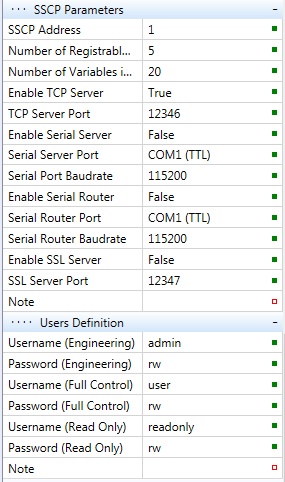
      aeae9058-316c-483d-b973-796a360950c7-image.png

      Is there anything more to be set up in Mervis on other place then this? Port 12346 seems to be open and listening.

      I am on Neuron L403 with Mervis 2.5.0 installed. Server is Ubuntu jammy on ARM. I had to install some outdated packages manually to meet apt integrity.

      posted in Mervis
      P
      Petr Helebrant
    • RE: History graphs not available in SCADA

      @AVsetula thank you very much, this made the trick. Now, after SDcard saving update and this, my Neuron becomes finally usable for me. Thank you guys for work you are doing.

      posted in Mervis
      P
      Petr Helebrant
    • History graphs not available in SCADA

      Hello,
      I have UniPi Neuron controller for 3 years now. Some time ago I have joined SCADA which is running well. I am using it as an Android app. In the beginning there was possibility to display graph with historical values from Mervis DB. This suddenly stopped working with last version of Mervis. I can see live values and change them but when I hold on variable and click graph button it says "No chart data available". In web version of SCADA it just says "error" in graph section. Is there any way to fix this?
      Thanks!

      posted in Mervis
      P
      Petr Helebrant
    • RE: Licence activation connection error with Mervis IDE 2.4

      Problem with activation solved. I have been using virtualised Windows 7 for Mervis programming (and activation) without any trouble until Mervis 2.4 and it seems there is some problem with SSL with current Mervis version and this outdated OS. Everything else works fine, only the activation process fails. With Windows 10 I was able to finish activation as usual.

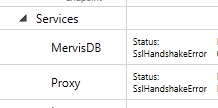
      But there is still problem with MervisDB and Proxy communication. SslHanshakeError persists.

      posted in Mervis
      P
      Petr Helebrant
    • RE: History log and SD card lifetime

      @tomas_hora,
      thanks for you answer, now it makes sense, why SD card died so quickly.

      One more question. It seems that this feature is called retain configuration in new Mervis IDE. What's going to happen if I disable 'enable periodical saving' option?

      posted in Neuron Series
      P
      Petr Helebrant
    • RE: Licence activation connection error with Mervis IDE 2.4

      @tomas_hora,
      My procedure was:

      1. flashing neuron-mervis-os_image-2.4.0.4 to SD card and booting it in my Neuron
      2. installing merviside-2.4.0-115662
      3. uploading RT
      4. uploading config
      5. trying to licence MervisOS without success

      If needed I can create direct access to my Neuron as I have public IP address on site.

      posted in Mervis
      P
      Petr Helebrant
    • RE: Licence activation connection error with Mervis IDE 2.4

      Hello @tomas_hora,
      ping to db.unipi.technology from the device results like this:

      unipi@L403-sn112:~$ ping db.unipi.technology
      PING db.mervis.info (77.240.189.131) 56(84) bytes of data.
      64 bytes from 77.240.189.131 (77.240.189.131): icmp_seq=1 ttl=52 time=15.1 ms
      64 bytes from 77.240.189.131 (77.240.189.131): icmp_seq=2 ttl=52 time=14.1 ms
      64 bytes from 77.240.189.131 (77.240.189.131): icmp_seq=3 ttl=52 time=76.0 ms
      64 bytes from 77.240.189.131 (77.240.189.131): icmp_seq=4 ttl=52 time=14.9 ms
      64 bytes from 77.240.189.131 (77.240.189.131): icmp_seq=5 ttl=52 time=14.8 ms
      64 bytes from 77.240.189.131 (77.240.189.131): icmp_seq=6 ttl=52 time=14.8 ms
      ^C
      --- db.mervis.info ping statistics ---
      6 packets transmitted, 6 received, 0% packet loss, time 11ms
      rtt min/avg/max/mdev = 14.091/24.956/76.038/22.847 ms


      Both logs are available here.
      https://drive.google.com/file/d/1fg_V-uB1DLyRYGrT9BApJl4NCFCRvqmD/view?usp=sharing
      https://drive.google.com/file/d/1KnJEv3SlOGP7uHzfHUKW5qjiIwgxenmS/view?usp=sharing

      Hopefully it helps...

      posted in Mervis
      P
      Petr Helebrant
    • RE: Licence activation connection error with Mervis IDE 2.4

      Hello @Martin-Kudláček,
      I have direct access to the Internet without proxy server. Only thing I have in my firewall is NAT rule. Activation, MervisDB and SCADA proxy worked like a charm with previous version of Mervis IDE so it seems for me that it's version related issue.

      I have also tested db and proxy accesibility. Both are DNS translatable and pingable.

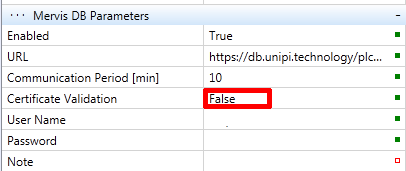
      I have also tried to disable certificate validation.
      Screenshot from 2021-04-01 16-26-27.png

      Nothing helps...

      posted in Mervis
      P
      Petr Helebrant
    • RE: Licence activation connection error with Mervis IDE 2.4

      There is another issue running IDE 2.4, maybe it's related to licence activation issue. Both MervisDB and Proxy services tells SslHandshakeError
      Screenshot from 2021-03-31 19-16-20.png
      Any solution to fix this?

      posted in Mervis
      P
      Petr Helebrant
    • Licence activation connection error with Mervis IDE 2.4

      Hello,
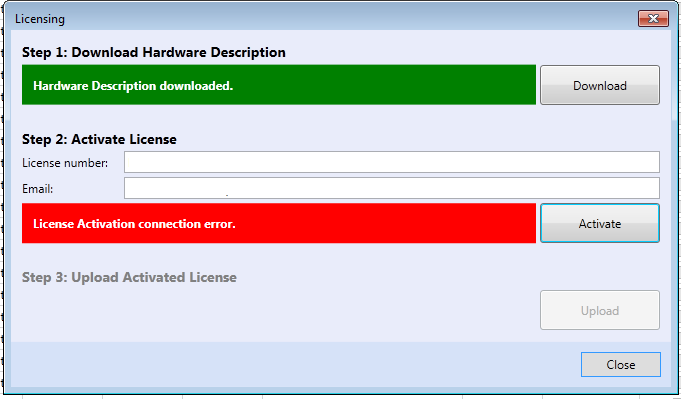
      I am having following problem with Mervis 2.4 and it's activation, any suggestions?
      Screenshot from 2021-03-31 17-07-25.png
      Note: Licence number and email is wiped out in screenshot, of course it's properly filled.
      Thanks!
      Petr

      posted in Mervis
      P
      Petr Helebrant
    • RE: History log and SD card lifetime

      Hello Tomas,
      when is this upcoming version od Mervis IDE going to be released? How often is the nvram file written to the storage in current version?
      Thank you!

      posted in Neuron Series
      P
      Petr Helebrant
    • RE: History log and SD card lifetime

      Hello @lionel,
      thanks for your reply. I have also considered using this eMMC adapter. After some "google reseach" I didn't found it more reliable than MLC SD card. It seems that eMMC modules are also using MLC memory chips so there is no differrence in memory reliability.

      I think that only solution for me is using SSD drive over USB or finding a way how not to store history data on SD but RAM and lower writes to SD to minimum.

      posted in Neuron Series
      P
      Petr Helebrant
    • RE: How to delete variables and data on Mervis DB?

      As far as I know, this can only be done manually by the support team and they don't want to do it regularly. If you'll find the way to do this, please share your solution. I also have unused data points from testing phase of my project...

      posted in Mervis
      P
      Petr Helebrant
    • RE: Stuck relays controlling blinds

      Hi,
      I would really recommend not to use built-in relays for the final load as it's not designed for high current peaks typical for starting motors and switching power supplies. This often causes that relay remains stuck in closed position forever.

      My solution for this is that I am using built-in relays just to bring 24V operation power to another appropriate relays to control final load.

      I can recommend relay arrays from GEYA to controll almost any home-stuff load. Big advantage of this solution is that you can change faulty relays any time and this time will probably happen in far future because they are protected from welding contacts together by fuses.

      For heating elements I am using high load 1 or 3 phase contactors with 24V control power.

      Hopefully this helps.

      posted in Neuron Series
      P
      Petr Helebrant
    • History log and SD card lifetime

      Hello,
      I am running Unipi Neuron L403 as home automation controller with about 20 datapoints being stored to MervisDB. I am saving all values every 5 minutes and sending it to DB with the same interval.

      My problem with this setup is that I have to change SD card every two months due to it's total failure. I am guessing that this failure is caused by temporary saving values to SD card before it's transfered to DB. In debugging system status window there is a note saying that values are saved to internal storage.

      My questions are:

      • Is there any way to store values just to operation memory before it's transfered to DB and save card from many unwanted memory writes?
      • I am still using MLC cards. Does it mean that if I buy SLC card, this problem will be solved forever or it just 20-times prolongs the card's life?
      • Is there any way how to directly create bootable USB drive from Mervis image? I have found solution here, but it seems pretty complicated...

      Thank you.
      Petr

      posted in Neuron Series
      P
      Petr Helebrant
    • HMI: Image by variable

      Hello, is there any way to select shown image in HMI depending on variable state? Or maybe there is a way to make it visible by bool variable, but I didn't find out how... any advice?
      Thanks!

      posted in Mervis
      P
      Petr Helebrant
    • RE: Mervis 2.3.0 History missing

      OK, History appears when the project is switched to full mode...SOLVED.

      posted in Mervis
      P
      Petr Helebrant
    • Mervis 2.3.0 History missing

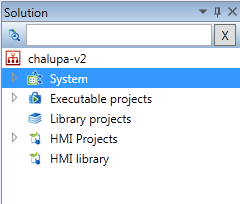
      Hi, I have installed MervisOS 2.3.0 on my Neuron L403 and started a new project but I am not able to find out how to enable History item in solution list. Does anyone have any advice how to make it visible?

      0_1588318655791_mervis-history.png

      Thanks!

      posted in Mervis
      P
      Petr Helebrant